
Judge a Sydekick answer
How do I tell whether a Sydekick answer is trustworthy?
Sydekick shows you its work, not its certainty. When a reply includes tracked activity, it carries a summary of what Sydekick did, and some answers attach the source they read. Sydekick does not put a confidence score beside its answers or recommendations, so the work summary and the answer's source are what you check instead.
What Sydekick actually shows you
Three things, in the order you meet them.
While it is working it narrates in plain language with phrases such as Thinking, Checking listings & reviews, Reading your reviews, Pulling SEO data, Building report, Generating image, and Sending for your approval. Those phrases show the activities Sydekick reports during the task; they are not a completeness or quality score.
When tracked activity is available, that narration collapses into a single row above the answer:
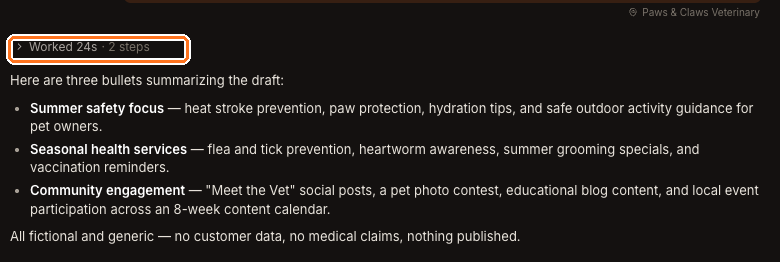
24 seconds and 2 steps tells you how long the task took and how many activity steps were recorded. A higher count means more recorded steps, not necessarily more independent sources or a more reliable answer. Note the client name above the row too: that is the scope the answer was produced under, and it is the first thing to check when an answer feels like it belongs to someone else.
Some answers go further and attach what they read. An AI visibility answer, for example, quotes the answer engine's own reply underneath the finding, so you can see the wording the conclusion came from rather than taking the conclusion on trust.
What it does not show
A confidence score on a Sydekick reply. Sydekick does not label its answers or recommendations with a percentage or a low-confidence warning.
Its private reasoning. The row summarises the work — how long it took and how many steps — not a transcript of how it decided. It will not tell you why it chose one interpretation over another, and it is not meant to.
A permanent record of the work. The step summary belongs to the live session. Reopen an older thread from Your recent conversations and the answer is still there, but the Worked … · … steps row is not. If you need to retain that activity summary, capture it during the live session.
The thirty-second check
For anything you are going to act on or send to a client:
Read the scope line
The client or location shown with the reply is what the answer covers. If it is not the one you meant, re-ask with the right scope rather than mentally adjusting the answer.
Read the work row
Treat the count as an activity log, not a quality score. If the recorded activity seems inconsistent with the task, verify the answer on the screen that owns the information.
Confirm the number on its own screen
Credits live on Agent, post performance lives on Analytics, directory counts live on Listings. Open the screen that owns the figure and check it matches.
This check keeps the recommendation tied to the Product context that matters. Use the relevant Product surface to confirm consequential information before you act on it.
Watch out for
Questions people ask
Where is the confidence score I was expecting?
There isn't one on a Sydekick reply. Sydekick does not attach a confidence rating or low-confidence warning to its answers or recommendations. Read the work summary, source, and scope line instead.
The step count disappeared from an old conversation. Is that a bug?
No — it is only kept for the live session. The answer itself stays in the thread.