
Act on AEO recommendations
What should I fix first to improve AI visibility?
Open AEO, choose a location and select Action center. It turns the location's latest report into a short ranked list, usually two to four items, each tagged High impact or Medium and each with a button that opens the place where you fix it. Work top down. The items come from your own numbers, not from a generic checklist.
Key facts
| Where it lives | AEO → Action center, for one location. The tab label carries a count, such as Action center (3) |
| How many items | Up to four kinds, so usually two to four; the list is capped at six |
| Priority | Missing directories and absent prompts are High impact. The weakest engine and a leading rival are Medium |
| Buttons | Fix listings, Create post, Open Listings and Compare, each shown with an arrow |
| Dismiss or snooze | Not possible. The list is rebuilt from the latest report every time |
Why this matters
A report can leave you with a lot of numbers and no obvious first move. The Action center picks the biggest gaps and sends you to the tool that closes each one, so you start with the change most likely to matter instead of the one that is easiest to find.
Steps
Open AEO, choose the client and location, and select Action center.
Read the score on Overview first. The list ranks gaps against each other, so the score tells you whether they are urgent or just the next improvements.
Take the High impact items first. Select the button to go to the tool.
Make the change in that tool: Listings for directories, Posts for content, Reviews for the review signal.
Wait for the next update before judging the result (see Then wait below).
What a recommendation looks like
The Action center for a location with a mid-range score shows items like these, each with its priority, a one-line reason and a button:
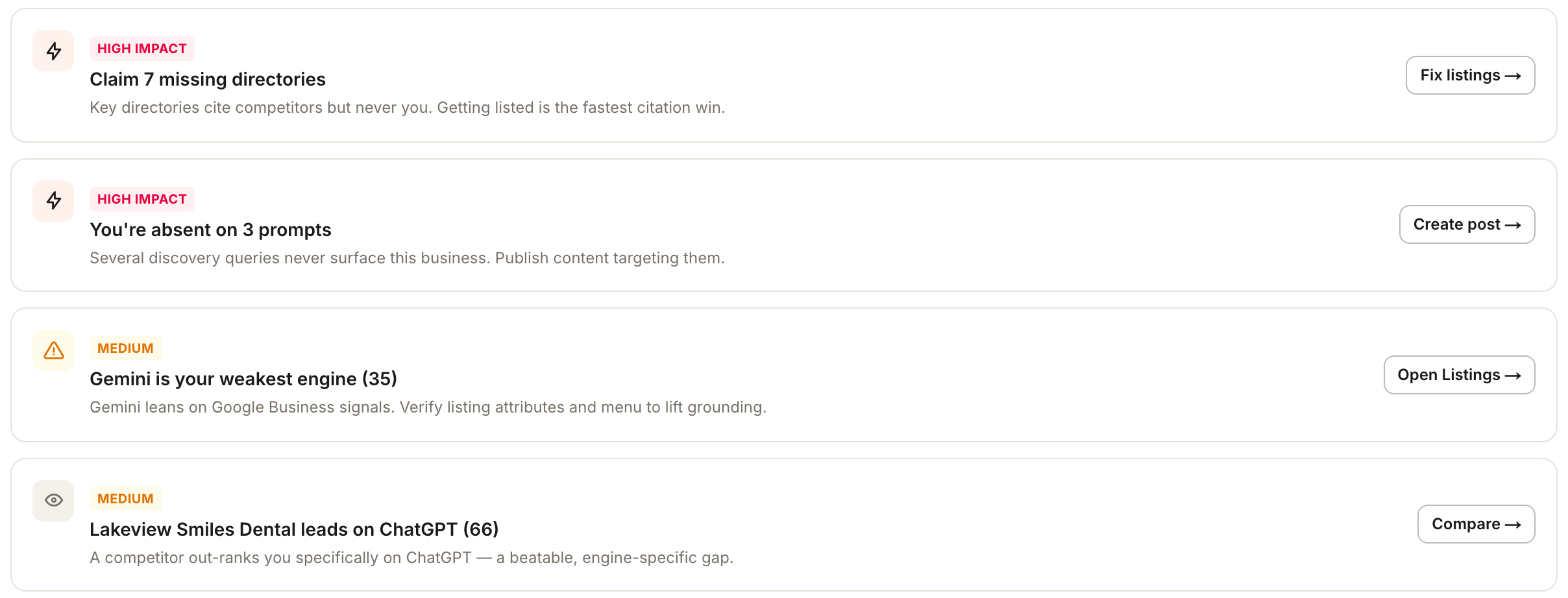
| Priority | Recommendation | Button |
|---|---|---|
| High impact | Claim 7 missing directories | Fix listings → |
| High impact | You're absent on 3 prompts | Create post → |
| Medium | Gemini is your weakest engine (35). The reason adds that Gemini leans on Google Business signals, so verify listing attributes and menu | Open Listings → |
| Medium | A named competitor leads on ChatGPT (66), for example "Lakeview Smiles Dental leads on ChatGPT (66)" | Compare → |
The buttons are navigation. Nothing here changes your data. Each one takes you to a place where you check or make the change yourself:
- Fix listings opens Listings → Published for this client and location, filtered to the directories missing from AI citations, with a banner naming them. See Which sources do AI engines cite.
- Open Listings opens the Listings overview for the same client and location, with no filter.
- Create post opens Posts for this location, on its calendar. It does not start a draft for you.
- Compare switches to the Competitors tab in place.
For a website rather than a physical location, there are no listing steps, so the weakest-engine button reads Review citations and opens Reviews.
It ranks relative gaps, not failures
The weakest-engine item is the one to understand before acting on anything. "Gemini is your weakest engine (35)" names the lowest of this location's engine scores. On a strong location that lowest score can still be a very good one, because the Action center compares your engines against each other, so the weakest one is always named.
Read every item as the largest remaining gap rather than a problem. On a strong location the whole list may be gaps worth leaving for now; on a weak one the same list is urgent. The score at the top of the page tells you which you are looking at.
An item such as You're absent on 3 prompts counts questions where no engine gave a usable answer that named the business. A question where an engine only asked for the customer's location is excluded, not counted as an absence; the prompt coverage grid shows how those cells look.
When there is genuinely nothing to raise, the tab says so — "No recommendations — visibility looks healthy across the board."
Why the fixes point at other modules
Nothing in the AEO tab changes your AI visibility, because nothing in the AEO tab is what the assistants read. They read your listings, your reviews and your published content. The recommendations route outward by design:
Citations gaps route to Listings
Missing directories are a listings job. Getting listed is what makes a directory available to be cited in the first place.
Review signal routes to Reviews
Ratings and review volume are what answers most often credit when they explain a recommendation.
Freshness routes to Posts
Recent content is how the assistants judge whether a business is still current.
The Visibility factors card on Overview uses the same routes, with Target prompts, View reviews, Update listing and Fix citations beside each factor.
Then wait
The Action center is calculated from the location's latest report. A change you make today shows up in the next completed update, which is the next scheduled one (Monthly unless the location's schedule says otherwise) or one you start with Refresh… in the refresh clock. See where your report comes from.
The attention chips are the same idea, shortened

The coloured chips under the page title are the one-glance version: how many prompts you are absent on, how many directories are missing, your rank among the businesses on the leaderboard, and an engine chip for any engine that moved by three points or more since the previous report. At most five chips show. A location with almost no visibility reads differently, for example Absent on 11 prompts, 9 directories missing and #3 of 3. Treat the chips as a starting diagnosis that points you to the tab to inspect next.
What you'll see when it's done
- A ranked list of up to four kinds of item, with the highest-impact work first
- Each button opening the right tool for the same client and location
- After the next update, a list that has changed to match the new report
Watch out for
- Do not read the weakest engine as a failure. It is the lowest score, not necessarily a low one.
- The list changes when the report does. It is not a task queue, so an item disappears only because the new report no longer shows the gap.
- Fixes do not show immediately. Give the next update time to pick the change up.
Questions people ask
The list changed and I didn't do anything. Why?
Recommendations are rebuilt from each new report. If an engine moved, or a competitor's citations changed, the ranking moves with it.
Can I dismiss or snooze a recommendation?
No. The list is derived from the latest report every time it renders, so it reflects the latest measurement rather than a queue you work through.
Why does Create post open the calendar and not a new post?
The button takes you to Posts for the location so you can decide what to publish. Use Create Post there to start one.
Where to go next
- Which sources do AI engines cite when they answer about me? — the detail behind the citations recommendation
- How do I generate an AEO report, and what happens next? — when your fix will actually show up