
Compare local competitors
How do I see which competitors are beating me in local search?
SEO → Ranking Analytics → Competitors compares the businesses found in your latest measured keyword grid. Synup pins your matched business first, then orders auto-discovered competitors by the share of counted grid points where they rank in the top three. Businesses you track manually can also remain on the list even when they are absent from that grid.
The leaderboard is evidence, not a guess
Auto-discovered rows come from the businesses captured at real grid points. Your own matched business is pinned to the top with (You) after its name — which is also how you confirm Synup matched the right record. A manually tracked row with zero grid points is different: it records a competitor you chose to follow, not proof that the business appeared in the current grid.
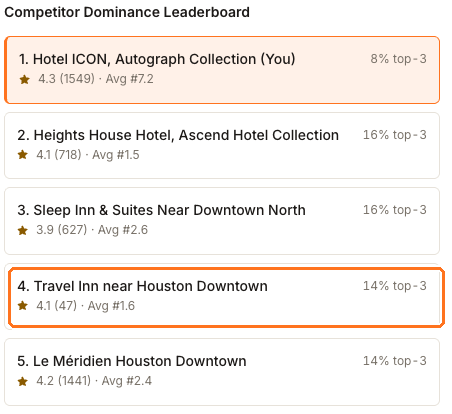
Read each row as three separate facts: the top-3 share on the right is how much of your grid that business owns, and beneath the name sits its star rating, its review count, and its average rank.
In the captured report, the downtown hotel has 1,549 reviews at 4.3 stars and holds the top three at 8% of the grid. Travel Inn near Houston Downtown has 47 reviews and holds 14% at Avg #1.6, against the hotel's #7.2. These are genuine report measurements from that capture, not fixed benchmarks; ratings, reviews and ranks can move when the source data or grid report changes.
That is the most useful thing this tab does: it lets you test an assumption against the measured rank, top-three share, rating and review count. The comparison shows what differs, but it does not establish why one business outranked another.
What the per-competitor panel adds
Select any row — including your own — to see its detail beside the list.

Grid Points is the count of places in your grid where this business showed up at all. Check it against the top-3 % beside it: a business that appears in only a handful of points but wins every one of them is strong in one neighbourhood rather than across your whole market, and that is a different problem to solve.
The share percentages describe how much of your grid each business holds, not shares of one another, so they won't add up to 100%.
Why your Avg Rank looks better here than on the Overview tab
This panel says Avg Rank #7.2. The Avg Rank stat card one tab over says #17.6. Both are correct, and they are counting different things.
Avg Rank on the Competitors tab
- Counts
- Only the grid points where you actually appeared
- Here
- 12 points, giving #7.2
- Answers
- When people do find me, how high am I?
Avg Rank on the Overview tab
- Counts
- Every point Synup measured, counting anything outside the top 20 as 21
- Here
- 49 of 49 measured, giving #17.6
- Answers
- Across my whole area, how visible am I?
The Competitors figure ignores everywhere you were missing, so it will be the same as or lower than the Overview figure. Quote the Overview one when you are describing coverage, and this one when you are describing position where the business appeared.
You may not find yourself on this list
Synup identifies you in the scraped results the same way it identifies everyone else, so if your business never reached the top 20 at any grid point there is nothing to match and you get no row at all — no (You) on the leaderboard. That is consistent with Avg Rank #21 on the Overview tab. Both are saying the same thing, and neither is a bug.
Adding a competitor yourself
The box at the top of the tab tracks a business by name. Use it when you know a relevant rival that has not surfaced in the grid. The shared competitor record can appear in Reviews, SEO and AEO comparisons, but adding the name does not prove it appeared in the current ranking report.
Watch out for
- Rank trends need two months. The chart under the leaderboard says so directly: Rank trends appear once at least two monthly reports exist. One report gives you today's standings and no movement.
- Names come from public search results, spelling and duplicates included. Two rows that look like the same business usually are — separate listings for one place.
- The comparison follows one keyword. The leaderboard uses the newest tracked keyword that has an actual measured report. A newly added keyword whose report has not finished — or whose scan measured nothing — does not replace the last measured comparison.
Questions people ask
Some rows show 0% top-3 and a dash for rating. Why are they there?
A 0% top-three row did not hold a top-three position in the counted grid. A dash means that field was not available in the captured result or tracked snapshot. Check Grid Points as well: a zero can identify a manually tracked competitor that is absent from the current grid, while a positive count confirms appearances outside the top three.