
Read Sydekick insight
How do I read the Sydekick insight tab for a location?
SEO → Ranking Analytics → Sydekick insight is where Sydekick explains your ranking data rather than just displaying it. Four collapsed sections analyse different angles, and a fifth panel suggests keywords you aren't tracking. Like the Recommendations tab, it normally generates itself when you first open it and costs nothing to read. If no analysis is available, the tab shows Generate Insights.
Start with Competitor Gap Analysis
Open a section to see its findings, each tagged with a severity.
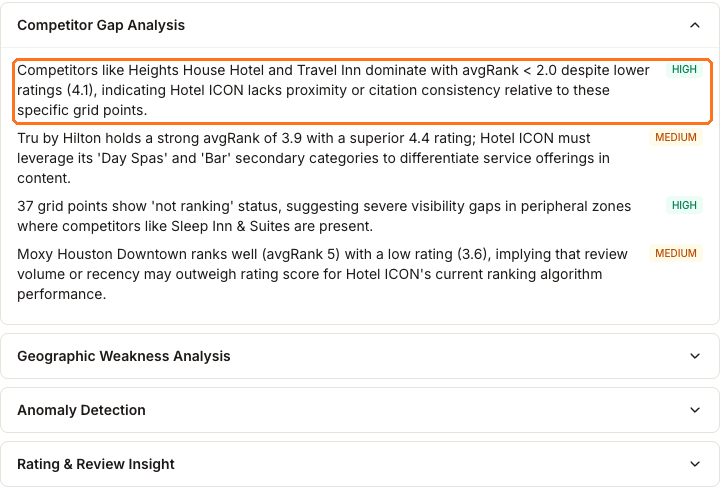
The boxed finding is the kind of thing this tab is for. Two named competitors hold an average rank under 2 on lower star ratings, and Sydekick's read is that proximity or citation consistency may explain the gap at those points. That is a lead to investigate before assuming reviews are the problem; the finding does not prove the cause.
Findings also connect the numbers on the other tabs. The second HIGH one here explains the Not Ranking 37 figure on the stat cards as a peripheral-coverage problem, and names a competitor that is present in exactly those outer zones.
The other three sections take different cuts: Geographic Weakness Analysis for where on the grid you fall away, Anomaly Detection for changes that don't fit the pattern, and Rating & Review Insight for how your reputation compares.
The Keyword Opportunity Finder
Below the analyses, Sydekick proposes terms to track, each with a reason. The panel below is a different location — a bed and breakfast in Fairbanks, Alaska — because the Houston hotel had only one term to suggest, and a list is what you need to see here.
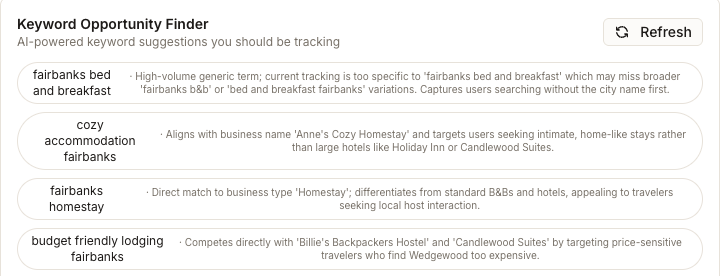
The reasons are the valuable part. A suggestion that names a specific competitor, or matches something distinctive about your business, is usually a better bet than a broad high-volume term you would be starting from nothing on.
Select the ones you want, then use Add Selected Keywords at the bottom. This spends credits. Adding from here starts generating a grid report for every keyword you selected, at the same per-grid-point cost as adding one by hand — so select two or three, not twelve. The counter beside the button shows how much of the location's keyword allowance you have used.
Watch out for
- Read every suggestion before you select it. Some are near-duplicates of what you already track, and a few carry a conditional — "if applicable", "if located near central areas". You are the one who knows whether it applies.
- Regenerate and Refresh replace, not append. The header timestamp tells you how current the analysis is. Both controls produce a fresh result from current data.
- The findings are interpretation. Severity chips are Sydekick's assessment of importance, not a measured score. Where a finding says "likely" or "suggesting", treat it as a lead to verify.
Questions people ask
Is this the same as the Recommendations tab?
They come from the same data and answer different questions. Sydekick insight explains what may be happening and why. Recommendations gives you impact-labeled changes to consider, each with a hand-off to Sydekick. Read this tab to understand the situation, then use the other one to prioritize action.
A finding mentions missing rating data. Does that mean my reviews are gone?
No. It means the ranking snapshot used for this analysis did not provide a rating for your business; not appearing in the stored local results is one possible reason. Check the Reviews module for the current review data before drawing a conclusion.