
Act on Next Recommendations
How do I review and act on Next Recommendations?
SEO → Ranking Analytics → Recommendations turns your ranking data into an impact-labeled list of profile changes, each one explained and ready to hand to Sydekick. It normally fills in on its own the first time you open it, at no extra credit cost. If no cards are available, the tab shows Generate Next Steps so you can try the analysis again.
Read one card before you read the list
Every card has the same four parts, and knowing which is which saves a lot of time. The example below is from a downtown Houston hotel.
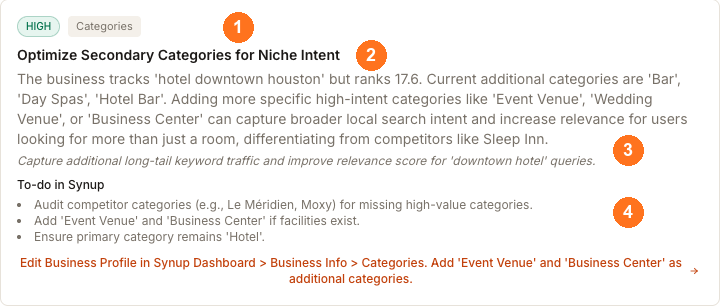
① the chips give you impact — HIGH, MEDIUM or LOW — and the part of your profile it affects. ② the recommendation itself. ③ the explanation: reasoning that may cite competitors or ranking measurements, followed by an italic expected-impact statement. ④ To-do in Synup, the checklist if you want to do it by hand.
Underneath those four sits an orange line, and that is the one thing worth being precise about.
The orange line hands the work over — it doesn't take you there
It reads like a route through the product — the one above even uses the > separators of a menu path — but it is not a link and it will not navigate you anywhere. It is the suggested action written out, and clicking it sends the whole recommendation to Sydekick with your current client and location attached. You'll see Sent to Sydekick — watch the panel and the reply arrives in the Sydekick panel.
So read that line as what needs doing, not as where to click. It comes from the same analysis that wrote the card, so it sometimes names areas Synup doesn't have — following one by hand will leave you hunting for a screen that isn't there. Where a recommendation has no suggested action text, the line reads Fix this with Sydekick instead, which is the same control.
Use the impact chips to prioritize the list, starting with HIGH cards. Impact is the analysis's estimate of which changes matter most; it is not a measured promise of ranking movement.
Watch out for
- The reasoning is analysis, not a measurement. Cards explain why a change should help by drawing conclusions from your grid and your competitors. Treat a claim like "these categories will capture broader local search intent" as a well-informed hypothesis worth acting on, not as something Synup measured.
- Check a recommendation against your own profile before acting. A card may suggest adding a category or attribute that doesn't apply to your business. The to-do lists are deliberately worded as things to check.
- Regenerate replaces the list. The header shows when the current set was generated. Pressing Regenerate produces a fresh analysis from current data; it does not add to what is there.
Questions people ask
Do I need to generate these, or do they cost anything?
The tab normally computes and caches recommendations the first time you open it, at no credit cost. If the list is empty, use Generate Next Steps. Recommendations are most useful when the location has current keyword and grid-report data for the analysis to inspect.
The tab says "No Next Steps Yet". What's missing?
It means there is no recommendation card to show yet; it does not identify one specific cause. Select Generate Next Steps first. If the list remains empty, check that the location has a tracked keyword with a generated grid report, then try again.