
Schedule holiday and seasonal hours
How do I schedule holiday and custom-date hours?
A closed door on a day your listing says you're open is the most expensive mistake in local search, because the customer is already standing outside. Exceptional dates live on the location's Hours card: open it with Edit — or Set hours if the location has none yet — and the drawer opens on Hours — Master.
Everything happens in one drawer
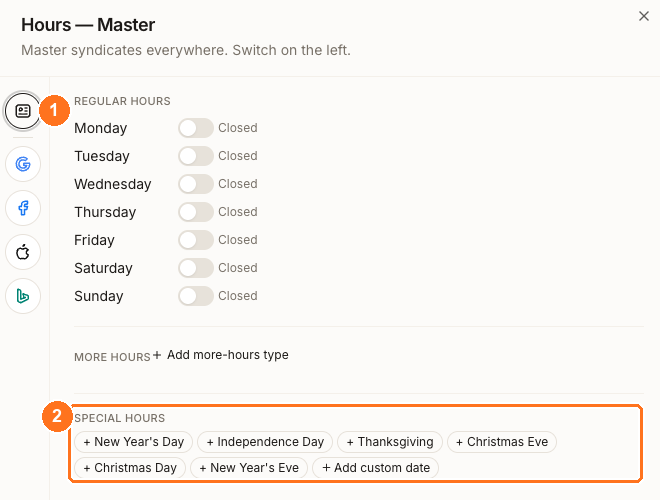
① The rail switches which publisher you're editing. Leave it on Master — that's what syndicates everywhere, and a publisher tab would restrict the change to one site. ② Special hours sits below your regular week rather than replacing any of it: six quick-add holidays and Add custom date, each one an exception for a single date.
Adding a date
Clicking a chip adds a row: dated, and already set to Closed, so a full-day closure needs nothing more than saving. + Add custom date does the same for any other date and starts on tomorrow.
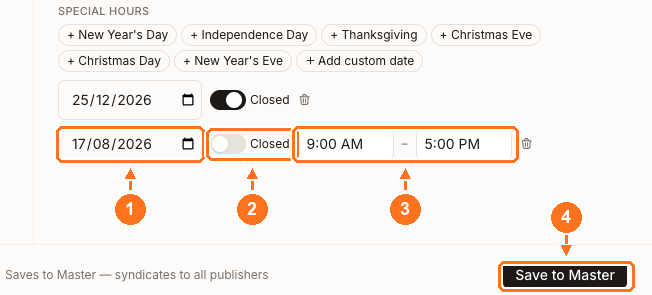
① The date stays editable, which matters because the chips don't always fill in the year you want. ② Closed is on by default. Switch it off for a day you're trading shorter hours rather than closing, and ③ the opening and closing times appear, starting at 9:00 AM – 5:00 PM. ④ Save to Master stores every row on the list, and the footer says what that means: Saves to Master — syndicates to all publishers.
Check the date the chip filled in
The quick-add chips are a shortcut, not a calendar. They fill in this calendar year's date, and one of them is fixed to a date that moves. So before you save:
- Check the year. A chip for a holiday that has already passed this year adds a past date, not next year's.
- Check Thanksgiving. The chip is fixed to 27 November, but Thanksgiving is the fourth Thursday, which is 26 November in 2026. Set that one by hand.
What happens after the date passes
You save the date
The dated exception is stored alongside your regular week, not instead of it. Your Monday-to-Sunday pattern is untouched.
The publishers apply it on the day
Each publisher shows the exception for that date only. Your regular hours apply again the next day, so there is nothing to switch back.
The row stays in the drawer
Synup does not delete a special-hours date once it has passed. It sits in the list until you remove it with the bin icon.
So your hours revert on their own — but your list doesn't tidy itself. Delete dates you've finished with, or next year's edit starts from a screen full of last year's.
Which publishers take a special date
Google, Apple and Bing all accept dated exceptions. Facebook does not — there is no special-hours field on the Facebook tab at all, so a Facebook page keeps showing your regular hours through the holiday. If that matters to you, change it on Facebook directly.
Bing shows one interval per day, so a split shift like 9–12 and 2–6 arrives as 9–6 there.
Watch out for
Questions people ask
What is the difference between more hours and special hours?
Special hours covers exceptional dates — a holiday, a closure, a one-off. More hours covers extra recurring hour types alongside your normal opening, the kind a business uses to publish delivery, kitchen or senior hours separately. Both are in the same drawer.
Can I set the same holiday across every location at once?
Not from this drawer, which is scoped to one location. A chain closing on a shared date needs the date added per location, which is worth booking time for rather than doing on the day.
Next
Once the dates are in, when changes go live covers getting them out and how long each publisher takes.