
Add UTM tracking rules
How do I add UTM rules to published website links?
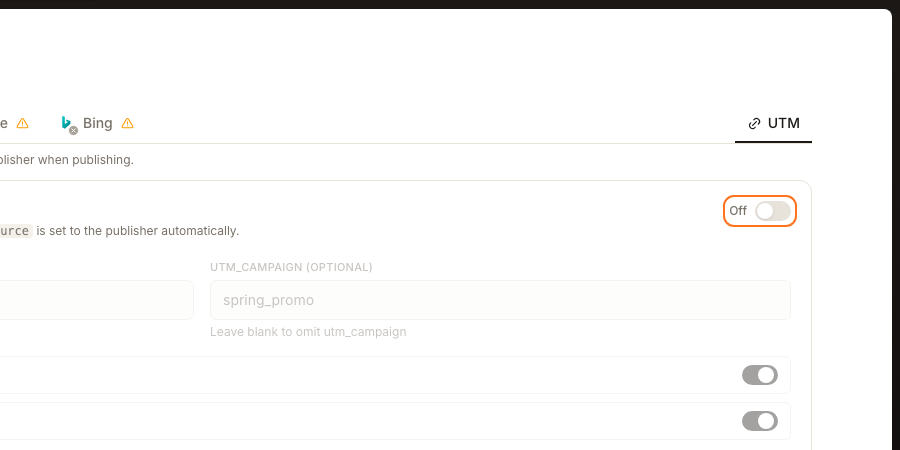
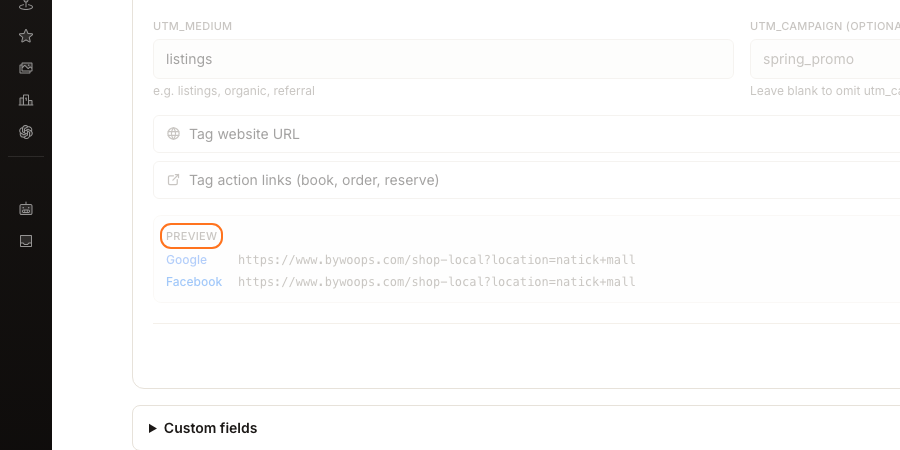
UTM rules live on the UTM tab of a location. Switch on UTM link tagging, set UTM_MEDIUM, and choose whether to tag your website link, your action links, or both. You never set the source — Synup fills utm_source with the publisher automatically, so traffic from each directory arrives separately in your analytics. PREVIEW shows the tagged link before you save.
Key facts
| Where it lives | Locations → a location → the UTM tab |
| Summary line | Link tagging · Auto-tag outbound links with UTM parameters per publisher when publishing. |
| Starts as | Off, with the fields below it disabled |
| You set | UTM_MEDIUM, and optionally UTM_CAMPAIGN (OPTIONAL) |
| Synup sets | utm_source, filled with the publisher automatically |
| What gets tagged | Tag website URL and Tag action links (book, order, reserve) |
| Applied when | Links are published — existing links are not rewritten |
Why this matters
Traffic from directory listings usually arrives in analytics as one undifferentiated lump, or worse as direct traffic with no origin at all, so the listings that actually earn visits are indistinguishable from the ones that don't. The useful part of this screen is the part you never configure: because utm_source is set to the publisher automatically, each directory separates itself without you maintaining a different URL for each one.
Steps
Open Locations, choose a location, and open its UTM tab. The summary reads Link tagging · Auto-tag outbound links with UTM parameters per publisher when publishing.
Turn on UTM link tagging. It arrives Off, and the fields beneath it stay disabled until you switch it on.
Fill in UTM_MEDIUM. The helper suggests e.g. listings, organic, referral and the field offers listings, which is the sensible choice unless your analytics already uses a different convention.
Optionally fill in UTM_CAMPAIGN (OPTIONAL). The helper notes Leave blank to omit utm_campaign, so an empty field is a real choice rather than an unfinished form. Use it for something time-bounded — the placeholder suggests spring_promo.
Choose what gets tagged: Tag website URL for your main link, Tag action links (book, order, reserve) for booking and ordering buttons, or both.
Check PREVIEW. It shows the finished link for Google and Facebook so you can confirm the source is being filled in as expected.
Click Save UTM settings.
What you'll see when it's done
- UTM link tagging no longer reads Off, and the fields beneath it are editable
- PREVIEW shows a tagged link per publisher, with the source differing between them
- The rule sits on the UTM tab beside the location's publisher tabs, where you can find it again
Watch out for
utm_source is handled for you, and duplicating it as the medium collapses the distinction that makes this worth setting up.utm_medium is a value your analytics has to recognise. If your reporting already groups traffic by an existing medium convention, match it here rather than introducing a word only this screen uses.Questions people ask
Do I need to set utm_source myself?
No, and there is no field for it. Synup sets utm_source to the publisher when the link is published, which is the point of configuring a rule here rather than hand-writing URLs. The helper says it directly: utm_source is set to the publisher automatically.
Is UTM_CAMPAIGN required?
No. The field is labelled UTM_CAMPAIGN (OPTIONAL) and the helper confirms Leave blank to omit utm_campaign. Leave it empty for an always-on listings rule, and fill it only when you want to isolate a specific push.
What is the difference between the website URL and action links?
Tag website URL applies to the main website link on the listing. Tag action links (book, order, reserve) applies to the booking, ordering and reservation buttons. They are separate toggles because the two kinds of click usually mean different things to your reporting.
Next
The UTM tab sits alongside the publisher tabs on the same location, so it is worth knowing how publishing changes reaches each site before you rely on the tagging. Once tagged links have been live for a while, the Listings Analytics tab and Profile Analytics guidance show publisher-reported engagement to set against what your own analytics records.