
Boost a post with budget
How do I put paid budget behind a post?
Boosting pays to promote a post that has already published. Synup doesn't bill you for it — the spend goes through your own Meta ad account, and Synup builds the campaign against it.
Two limits shape everything else. Boosting is Facebook and Instagram only, so there is nothing to boost on Google, LinkedIn, X or the rest. And Instagram is not available yet — the option shows, disabled, until Meta finishes reviewing the app. In practice, today, boosting means Facebook.
Connect an ad account first
Nothing about boosting works until a connection has an ad account chosen. Go to Settings → Connections → Ad Accounts.
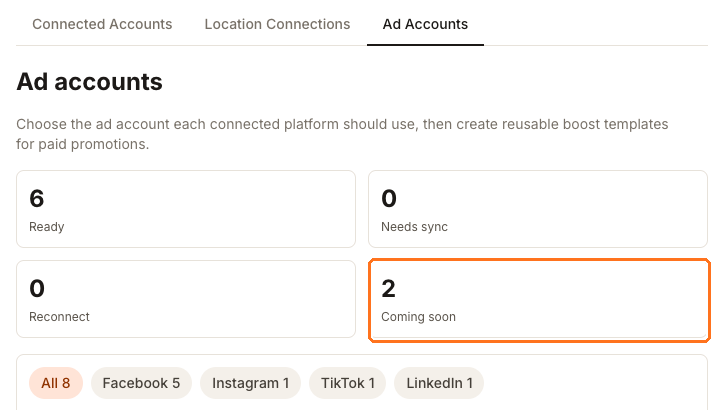
The counters across the top are your status at a glance. Ready connections can be configured; Needs sync and Reconnect need attention before they will work. The boxed Coming soon count is the honest one — TikTok and LinkedIn connections appear in this list but cannot be used for boosting yet.
Pick a connection, then choose one of the ad accounts Synup discovered on it and press Use this. Until you do, that connection shows No ad account selected and its boost controls stay switched off. Only an active ad account counts, so a disabled or restricted one won't unlock anything.
Boost templates appear once an account is selected. They save a budget and duration you use repeatedly so you aren't retyping the same campaign shape.
Boosting when you publish
With a Facebook profile selected in the composer, a Boost this post section appears below the preview. Tick the box and the campaign runs automatically the moment the post publishes — the badge reads On publish.
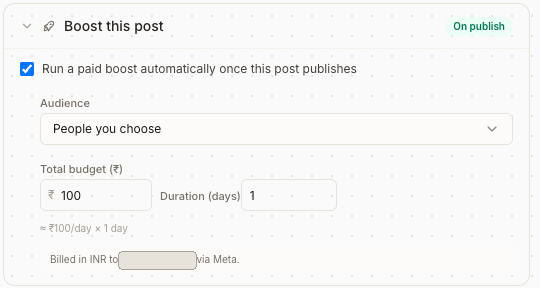
Three decisions, and only three:
Audience. People you choose targets by location and age. People who like your Page reaches your existing followers. …and their friends extends beyond them. Start with your Page audience for an offer aimed at regulars, and choose your own targeting for anything meant to find new customers.
Total budget. You enter the total you're willing to spend, not a daily rate. Synup divides it by the duration and shows the result underneath, so you can see the daily figure before you commit.
Duration in days. The same total over more days means a smaller daily budget and slower delivery.
The line at the bottom names the currency and the ad account that will be billed. Read it — with several connected accounts it is easy to fund a campaign from the wrong one.
Boosting a post that is already live
Open the post and use its Boost tab, which also lists any campaigns already running against it. If the tab tells you the post must be published on Facebook or Instagram before boosting, that is the gate doing its job: a draft, a scheduled post, or a post that only went to Google has nothing for Meta to promote.
Watch out for
Next
Post-level reach and clicks stay in post analytics; boost spend is reported against the campaign on the post's own Boost tab. To write the post first, see the composer.