
Read post performance analytics
How do I read post performance for a location?
Post Analytics covers Google Business Profile and Facebook. It does not cover your other networks. The tab says so in its own subtitle, and it is the first thing to know — a portfolio publishing to Instagram, LinkedIn and TikTok will see none of that here, and the zeros are not a performance result.
What the three numbers count
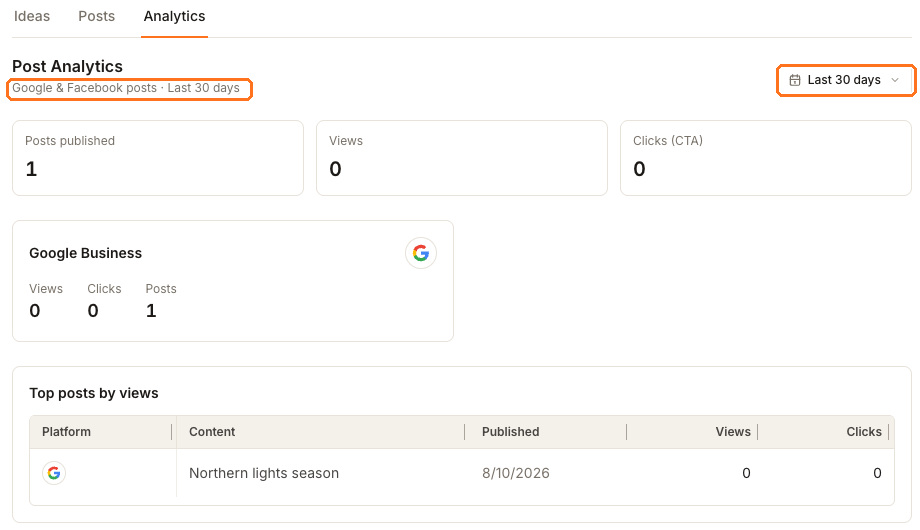
Posts published counts posts that actually reached Google or Facebook inside the window. Drafts and scheduled posts are not in it, which is why this number is often lower than the count in your Posts list.
Views is how many times those posts were seen. Clicks (CTA) is how many times someone pressed the call-to-action button on one — so a post with no button will always report zero clicks no matter how well it performed.
The boxed control top right sets the window. Everything on the page moves with it, including Top posts by views, which ranks the individual posts so you can see which one carried the period.
The per-platform card below the summary splits the same figures by network, and it is the quickest way to see that one channel is doing all the work.
Published is not the same as created
The Published date in Top posts by views is when the network accepted the post. The Created date in the Posts table is when you wrote it. A post drafted on the 7th and published on the 10th shows both dates, and neither is wrong.
When everything reads zero
Give it time before treating it as a result. Networks report engagement back on their own schedule, so a post published today will normally sit at zero views for a while. A genuinely flat number over a full window is worth acting on; a flat number on a two-day-old post is not.
If the zeros are on a network that isn't Google or Facebook, they aren't a measurement at all — that network simply isn't covered here.
Numbers for one post
The Analytics tab is per location. For a single post's own figures, open it from the Posts list and use its Insights tab, which reports that post channel by channel.
Next
If a post you expected isn't counted, check its status — it may not have published. To promote a Facebook post that is performing, see boosting a post.