
Understand post status
My post says Partial, Pending or Error — what does that mean?
One post usually goes to several channels, and they don't succeed or fail together. The Status chip is a summary of all of them; the Channels icons are the actual per-channel state. When something looks wrong, read the icons.
Read the channels, not just the chip

Hover a channel icon and it tells you that channel's state — and if the network rejected the post, it shows the network's own error text. That message is the diagnosis, and it is the only place you'll find it.
The eight states
- Draft — saved, not sent. Nothing has been attempted.
- Scheduled — waiting for its publish time.
- Publishing — in flight right now. Give it a moment.
- Active — live on its channels.
- Partial — the one worth understanding. Some channels took it, others didn't. The post is live somewhere, so don't recreate it; open it and look at which icons failed.
- Error — publishing failed. The channel tooltip carries the reason.
- Expired — an Offer or Event whose dates have passed. Normal, not a failure.
- Deleted — removed from the networks it had published to.
While a post is on its way, individual channels show as pending, which is why a brand-new post can look like nothing is happening. That is the normal state between pressing publish and the network confirming.
What to do about Error
Read the channel's message first, because the fix depends on it and the causes are not alike. A rejected image or an over-length message is yours to fix — edit the post and publish again. A dropped or expired connection isn't about this post at all; reconnect the profile and the next post works. An error naming media the network can't find usually means the file itself was the problem, so replace it rather than retrying the same post.
What the filter can and can't find
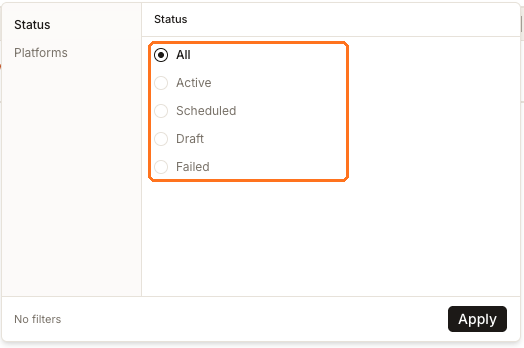
Filters offers five choices: All, Active, Scheduled, Draft and Failed. The badges use eight labels. So there is no filter for Partial, Publishing, Expired or Deleted — and the filter's Failed is the state the badge calls Error.
The practical consequence: to find a partially-published post, filter to All and sort or scan the Status column rather than looking for a Partial filter that isn't there.
Watch out for
Next
If the post isn't in the list at all, finding a post covers the scoping reason that usually explains it. For what the networks did with a post that published cleanly, see post analytics.