
Start a Sydekick conversation
How do I start a new Sydekick conversation?
Sydekick has two doors and one brain behind them. On the Dashboard there is a composer sitting under the greeting; on every other page there is a Sydekick button in the top bar that slides a panel in from the right. Either way you get the same assistant and the same conversation history, so use whichever one you are already looking at.
Two ways in
The Dashboard composer is the one most people find first. It has a scope control and a Skill button underneath.
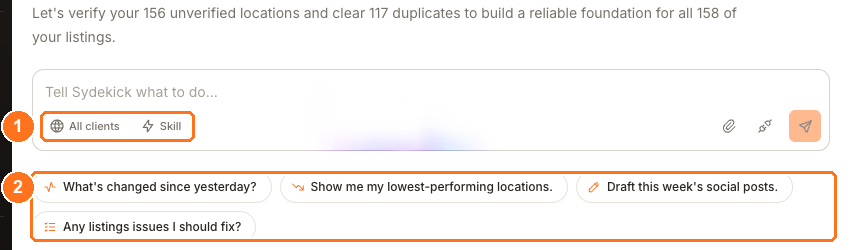
Use the scope control to set who the request is about — see choosing the client, location and skill.
The panel version is identical except for one thing. It arrives with a chip already attached, named after the page you were on:
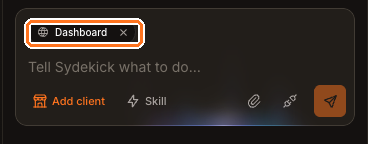
That chip is Sydekick noticing where you are. Ask "what's wrong here?" from a Listings page and it knows you mean listings. Remove it with the × if you want to talk about something else without navigating away.
There is also a full-screen version at Sydekick → Maximize to full screen, which is worth using when you are reading something long or working with a file it produced.
Starting a clean thread
The + button at the top of the panel starts a new conversation. Do that when you change subject — Sydekick reads the thread it is in, so a question about reviews asked halfway through a conversation about rankings can pick up the wrong context.
Old threads are not lost. They are listed under Your recent conversations in the panel, under Recent threads on the Dashboard, and in the rail of the full-screen view.
Check anything you would act on
Sydekick can help you understand what happened, which locations may need attention, and what a screen is showing. When information will affect an action or decision, confirm the current value on the relevant Product screen before acting. Learn more in telling whether an answer is trustworthy.
Watch out for
Questions people ask
Does Sydekick see what is on my screen?
It sees the page you are on, and it tells you so with the chip above the message box. It does not read the individual rows you have scrolled to — the chip is a scope hint, not a screenshot.
Can I stop it once it has started?
Yes. The Send button becomes Stop while it is working.