
Read the prompt coverage grid
How do I read the prompt coverage grid?
The grid is the score, unrounded. Every row is one discovery question Synup asked; every column is one answer engine; every cell is that engine's answer to that question, scored 0–100. Read a row to find a question you lose, a column to find an engine that doesn't know you.
What the numbers in the cells mean
Cell scores come from your rank in that one answer, not from a percentage of anything.
| Where you ranked | Cell score |
|---|---|
| 1st | 100 |
| 2nd–3rd | 85 |
| 4th–10th | 60 |
| 11th–20th | 35 |
| 21st or lower | 20 |
| Not named at all | 0 |
The legend under the grid colours those into Strong 60–100, Partial 30–59, Weak 1–29 and Absent. An Absent cell is drawn as a dashed outline rather than filled — it is the one state you can spot without reading a single number.
Because a miss scores 0 and still counts in the average, absent cells are expensive. In a six-prompt report, one dashed cell drags an engine's average down more than two fourth-to-tenth-place finishes would.
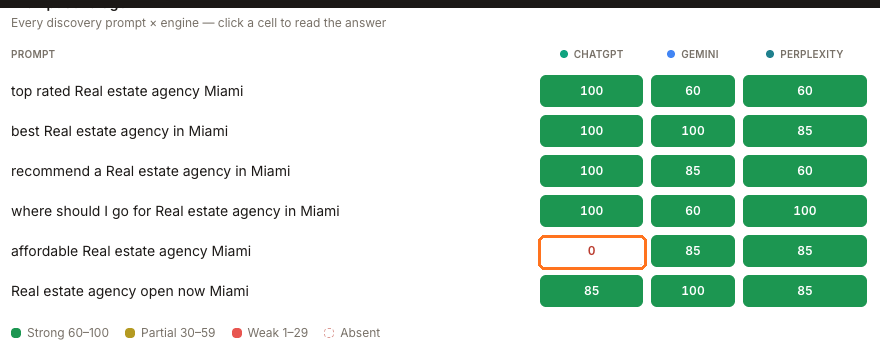
The boxed cell is the only Absent one on this location — the dashed outline is what you are scanning for.
Read the row, then the column
A Texas auto-repair shop scoring 79 overall makes the point in one screen:
| Question asked | ChatGPT | Gemini | Perplexity |
|---|---|---|---|
| best Auto repair shop in Balmorhea | 100 | 85 | 100 |
| top rated Auto repair shop Balmorhea | 100 | 0 | 85 |
| recommend a Auto repair shop in Balmorhea | 100 | 85 | 100 |
| where should I go for Auto repair shop in Balmorhea | 100 | 85 | 100 |
| affordable Auto repair shop Balmorhea | 100 | 0 | 100 |
| Auto repair shop open now Balmorhea | 100 | 0 | 85 |

Reading down: ChatGPT 100, Gemini 43, Perplexity 95. Reading across: ChatGPT and Perplexity surface the business for all six questions. Gemini surfaces it for best, recommend and where should I go, but misses top rated, affordable and open now. The business has strong overall visibility, but those three customer intents are a clear Gemini-specific coverage gap — something the single 79 on the card above cannot show.
Compare the Miami agency at 81, where the one absent cell is affordable Real estate agency Miami on ChatGPT alone. Same shape of finding, different fix: one question to win rather than one engine to win.
The questions are chosen for you
You cannot add, edit or remove a discovery prompt. Synup writes them from your category and city, and deliberately never names your business inside the question — a question that named you would prove nothing.
You will often see a short, plain set: best …, top rated …, recommend a …, where should I go for …, affordable …, … open now. Longer, more specific sets appear for other locations. Either way the wording is fixed for that report, so a row that reads oddly for your business is worth noting but not something you can rewrite.
Click a cell to see the answer — and what to do about it
Every cell is a button. Clicking one opens Sydekick with that single prompt and engine already loaded, and it returns four things: the engine's answer verbatim, your standing in it, a short list of findings, and up to three suggested actions.
This is the most useful thing on the page, and it is worth using on your worst cell rather than your best. Clicking the absent ChatGPT cell on the Miami agency returned the real answer text naming three competitors — with their ratings and review counts — and the finding that "Your location is completely absent from ChatGPT's answer despite the prompt matching your real estate category." The suggested actions were to track those three as competitors, ask customers for reviews, and draft a local post.
The suggestions under What to do next carry Run this → buttons that can continue into an action — adding a competitor, starting a review request, drafting a post. Read them before you click one. Opening the cell reads the stored report; it does not regenerate the report or change Product data. A follow-up action can change something.
Watch out for
Where to go next
- Who does AI recommend instead of me? — the businesses that filled the cells you missed
- Which sources do AI engines cite about me? — where those answers came from