
Work the directory table
How do I read the directory table and act on a listing that needs attention?
A location's Listings → Published tab lists every directory that location is eligible for, with its Weight, connected Account, Status and any available action. Start with the Requires action chip, read each row's reason before you touch it, and expect only Google and Facebook rows to offer a button.
Steps
Open the location, then Listings → Published. The five chips split the table, and they always add up to All.
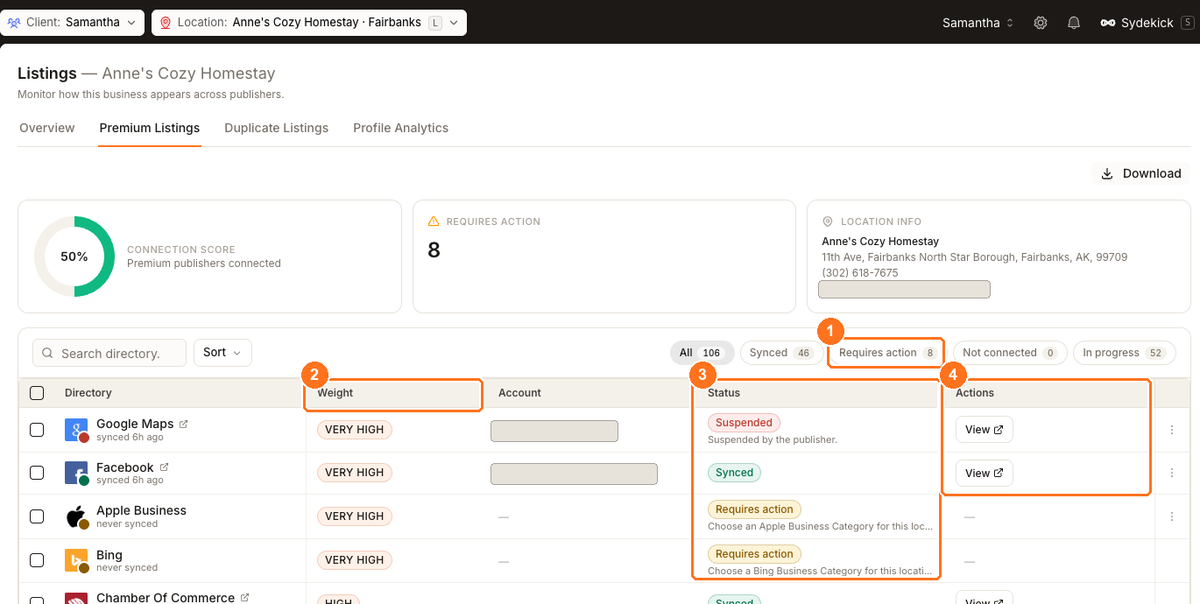
The teaching path is Requires action → Weight → Status and reason → Actions. The selected Published tab contains all of these controls.
Click Requires action to reduce the table to the rows reporting a problem.
Sort by Publisher weight. A Very high directory is worth more than every Low row put together, and the table is mostly long tail.
Read the status reason under each row's chip. It tells you whether the row is yours, the directory's, or nobody's.
Act only where the row offers something. Connect and Reconnect appear for Google and Facebook, Retry on a failed submission, View opens the live listing. Use the row's ⋮ menu for Reconnect and Disconnect; rows with nothing available have no ⋮ at all.
Leave any Requires action row showing — alone. The fix isn't on this screen — either the reason tells you to contact the directory, or it's a submission Synup will retry.
What each chip is counting
Every row lands in exactly one chip. Synced means the directory has your data and reports a successful sync. Requires action means the directory came back with a problem, or a connection has expired or been suspended. Not connected is reserved for the publishers you connect yourself with your own account — Google, Facebook and Apple — where nothing has been attempted. In progress covers everything still moving: submissions in flight, and the long tail of smaller directories Synup submits on your behalf.
That last point explains a result that looks wrong at first. A location can show Not connected 0 here while its Listings → Overview says 3 not connected. Both are right: the smaller directories don't use an account you own, so this table describes them as Sync in progress rather than implying you forgot to connect something. The Overview counts them the other way.
Why most rows have no button
The Actions column is emptier than people expect, and that's expected rather than broken. Synup submits to most directories using its own credentials, so there's nothing for you to connect. Only Google and Facebook have a customer-facing connect flow on this screen; everything else shows —, including Very high weight rows like Apple Business and Bing sitting in Requires action.
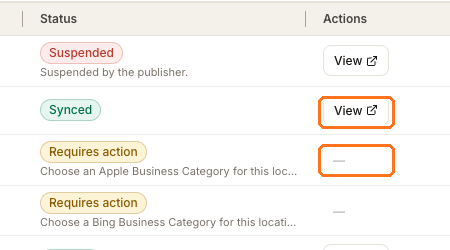
The Account column shows the email of the account a publisher is connected with. Check it before reconnecting — a row failing with Not reachable with the connected account usually means the wrong account is linked, not that the connection is broken.
Requires action is not a list of your mistakes
It collects every row that is neither synced nor simply unattempted, and several of the reasons underneath are informational. Read the reason on each row before deciding whether anyone needs to act:
| Reason shown | Yours to fix? |
|---|---|
| Something went wrong. Try again shortly. | No — usually resolves itself; recheck later |
| Your category isn't mapped to this directory yet. No action needed. | No — the reason says so |
| Choose an Apple Business Category for this location. | Yes — set the publisher category on the location |
| Already claimed by another partner. Contact the directory to release it. | Yes, but with the directory, not in Synup |
| Accepted — awaiting the live link. | No — it worked; the link hasn't arrived |
Watch out for
Questions people ask
Why does one location list far more directories than another?
Eligibility depends on the location's country and category, so locations in the same account can have different directory totals. A shorter eligible list is not a problem by itself.
What's the difference between "In progress" and "Sync in progress"?
They're the same bucket. In progress is a submission genuinely in flight; Sync in progress is how the table labels the smaller directories that Synup submits for you and that haven't gone out yet. Both sit under the In progress chip and both need nothing from you.
There's no Connect button on a directory I want. How do I connect it?
You don't. Apart from Google and Facebook, Synup submits to directories with its own credentials — there's no account for you to link. The row moves to Synced on its own once the submission is accepted.
Does fixing these rows raise my Connection score?
Only if the row is Google or Facebook. Connection score deliberately ignores the long tail so a hundred small directories can't dilute it. Fixing smaller rows raises your overall location health instead.
Next
For the gauge at the top of this screen and what it does and doesn't count, see Connection score. To understand when a change you saved actually reaches these directories, see when listing changes go live.