
Understand your Connection score
What is Connection score, and why do directories still need action?
Connection score measures one thing: how many of the publishers Synup connects directly — currently Google and Facebook — are actually connected. It is deliberately narrow, which is why the Requires action count beside it can be far larger without either number being wrong. The score covers premium connections; Requires action covers every eligible directory.
ASK SYDEKICK
Which directories are not synced for this selected location, and which need action?
Set the scope chip to the client and location you mean, then ask. Sydekick reads that location's directory table and ranks what to fix first. It only reads — nothing is connected, disconnected, or re-synced.
Reading the two numbers together
The gauge answers "are my most important connections in place?" — not "is every listing healthy?".
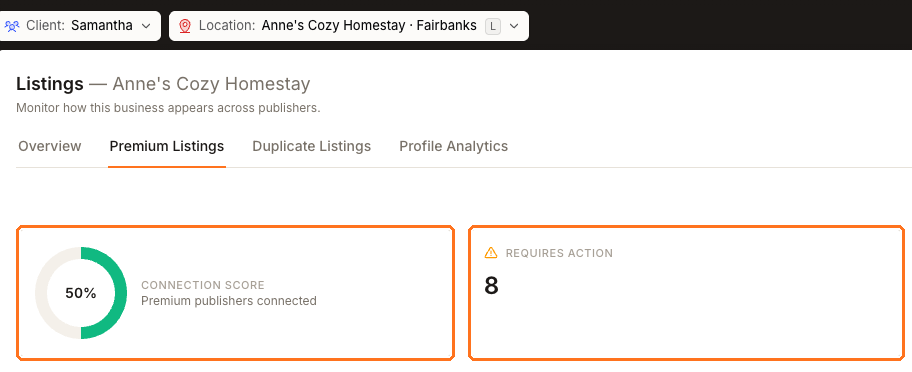
Both cards sit at the top of a location's Listings → Published tab. In the example above, the score reads 50% while 10 directories need action out of 105. Of the two publishers the gauge counts, Facebook was synced and Google was suspended by the publisher.
So the gauge is telling you about two connections and the card beside it is telling you about a hundred-odd directory submissions. Read together they give you a plan: repair the premium connection first, because it carries the most traffic, then work the rest by Weight.
What the score does not measure
It is not overall sync coverage. For "how much of my directory presence is working", read location health on the Listings Overview instead.
It is not profile quality either. A location can be fully connected and still have a thin, half-filled profile, which is measured separately as Profile completeness.
And it does not move when you fix a small directory. Only Google and Facebook change this number.
Or do it yourself
Open the location, then Listings → Published.
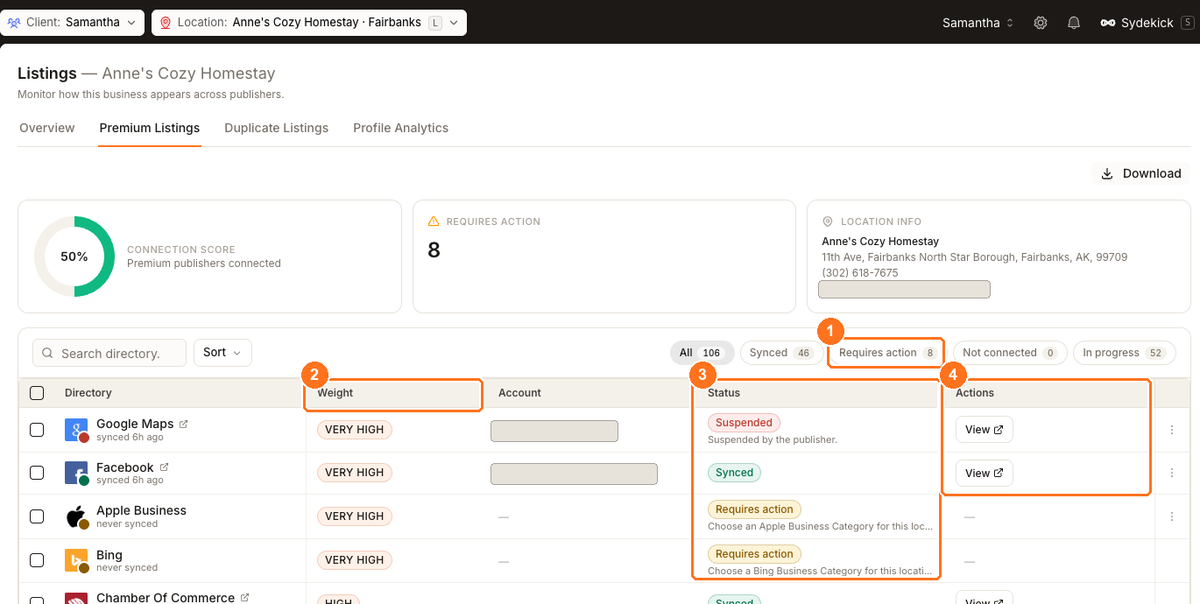
Use Requires action to make the worklist, Weight to set priority, Status to understand the reason, and Actions only where the row offers one.
Use the chips to pick a worklist. Take Requires action first — those directories reported a problem — then Not connected. In progress is work already moving and needs nothing from you, so let those rows settle rather than reconnecting them.
Scan by Weight rather than top to bottom. One Very high row needing attention costs you more than every Low row combined.
Read the reason under each Requires action status before doing anything. They are not all yours to fix: Your category isn't mapped to this directory yet. No action needed. is informational, while Already claimed by another partner. needs you to contact that directory.
Act on the rows that offer something in the Actions column. The directory table walks through a row in detail.
Watch out for
Questions people ask
What is the difference between Requires action and Not connected?
Not connected means no connection was ever established. Requires action means a directory reported a problem — a rejected category mapping, a listing claimed elsewhere, or a failed submission. Requires action is the more useful queue, because each row tells you why.
Where do I see coverage across every location instead of one?
Set the Location picker to All locations and open Listings → Overview, which reports health and the directories costing you most across the portfolio.
Next
To work the directory table row by row, see the directory table. To catch connections drifting before they break, see monitoring connection health.