
Reply to a review
Where does my review reply actually go?
The button on the review tells you where your reply is going.
Respond means Synup can post it for you. That is Google Maps and Facebook only — the two sources Synup holds a connection to.
Respond on {source} means Synup cannot post there. It opens the review on that site so you can answer in your own account. Nothing you type in Synup reaches the customer.
If you have ever written a reply in Synup and had a client tell you it never appeared, this is almost always why.
The two kinds of review in your queue
Both of these sit in the same list, and they look almost identical until you reach the right-hand side.
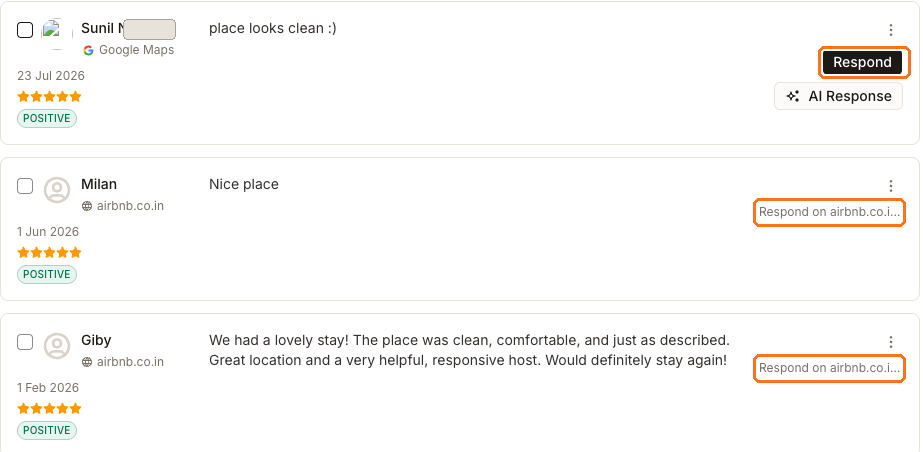
The top review came from Google Maps, so it offers Respond and AI Response. The two below it were collected from a marketplace, so the only thing on offer is Respond on airbnb.co.in, which is a link out.
Look at the checkboxes on the left too. The marketplace rows are greyed out and say "Replies aren't supported for this source". That is the same rule showing up a second time — you cannot include those reviews in a bulk reply either.
Google Maps
- Reply button
- Respond
- Who posts it
- Synup sends it to Google
- AI drafting
- Available
- Counts as replied
- Yes
Facebook
- Reply button
- Respond
- Who posts it
- Synup posts it as a Page comment
- AI drafting
- Available
- Counts as replied
- Yes
Yelp, Tripadvisor and other collected sources
- Reply button
- Respond on {source}
- Who posts it
- You do, on that site
- AI drafting
- Not available
- Counts as replied
- No — Synup never sees your answer
Replying on Google or Facebook
Two buttons do two very different things here, and it is worth being clear about them before you touch either.
AI Response writes a draft. Send publishes it. Generating a draft changes nothing — not for the reviewer, not on Google, not in Synup. Nothing leaves the box until you choose Send.
Open the review and choose Respond. The composer opens with the placeholder Write a response…, a character count, Discard, and a Send that stays unavailable while the box is empty.
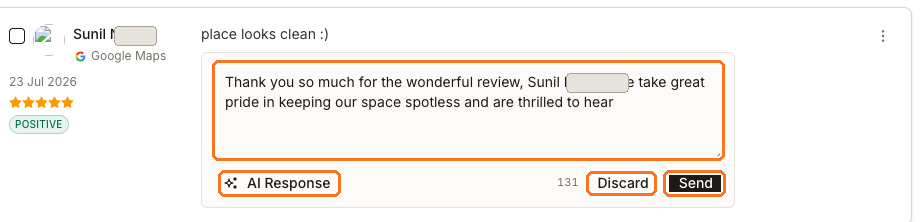
The large box is the draft itself — here already filled in by AI Response, which is the control at the bottom left. Along the bottom right sit the character count, Discard, and Send. Note that Send only turns solid once there is text to send.
AI Response reads the reviewer's name, rating and review text and writes two to four sentences back. It appears on Google and Facebook reviews only, for the same reason Respond does.
Then edit it. The draft is a starting point, not a finished reply — it does not know what you actually did about the problem. Discard clears it and keeps nothing.
When the wording is yours, choose Send.
On Google, your reply may sit in a Pending state for a short while: Google moderates owner replies before showing them. Synup re-checks that review shortly afterwards rather than waiting for the next daily sync, so the state updates on its own.
Editing or removing a reply you already sent
Sending again replaces what is there. Google keeps exactly one owner reply per review, so a second send overwrites the first rather than adding to it. On Facebook, Synup edits the comment it already posted instead of leaving a duplicate.
You can also delete a reply on Google and Facebook, which removes it from the publisher as well. That is worth pausing over — it is a live change to something the public can currently see.
Watch out for
Questions people ask
I replied to a Tripadvisor review in Synup last week. Why is it not on Tripadvisor?
Check what the button said. If it read Respond on Tripadvisor, the reply was never sent from Synup — that control is a link to Tripadvisor, and the answer has to be written there in your own Tripadvisor account.
Does AI Response send anything on its own?
No. It writes text into the box and stops — nothing is saved and nothing reaches the publisher. Send is the only action that publishes. If you change your mind, Discard clears the draft and keeps nothing.
Why can I not select some reviews for a bulk reply?
Because Synup cannot post to their source. The checkbox is disabled on any review that offers Respond on {source}, and on any review that has been removed.