
Manage review sources
How do I control which sites Synup collects reviews from?
"We're missing our Tripadvisor reviews" is usually not a bug. It is a question of which lane the source is in.
Reviews reach Synup three different ways, and what you can do about a missing source depends entirely on which one applies.
Connected account
- Which sources
- Google and Facebook
- How it arrives
- Through the publisher's own API, using your connection
- If it is missing
- Fix the connection, not the source list
- Listed in the panel
- It can appear as Auto · Connected account after reviews have been collected
Review feed
- Which sources
- Yelp, Tripadvisor, Trustpilot and other known marketplaces
- How it arrives
- Synup fetches them for you
- If it is missing
- Add the page URL yourself
- Listed in the panel
- Yes, if it was added
Web scraping
- Which sources
- Any other public reviews page you point at
- How it arrives
- Synup reads the page you gave it, on a schedule
- If it is missing
- Check the URL points at the reviews page
- Listed in the panel
- Yes, as Custom
ASK SYDEKICK
Which review sites are being collected for this location?
Set the scope to the client and location you mean, then ask. Sydekick lists the sources that location collects from and how many reviews each has brought in. It only reads — no source is added, hidden or removed.
Facebook is the one real exception
Google degrades gracefully. If the connection drops, Synup can still pick Google reviews up another way, so you keep getting reviews even while the connection needs attention.
Facebook has no fallback at all. No connection means no Facebook reviews — not fewer, not slower. If a client's Facebook reviews vanished, go and look at the connection rather than adding a Facebook URL here.
See what this location is collecting
Open the location's All Reviews tab and choose Manage review sites. Reading this panel changes nothing.
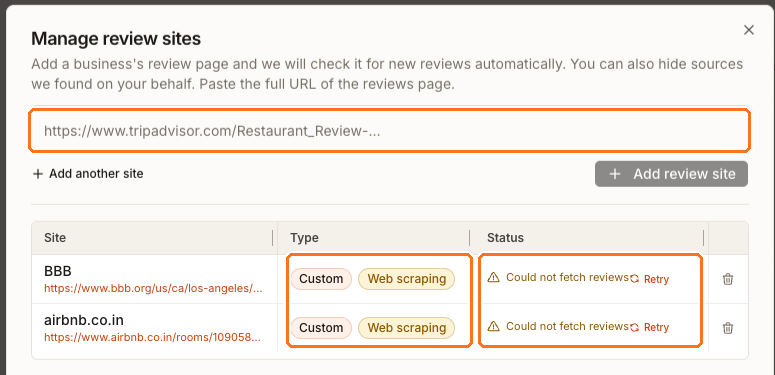
Three areas are boxed above, and they answer three different questions.
The field at the top is where a new source goes. The Type column tells you which lane a source is in — Custom if someone added it, Auto if Synup found it, with the collection method beside it. The Status column is the one that usually explains a complaint: Could not fetch reviews is the literal answer to "why are these reviews not in Synup", and Retry re-runs the fetch. The usual cause is a URL pointing at the business's main page rather than its reviews page.
Google and Facebook still arrive through a connection. When either appears in this panel, it is an Auto source marked Connected account; reconnect it from the connection strip above the queue rather than pasting its URL as a custom source.
Add a source
Paste the full URL of the business's reviews page into the field. Add review site stays unavailable until there is something to check, and Add another site gives you a second field when you are adding several.
Synup checks the page as you add it and tells you what it found — that it collects reviews, that it collects reviews but for what looks like a different business, or that it found none and the URL probably is not the reviews page. Believe that last message before you save.
Change a source you already have
Hide applies to sources Synup found on your behalf. It stops one cluttering the queue and analytics while keeping the reviews already collected. If you are unsure, hide.
Remove applies to sources someone added by hand, and takes the source out of the location.
Both change what a real location collects, so neither is a browsing action — decide before you click.
Questions people ask
Why did a source appear that nobody added?
Synup finds some marketplaces for a location by itself. Those arrive as Auto, and hiding is the way to quieten one you do not care about.
A review is on Google but not in Synup. Where is it?
Synup does not re-read every source every hour. Check Last fetch attempt above the queue first — if the fetch has not run since the review was posted, there is nothing wrong.
Can I report a fake review from here?
No. Reporting reviews is not part of Synup. Use the review site's own reporting flow.