
Compare review competitors
How do I compare my reviews with my competitors?
Reviews → Competitors puts your Google rating next to nearby businesses in your category. It benchmarks Google reviews only, and it refreshes monthly rather than live.
Read it for one thing: whether your reputation is actually competitive, or just good on a small sample.
Where your location stands
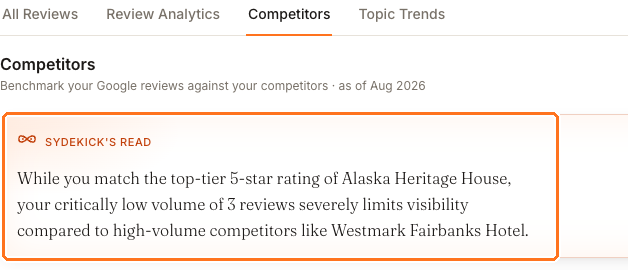
The as of month beside the heading is worth noticing. A figure that looks behind your live rating usually is, and that is expected rather than a fault.
The orange Sydekick's read panel states the headline in a sentence before you read a single number, which is generally the fastest way in.
Rating alone doesn't tell the competitive story
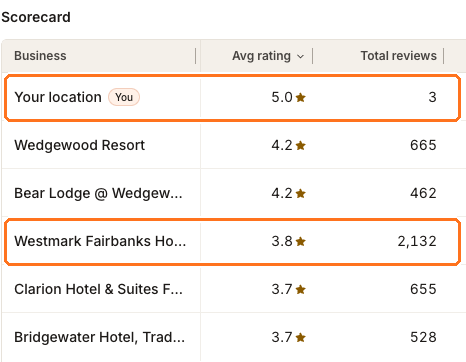
The location above has the best rating on the board — 5.0 — and three reviews. The business at the bottom of the rating column has 2,132.
A perfect score on three reviews is not really a score yet. Customers and search engines both treat a large body of reviews as stronger evidence than a small flawless one, so a 5.0 on three can lose to a 4.2 on several hundred. The Review velocity chart underneath makes the same point bluntly: it reports what share of all the reviews in this set are yours.
When rating is already high and volume is low, the useful work is asking happy customers to leave reviews — not defending the rating.
Reading the scorecard properly
Each row carries more than an average, and the extra columns are where the useful comparisons live.
- Total reviews is the credibility column. Compare it before you compare ratings.
- New this month shows who is still collecting reviews. A rival adding reviews steadily will overtake a static competitor regardless of today's average.
- Net sentiment and Distribution show whether an average is earned consistently or is the midpoint of a lot of fives and a lot of ones. A rival on your rating with a much wider spread is a different competitor from one who never slips.
Strengths vs gaps above the table splits themes into what rivals get praised for and what you get praised for. Where rivals win is the most directly actionable list on the page: things customers in your area care about and are not currently crediting you with. Click any topic to see which businesses earn it.
Why a business appears in the summary but not the scorecard
The Scorecard shows up to five competitors. Businesses you add yourself are prioritized within those five; they do not create extra rows beyond the five-business comparison. Synup tracks more than that in the background — often a couple of dozen — and the Sydekick summary can draw on that wider set.
So a name in Sydekick's read or in Strengths vs gaps that you cannot find in the table is normal, not a bug. Open Manage competitors to see everything being tracked.
Adding, removing and refreshing competitors
Manage competitors is where you curate the list. Discovery is based on your Google category and location, so it errs on the side of including too much — removing the businesses you do not really compete with is normal housekeeping, and adding the ones you do by name is usually the first thing worth doing.
Two things to know before you use it:
- Removing is close to permanent. Synup will not re-discover that business automatically. Add it back by name if you change your mind.
- Some entries carry a warning that Synup could not match them to a Google listing. Those are tracked but contribute no rating or review data, so they will never appear in the Scorecard.
Refresh re-runs discovery and pulls current figures. Because the comparison is built monthly, use it when you have changed the list rather than expecting it to move the numbers day to day.