
Track review topic trends
How do I read Topic Trends without misreading it?
Topic Trends turns your review text into themes — cleanliness, comfort, host — and shows how often each comes up over time. The counter at the top right tells you how much is ready: 3/3 analyzed means every review at this location has been read for topics.
See what customers keep mentioning
All topics is the list to start from. It ranks every theme by how often it has ever been mentioned, with the average rating of the reviews mentioning it and how it has moved in the last 90 days.
A high mention count with a low average rating is the combination worth acting on: it means the thing customers talk about most is also the thing dragging your rating down.
Only reviews with text can be tagged. A star rating on its own has nothing to read, so it never appears here.
Reading Topics × time
The grid is the most useful thing on the page, because it shows when rather than just how much. Each cell is one month, coloured by sentiment, with the number of mentions inside it.
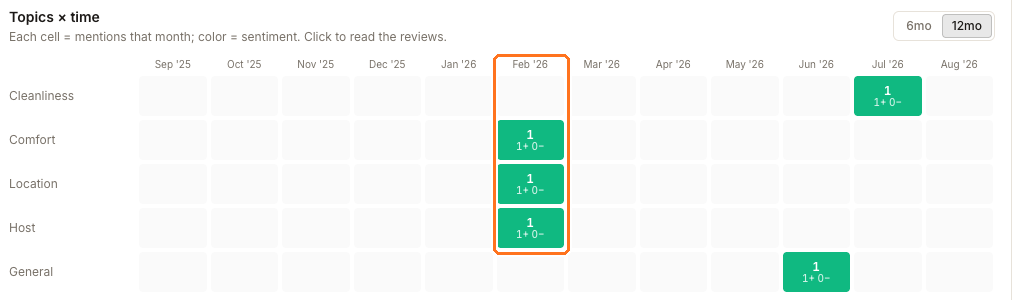
Read it left to right along one topic to see whether it is a running theme or a single moment. Comfort, location and host above were each mentioned once, all in February. Cleanliness and general appear later in the year.
Is a topic really rising or falling?
Here is the thing that catches people out, and it is worth understanding once.
The page runs two different clocks.
The six-month view
What changed and Compare periods look across roughly six months, split into an earlier half and a later half.
The ninety-day view
Δ 90d, Rising and Declining compare only the last 90 days against the 90 days before that.
So a theme last mentioned five months ago has faded on the six-month view and is simply absent from both 90-day windows. The summary calls that a decline; the Declining card says No change this period. Both are correct — they are measuring different stretches of time.
When the two disagree, go back to the grid. Comfort, location and host all sit in February, outside both 90-day windows, which is exactly why the recent comparison reports no movement for them.
One more caution on a small location: a topic mentioned once will still appear in Rising or Emerging, because one is more than zero. Check the count before you treat it as a trend.
Read the reviews behind a topic
At a single location, click a cell in the grid or a topic in the table to send that exact topic — and the month, when you clicked a cell — to Sydekick. The handoff keeps the current client and location scope, then reads the matching reviews so you can ask what the mentions actually say. Do this before acting on anything: it is the difference between guests mention parking and knowing whether they are praising it or complaining about it.
In the all-locations roll-up, the cells are summaries across several locations and do not open that per-location Sydekick handoff. Pick a location first when you need the reviews behind a topic.
The Over time chart underneath does the same job for one topic at a time, splitting its mentions into positive and negative so you can see whether a theme is turning.
Managing and re-analyzing topics
Manage topics is where you curate the list Synup tags against. Re-analyze re-reads every review at the location and rewrites its topics — it is not a refresh button. Run it when reviews have arrived that the counter says are not analyzed, rather than to try to change a result you disagree with.
If the counter says every review is analyzed but no topics appear at all, that is not a normal empty state. Raise it with support rather than re-running the analysis.
Questions people ask
Are these the same as the chips on the reviews page?
No, and it is worth keeping them apart. What customers are talking about on the review list and in Review Analytics shows keywords pulled from recent reviews. Topic Trends works from topics stored against each review, which is what lets it compare one period with another.
Why does a topic show an average rating of 5.0 when I know we have complaints?
The average belongs to the reviews mentioning that topic, not to the location. A theme praised in your best reviews will read 5.0 even when the location has weaker ones about something else.