
Understand Review Health
Why is my Review Health not 100 when my rating is perfect?
Review Health is not a rating. It scores what you did with your reviews as much as what they said.
Your star rating is worth 45% of it. The other 55% is your response rate and how much of your feedback is positive, and unreplied negative reviews subtract on top of that.
That is why a location can sit at a perfect 5.0 and still not be near 100.
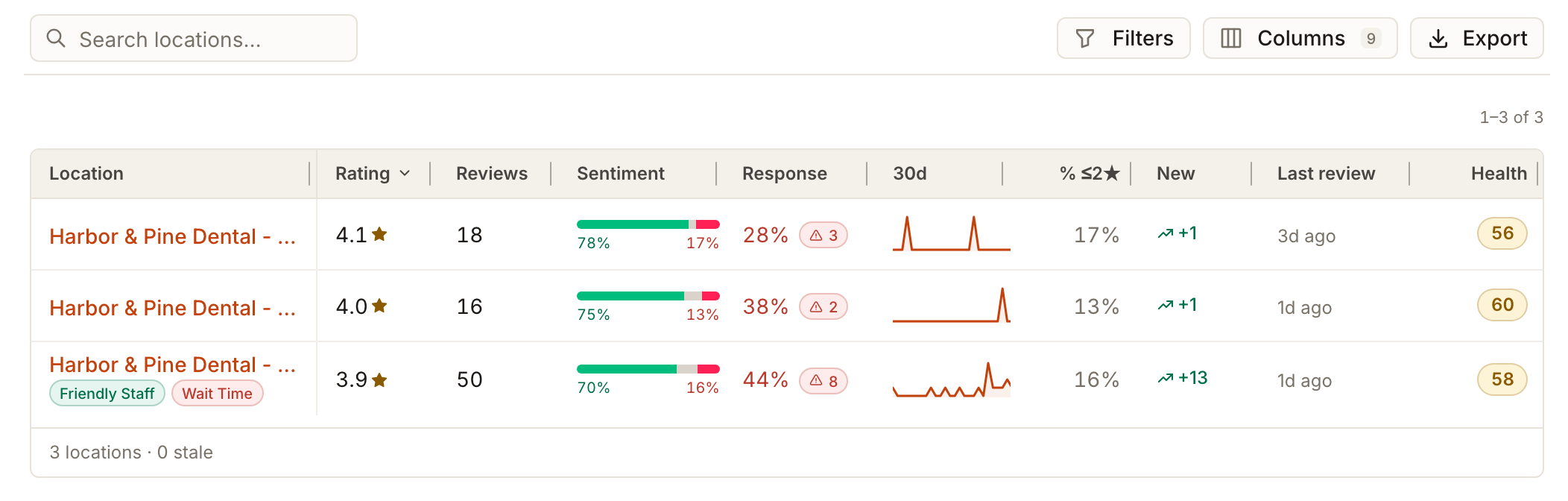
Key facts
| Where it lives | Reviews → Reviews Overview with All locations selected. The Reputation table's last column, Health |
| What it covers | One location at a time, all time, using public directory reviews only |
| What it leaves out | Private feedback collected through review campaigns, and reviews that were removed |
| Bands | Healthy 70 and above, Watch 40 to 69, At risk below 40 |
| What you need | Reviews connected for the location. No plan add-on |
Steps
Open Reviews in the left navigation and pick a client with All locations. The Reviews Overview tab opens with the Reputation page.
Scroll to the locations table. The Health column is the last one. It shows a number from 0 to 100 for each location.
Compare it with Rating and Response. A good rating with a low response rate, or with several unreplied negatives (the red count beside Response), is the usual reason.
Select Filters and use Needs attention (Unreplied negatives, Stale, Low response, Declining) or Health (At risk, Watch, Healthy) to list the locations that need work.
Open a location and reply to its unanswered reviews, starting with the negative ones. See Reply to a review.
A 5.0 location scoring 70
Take a location whose three reviews are all five stars and none has a reply. Its Health is 70.
Four things go in, and only one of them is your rating.
Average rating
- Share of the score
- 45%
- What it measures
- Your star average, out of 5
- This location
- 5.0, full marks
Response rate
- Share of the score
- 30%
- What it measures
- How many reviews you replied to
- This location
- 0%, nothing earned
Positive share
- Share of the score
- 25%
- What it measures
- How much feedback reads as positive
- This location
- 100%, full marks
Unreplied negatives
- Share of the score
- subtracts up to 25 points
- What it measures
- Negative reviews still waiting on you
- This location
- none, no penalty
So this location banks 45 for its rating and 25 for its positive share, loses nothing to the penalty, and forfeits the entire 30 available for replying. That is 70.
Replying to all three reviews would take it to 100, without a single new review arriving.
Check the arithmetic on a real row
The bottom row of the table above has a 3.9 average over 50 reviews, 44% replied, 70% of reviews positive and 8 unreplied negatives. The score works out as 45 x (3.9 / 5) = 35.1, plus 30 x 0.44 = 13.2, plus 25 x 0.70 = 17.5, minus the penalty of 8 unreplied negatives out of 50 reviews (half of 16%, so 8 points). That is 57.8, shown as 58.

The location's own page shows the same inputs: the average rating, the response rate with a Poor, Can improve or Good label, and the count of unreplied negatives.
The three bands
The legend on the Locations focus map names them, and the Health filter uses the same words:
- Healthy: 70 and above
- Watch: 40 to 69
- At risk: below 40
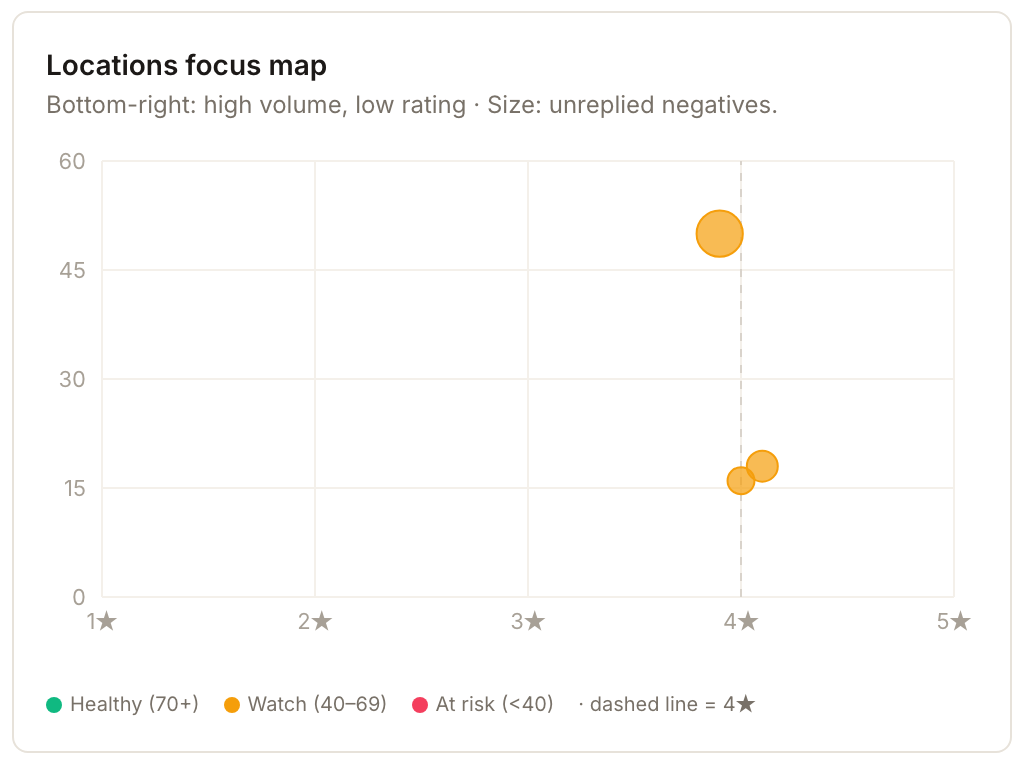
A location with a good rating that never replies and carries a few unanswered complaints drops through the bands quickly, because the response-rate term is empty and the penalty is working against it at the same time.
What actually moves the number
Reply to the unanswered negatives first. It is the only action that improves two terms at once: it lifts your response rate and it removes the penalty those reviews were applying.
After that, reply to everything else. Response rate is the largest slice of the score you have direct control over on any given day. Your star average moves slowly and only as new reviews arrive, but the reply you send this afternoon counts as soon as it is published.
Chasing new five-star reviews to fix a low Health score usually disappoints, because rating is capped at 45% and a location in trouble is rarely in trouble because of its rating.
What you'll see when it's done
- Once replies are published, the location's response rate rises, its unreplied-negative count falls and its Health score moves up in the table.
Watch out for
- Health is all-time. It reads every directory review the location has, not a recent window. The optional Health Δ column (hidden by default) compares periods.
- Only published replies count. A reply that is still a draft, pending approval, rejected or failed is still unreplied.
- Private feedback is not included. Feedback collected internally through a review campaign does not change Health.
Questions people ask
My rating went up but Health did not move. Why?
Rating is under half the score, and it is already close to its ceiling on most locations. If your response rate is low, that is where the missing points are.
Does Health count reviews I answered outside Synup?
Usually, yes, once Synup has synced. When a reply you post directly on Google or Facebook is published, Synup picks it up the next time reviews are synced and counts it as a reply. A reply that is still pending, was rejected or failed, or is only a saved draft, is not counted. For other review sites Synup may not be able to read replies back, and those reviews can still count as unreplied.
Why do two locations with the same rating have different Health?
Because the other 55% differs. Compare their Response column first, then check the rating, positivity and unreplied-negative factors for any remaining difference.
Where is the column called Review Health?
The table simply calls it Health.