
Embed a review widget
How do I show my reviews on my website?
A review widget is a small piece of code you paste into your website. Synup keeps it updated, so new reviews appear without you touching the page again.
Open Reviews → Widgets for a location, pick a widget, and copy its embed code.
Check the preview before you embed anything
The widget detail page shows its settings as a single line — star threshold, sources, sort order, how many reviews show, layout and theme — and, next to it, a live preview of exactly what visitors will see.
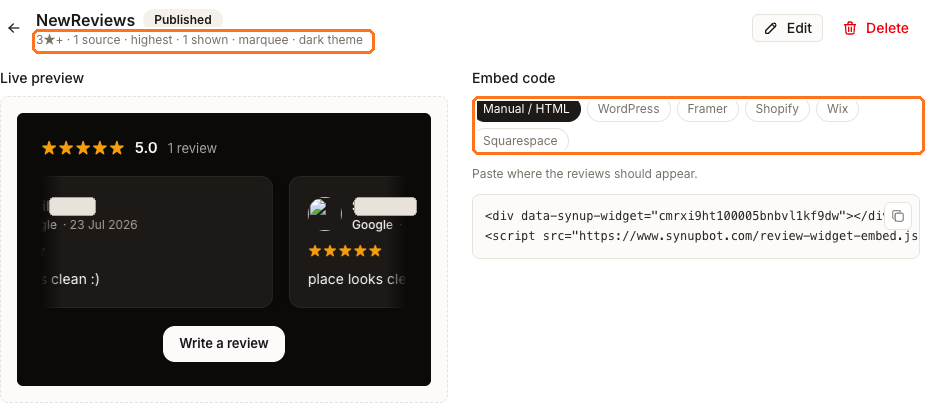
Look at the preview honestly before you put it on a page. The widget above is filtered to 3★ and above from one source, which leaves it showing a single review. On a marquee layout that one review simply scrolls past itself.
That is not a fault in the widget — it is what the location currently has to show. If the preview looks thin, the fix is more reviews, not different settings. Loosening the star filter to pad it out only puts weaker reviews on your own website.
The Write a review button in the preview is part of the widget, so it doubles as a way to collect reviews from visitors who are already on your site.
Getting the code for your platform
The Embed code panel has a tab per platform: Manual / HTML, WordPress, Framer, Shopify, Wix and Squarespace. Pick yours and use Copy embed code.
The instruction is the same everywhere — paste it where the reviews should appear — and
the code itself is the same two lines in every case: a div that marks the spot, and a
script tag that fills it. What changes between tabs is only where your platform lets you
paste raw HTML, which is a question about your website builder rather than about Synup.
If your platform is not listed, use Manual / HTML. Any site that accepts a custom HTML block will run it.
What the widget does and does not do
- It updates itself. New reviews that match the settings appear without re-pasting the code.
- It shows only reviews Synup has collected for that location — so a source you have not connected will not appear in it.
- It respects the star threshold you set, which is why a widget can look emptier than your review count suggests.
- Each widget belongs to one location. A multi-location site needs one per location.
Changing how it looks
Edit reopens the settings — threshold, sources, sort order, count, layout and theme. Changes apply to the widget wherever it is already embedded, so you do not need to touch your website again after a settings change.
Delete removes it. Any page still carrying that snippet will stop showing reviews, so take the code off your site first.