
Collect private feedback
How do I collect private feedback without filtering my reviews?
Two separate settings decide this, and only one of them carries any risk.
With screening on, the saved positive threshold controls the handoff. The static-URL builder lets you choose 3★ and up (1–2★ stay private) or 4★ and up (1–3★ stay private). Ratings below that threshold open a private feedback form in Synup; ratings at or above it reveal the public review destinations you configured. That conditional routing is review gating, so read Synup's warning before using it.
If you want feedback that never becomes a public review, create the campaign as Collect internally. Nobody is asked to review you anywhere and everything stays in Synup.
Screening is the other one, and it is the review-gating decision. Synup ships it switched off and warns you about it on the same screen.
The choice you can't take back
Start a campaign from Reviews → Invite → Acquire New Reviews → Via Email/SMS and Synup asks where the feedback goes before the builder even opens.
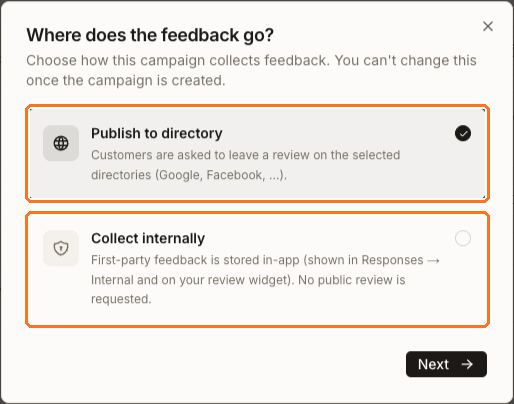
- Publish to directory sends people to Google, Facebook or whichever sites you pick.
- Collect internally keeps everything first-party. No public review is requested at all.
The dialog says it plainly — "You can't change this once the campaign is created." Pick the wrong one and you build a new campaign.
If your question is "I want to hear from customers before it becomes public", Collect internally is the clean answer. It raises no gating question at all, because you aren't choosing who to ask — you aren't asking anyone. Screening inside an internal campaign only decides who sees the comment box: leave it off and everyone gets one, turn it on and only the less-happy respondents do.
Screening, and why Synup warns about it
On a campaign that publishes to a directory, screening is the setting that decides who gets asked. It sits in step 2, Content, between Content and Destination.
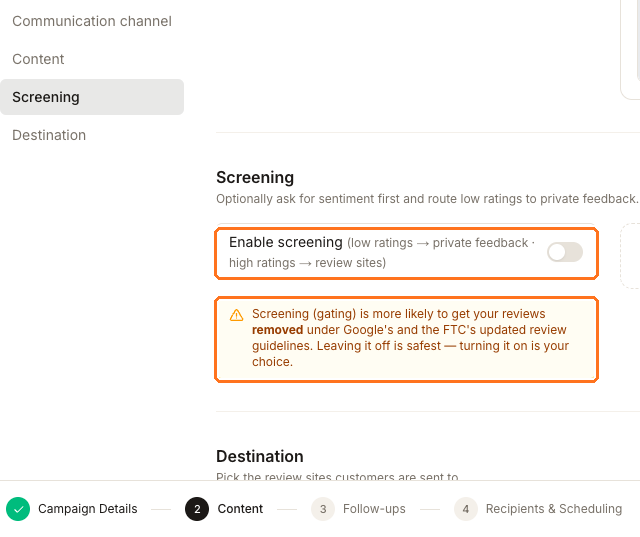
- Enable screening ships off, so by default your invite page shows everyone the same review buttons.
- Synup's warning stays on screen whether the switch is on or off: "Screening (gating) is more likely to get your reviews removed under Google's and the FTC's updated review guidelines. Leaving it off is safest — turning it on is your choice."
Switch it on and the invite page changes shape. It asks for a rating first. With the saved threshold at 4, someone who rates you 4 or 5 gets the review buttons. Someone who rates 1, 2 or 3 never sees them — they get a private comment box instead, and their answer is stored in Synup.
Sending people to two different destinations depending on how happy they are is what review gating means. Synup allows it, states the risk, and leaves the decision to you. Note that the risk it describes is to the reviews you already have, not only the ones you're about to ask for.
The 4-star cut-off isn't editable in the email and SMS builder — it comes from this location's saved funnel settings and starts at 4.
What each setup looks like to your customer
Publish to directory, screening off
- Asked first
- Nothing — the review buttons appear straight away
- Who gets the public ask
- Everyone
- Collected privately
- Nothing
- Gating
- None
Publish to directory, screening on
- Asked first
- Rate us
- Who gets the public ask
- People at or above the saved positive threshold
- Collected privately
- The rating and comment from everyone below that threshold
- Gating
- Yes — this is what Synup's warning is about
Collect internally
- Asked first
- Rate us
- Who gets the public ask
- Nobody
- Collected privately
- Every rating, and a comment when you ask for one
- Gating
- None — you aren't choosing who to ask
One place screening starts switched on
Acquire New Reviews → Via Static URL — the builder behind a shareable link and QR code — opens with Enable screening already on, and that screen doesn't repeat the warning. It does offer the threshold choice the campaign builder doesn't: 3★ and up or 4★ and up.
Check that switch before you publish a static funnel, particularly if the QR code is going to be printed. The permanent QR code & review link at the top of the Invite tab is different again — it inherits whatever this location's last campaign used.
Where the feedback you collect ends up
Go to Reviews → Invite → Responses and switch the view from Published to Internal. The page states what it's holding: "First-party feedback collected in-app. Never published to a directory; eligible reviews can appear in your widget."
The Internal table keeps the customer, source, campaign, date, rating and sentiment beside the written feedback. Search, rating, sentiment and other filters help you narrow the list. There is no public-reply action in this view; use the comment to identify the operational follow-up your team should make.
Read that last clause twice. Private means not published to a directory. It does not mean invisible. Your review widget has an Include internal reviews checkbox — off by default, and the widget's minimum-rating filter still applies — but tick it and feedback someone gave you privately can appear on your own website.
It stays out of your headline numbers either way: first-party feedback is excluded from your average rating, your Review Health and the Reputation roll-up, which read directory reviews only. In the review queue it's hidden until you select Internal as a review site.
Questions people ask
Can I switch a campaign from public to private later?
No. The destination is fixed when the campaign is created, so build a second campaign instead.
Does screening stop unhappy customers from reviewing me?
No. It only changes what your invite page offers them. Anyone can still open Google and write a review, and someone who intended to is unlikely to be stopped by a comment box.
Nobody has left private feedback yet — is something broken?
Probably not. The Internal view only fills up once a campaign that collects internally, or a screened campaign, has actually gone out and someone has responded. Until then it reads "No internal feedback collected yet."