Review everything. Approve in one click.
When the agent needs your sign-off, it lands in your approvals inbox — organized, prioritized, and ready to approve, edit, or reject. No email chains. No missed items.
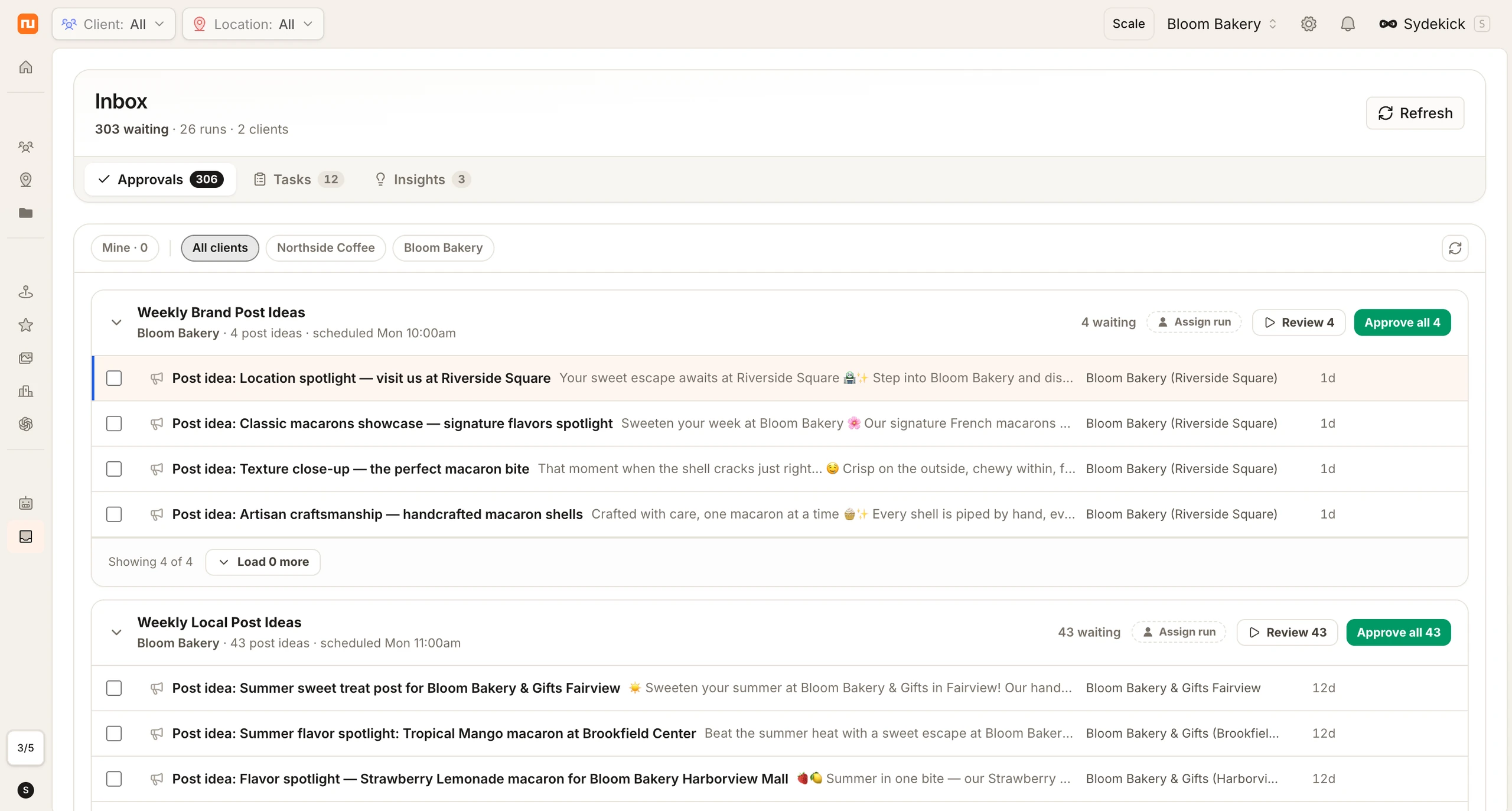
Draft. Review. Approve.
A single inbox for everything the agent needs your sign-off on.
Agent drafts the work
The agent prepares the action — a review response, listing update, or social post — and sends it to your inbox.
You review it
See the full context: what changed, why, and what it'll look like live. Edit inline if needed.
Approve or reject
One click to approve. The agent publishes immediately and logs the decision in your audit trail.
Six ways approvals keep you in control
Every pending action in one place — review, edit, or approve without switching tools.
Everything pending, one queue
Review responses, listing updates, social posts, all in a single prioritized queue.
Prioritized by urgency
The most time-sensitive items surface first, sorted by urgency and impact.
Edit before you approve
See full context, make inline edits. The agent learns from your changes for next time.
Approve 50 items in 10 seconds
Bulk approve by channel, location, or action type, one click when you trust the agent's work.
Auto-approve trusted actions
Set rules for trusted action types. Those pass through automatically without manual review.
Agent learns from your edits
Every edit you make teaches the agent, fewer corrections needed over time.
Marinara Pizza increased phone calls 80% while breaking into NYC’s toughest pizza market — working with Synup’s Customer Success team to maximize presence and manage reputation from day one.
Questions about approvals
Any action the agent takes in Manual or Semi-auto mode: review responses, listing updates, social posts, and more. In Full auto mode, actions skip the inbox but are still logged in the audit trail.
Yes. Define rules like "auto-approve all listing hour updates" or "auto-approve review responses with confidence above 95%." Actions that match your rules skip the inbox.
Yes. Assign approval permissions by role. Admins can approve everything, while junior team members only see their assigned locations.
The agent discards the draft and learns from your feedback. You can optionally provide a reason so the agent adjusts its approach for similar actions in the future.
Try the agent now
Start a conversation and see what it can do for your business — in minutes, not meetings.