
Olive Street Design's clients love the white-label sign-in dashboard for its at-a-glance simplicity — every client sees clean data under the agency's own brand, with nothing pointing back to Synup.
 Nat Rosasco
Give every client their own login, their own dashboard, and an AI assistant that answers their questions, all under your brand. They see their data. You look like a tech company.
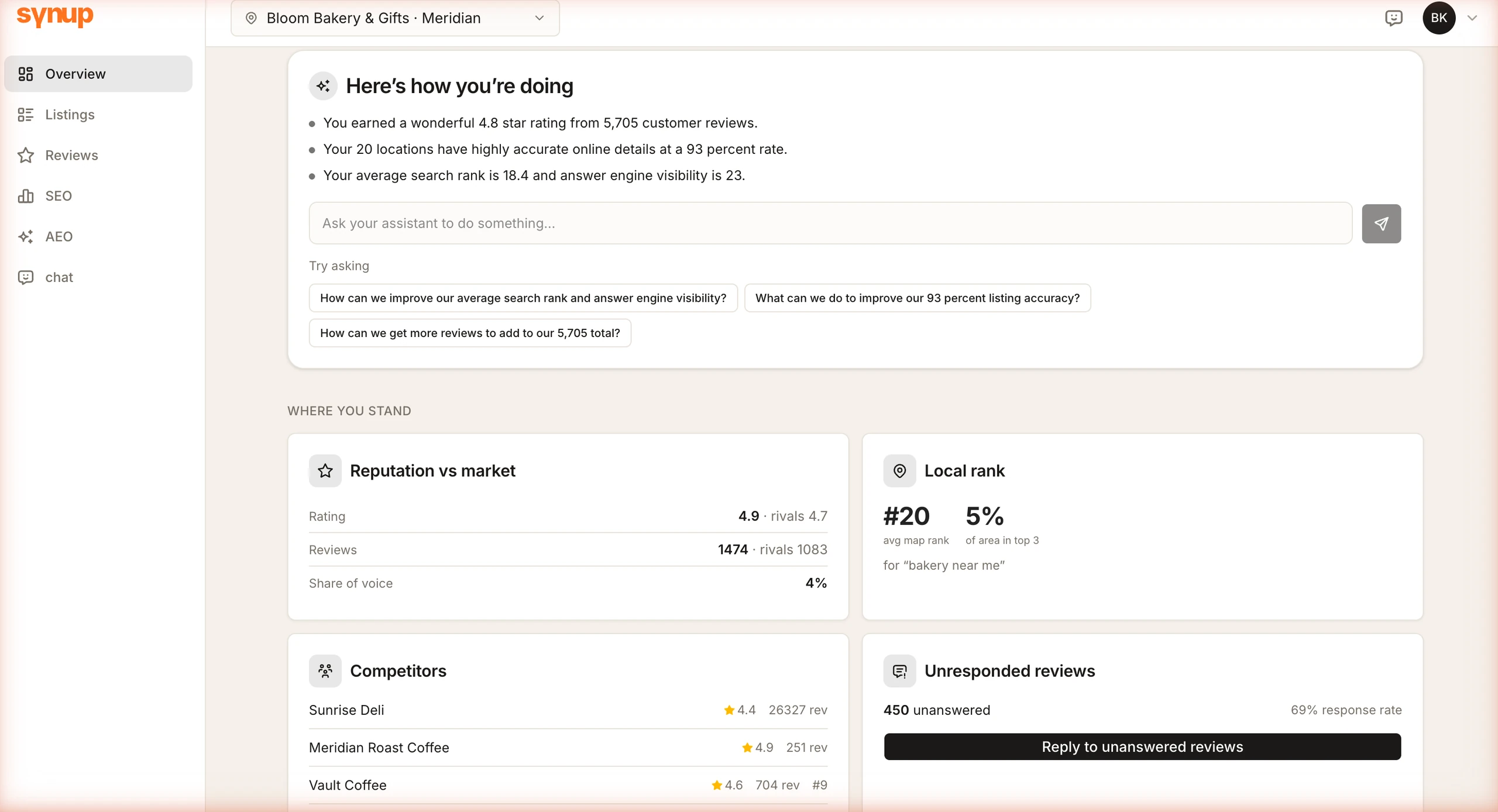
The portal gives each client a focused view of their own data, listings, reviews, local rank and AI visibility (AEO), without the complexity of the full agency dashboard. The only thing they can do besides look is ask.
Social is deliberately excluded from the portal, posting and scheduling stay in your dashboard.
Each portal tab pulls the same data your team works from, scoped to that client's locations, with your posted review replies visible inline. No PDFs to generate, no spreadsheets to email, and nothing for the client to edit.
Click a tab in the mock to switch views.
You send the first invite from the client's page in your dashboard. After that, the client asks for a link from the login page whenever they need one. It arrives from your address, on your domain, and logs them straight in.
One click sends a branded magic-link email. The first invite link is good for 7 days.
No password to set. Login links are single-use and expire 15 minutes after they're requested.
They land on Overview, on your domain. No setup, no support ticket.
The assistant runs on AI tokens. You set what your clients pay for them, they buy inside the portal, and the payment goes through your own Stripe account, or your own payment link. Reporting that pays for itself.
Token sales are optional: turn them off and the balance you grant is all the client ever sees. The daily AI summary and action feed are generated on your container and don't consume the client's tokens, only their own questions do.
All of it under your brand, on your domain, in your agent's name.
A plain-language overview of the client's performance, regenerated daily. No jargon, no dashboard tour required.
A 30-day grid showing every action your agency took for this client. Proof of work, at a glance.
Multi-location clients switch between locations with a dropdown. Every tab updates to that location.
View guideYour logo, your colors, your favicon, your domain. The portal looks like your product, not ours.
View guideNo passwords. Clients click the link in their email and they're in. Single-use, scoped to one client.
View guideThe sidebar collapses to a bottom tab bar on mobile. Clients check their data from anywhere.
View guide
Olive Street Design's clients love the white-label sign-in dashboard for its at-a-glance simplicity — every client sees clean data under the agency's own brand, with nothing pointing back to Synup.
Nat RosascoEach individual client can access their own data as per the locations they own, across five product suraces: Listings, Reviews, SEO and AEO, plus the white labeled AI assistant if included in the permissions / plans set by you.
The client portal lets clients both view their data and take action with Sydekick, within the permissions and approvals you set as an Agency.
With a magic link, no passwords and no SSO reuired. You send the first invite from the client's page in your dashboard, and that link stays valid for 7 days. After that, the client just enters their email on the login page to get a fresh link, single-use and good for 15 minutes.
Yes. Tab visibility follows each client's plan entitlements: every feature resolves to a flag, so a tab stays hidden when the plan doesn't include it. A client on a listings-only plan won't see SEO or AEO.
Yes. Once your logo, color and favicon are set, the portal runs on your own custom domain, and portal emails send from a DKIM-verified domain, so the client never sees Synup anywhere.
Yes. The sidebar collapses to a bottom tab bar and every tab reads cleanly on a phone, which is where most clients check it anyway.
Start your free trial, brand the portal, and send your first client a link. They'll see their own numbers, in your name, in minutes.