
Agent credits and usage
How do I see how many agent credits I've used?
Agent work is measured in credits, and Agent → Home is where you see them. The Usage & cost card opens with how many you have used against your plan's limit, how many are left, and how long they will last at your current rate. The charts and table underneath tell you what spent them.
The three tiles cover your whole period. The buttons underneath don't change them.
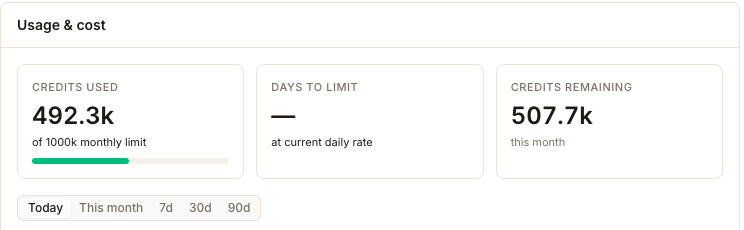
Credits used, Days to limit and Credits remaining always describe your current credit period, whatever is selected below them. Today · This month · 7d · 30d · 90d changes only the charts and the breakdown table. The tile total can therefore differ from the chart total because they cover different periods.
The three tiles
- Cover
- Your whole current credit period, always.
- Answer
- Am I going to run out?
- Changed by
- Your plan and your spend — not the range buttons.
The charts and the breakdown
- Cover
- Whichever range button is selected.
- Answer
- What did we spend it on, and when?
- Changed by
- The range buttons, and the dimension tabs below them.
Credits remaining includes any credits you have bought on top of your plan, and says so — it reads incl. N paid when there are some. Days to limit is a projection from your average daily rate across the period so far. It shows — when you are not on course to hit the cap before the period resets, which is good news rather than missing data.
"This month" usually means your billing period
The wording says month; the number behaves like your subscription. Usage resets when your billing period rolls over, not on the 1st — so if your plan renews on the 12th, the figure you are reading runs the 12th to the 11th, and Days to limit is measured against that reset rather than the end of the calendar month. Trial accounts are keyed to the trial window the same way, and only accounts with neither fall back to a calendar month.
It matters when you compare notes with your invoice, or when someone asks why usage "reset early". It did not; the period rolled.
Where the credits went
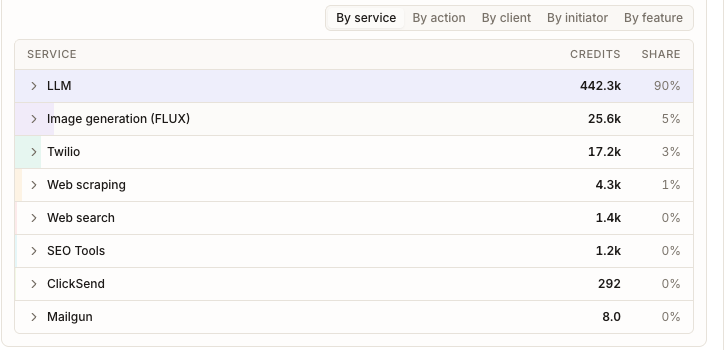
By service is the view worth reading: one row per service, its credits for the selected range, and its share of the total, so a glance tells you whether your spend is ordinary agent thinking or something more expensive. Every Sydekick message and every drafted post or reply runs through a language model, so that row carries the conversational and drafting work and is where to look first.
By client, By initiator and By feature re-cut the same total by who or what it was for, which is how you find one client or one automation quietly consuming the period. By action currently labels its rows with the engine's technical action names rather than plain English, so it is the least useful of the five.
Above the table, the donut and Top clients show the same split visually, and a Playbook usage panel appears once a scheduled playbook has spent credits — the fastest way to spot a routine running more often, or more widely, than you meant it to.
What can use credits
Anything the agent does with a language model — every message in a Sydekick conversation, every drafted post, every drafted review reply — plus the work it does on your behalf: generating an image, scraping a page, running a search or an SEO lookup, sending a text or an email. Practice and rehearsal runs count too, because they run the real agent on your real data.
Reading a screen costs nothing, including this page and the audit log. Nor does testing the agent's connection — that panel says so itself: "No LLM call, no credits spent."
There is no rate card in the product. Different services cost different amounts per action, and this breakdown is how you find out what yours cost. Two places print a single figure: a skill's practice run reports This practice used N credits, and the playbook practice step warns up front that it spends some. Use those for a feel for one run before you schedule it across fifty locations.
As you get close to the limit
A banner appears on this card at 75% of the period's credits, and at 90% it becomes a warning. If your account supports self-service credit purchases, the warning also shows Buy credits.
Your Credits remaining balance shows how much Agent usage remains available in the current credit period. If your account supports self-service credit purchases, select Buy credits to add more credits. The options available to add credits or change your recurring limit depend on your plan and billing setup.
Cross-checking against the audit log

Agent → Audit logs reads the same ledger, so set its Date to This month and its Credits in period tile is the headline from this page. The two divide the work: this one tells you which service spent your credits, and the audit log tells you which individual action did.
One caveat if you go there to reconcile a figure. This month does not mean the same thing on both halves of that page: the tile follows your billing period, the way the numbers here do, but the rows listed beneath it are trimmed to the calendar month. On a plan that renews mid-month the two cover different spans, so read the tile as the total and the rows as a sample of it rather than trying to add the rows up to the tile.
Watch out for
Questions people ask
How many credits does one post or one review reply cost?
Synup does not publish a per-action price in the product, and the answer genuinely varies — a reply drafted from a short review is not the same amount of work as a post with a generated image. Use By service over the range you care about to see what yours actually cost, and a practice run when you want the figure for one specific routine.