
Teach a new skill
How do I teach Sydekick a new skill?
You teach a skill by describing the job in plain English, the way you would brief someone new. Skills → Teach a new skill. The agent turns your sentence into a name, some trigger phrases and a set of instructions, shows you all three to correct, and offers a practice run before anything is saved.
Describe the job, don't script it
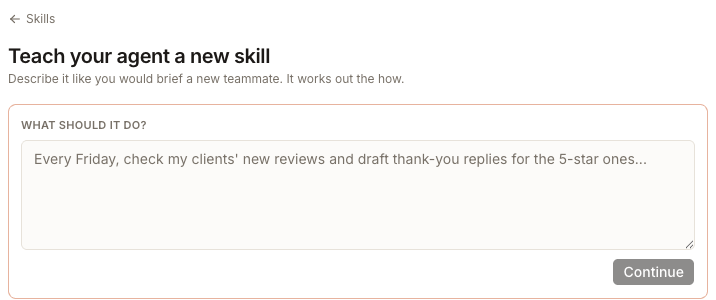
Write the outcome and the shape of it — "Every Monday, check each client's Google listing for missing hours or a missing phone number and draft a short summary of what needs fixing." You do not need to name tools or spell out steps. If you would rather start from something close, the list underneath holds ready-made briefs grouped the same way the library is: Reviews, Posts and social, Listings.
Check what it understood
Continue does not save anything. It turns your sentence into three editable fields, side by side with the sentence itself so you can compare them.
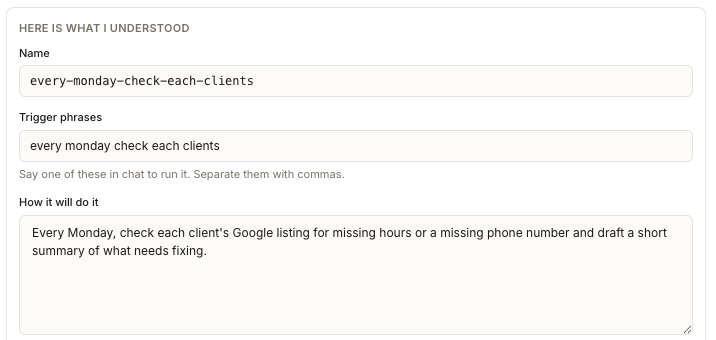
Read this as a first draft, not as a plan. The name and the trigger phrase are taken from the opening words of your brief, and How it will do it starts out as your own sentence — so a rambling brief produces a clumsy name and a phrase nobody would say out loud.
Two of these are worth your attention:
- Trigger phrases are what people will type in chat to run this. Give it two or three natural ones, comma separated — "listing gaps, check listings for gaps" — not the auto-filled slug.
- How it will do it is the actual instruction. Rewrite it as steps if the job has an order to it.
Modify takes you back to the brief without losing anything.
Leave the approval step on

It is on by default and its own line tells you why: "Everything it produces waits in Approvals for your yes." Turn it off and the product warns, plainly, "It will publish without asking. Only turn this off once you trust it."
That choice is written into the skill's instructions rather than kept as a separate setting, so it travels with the skill. After you save it lives in How it will do it — you change it by editing that text under Change it, not by finding a switch. When you first put a new skill to real work, check that its output actually turned up in Inbox → Approvals rather than assuming it did.
Watch it try before you save
Try it first runs the skill once, below the form, under the heading Watch it try, then asks "Did that come out right?" with Adjust it and Yes, save this skill. That is the whole point of the layout: your brief, the instructions and the output all stay on one screen so you can compare them.
A practice run is a real run. It uses your real data and spends credits, even though nothing it produces is sent or saved. Practise on a client where a strange result costs you nothing.
Saving restarts your agent
Save it takes about fifteen seconds, and the screen says so: "The first save for a new skill restarts your agent." Wait for it rather than reloading. When it comes back the skill is live — say one of its trigger phrases in chat, or pick it from Skill in the message box.
Two failures are worth recognising if you see them. "Created, but your instructions could not be written" means the skill exists but does nothing yet — open it and use Change it. "Created, but your agent could not restart" means it will not be used until the restart succeeds.
Skill, memory, or playbook?
Getting this wrong is the most common reason a taught skill disappoints. The three are not interchangeable.
A skill
- Is
- a job it does when asked
- You get it by
- teaching it here
- Runs when
- you say a trigger phrase, or pick it in the composer
A memory
- Is
- a standing fact or preference it reads every time
- You get it by
- adding it under Agent → Memory
- Runs when
- never on its own — it shapes other work
A playbook
- Is
- a routine on a schedule
- You get it by
- creating one under Playbooks
- Runs when
- on its schedule, or when you run it
The form watches for this. Write something that reads like a preference rather than a job and it offers, quietly, to save it as a memory instead. And once a new skill has proved itself, it asks whether it should run on its own — "Playbooks handle the when."