
Check client listing connections
Can a client connect, reconnect, or disconnect a publisher account?
The standard Client Portal lets a client check whether a selected location is connected to Google, Facebook, Apple, and Bing. It does not provide the client with controls to connect, reconnect, or disconnect those publisher accounts. If a row needs attention, the client should send the location and publisher details to their agency administrator.
Check the right location first
Connection status is location-specific. A multi-location business can have a healthy Google connection for one branch and no connection for another, so select the branch you intend to inspect before drawing a conclusion.
- Open the Client Portal.
- Use the location picker at the top of the portal to select the location you want to check.
- Select Listings in the left navigation.
- Read the Live on total, then review Directory status.
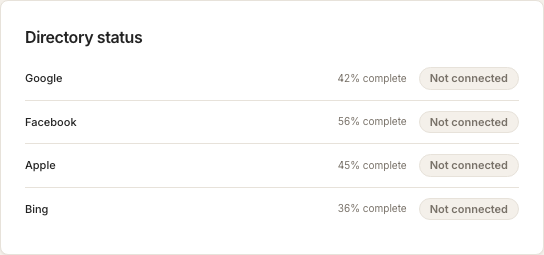
Each directory row reports the status for that publisher and selected location. A Connected row means Synup has an active pairing for that location. A Not connected row means the portal is not showing an active pairing for it.
Profile completeness and connection status answer different questions. The completeness percentage describes how much location information is filled in; it does not prove that a publisher connection is healthy.
When a connection needs attention
The standard Client Portal does not show Connect, Reconnect, or Disconnect controls. That is expected: changing publisher access can affect listing updates, so the agency administrator manages the connection from the agency account.
Send the administrator:
- the client and location name;
- the publisher whose row needs attention;
- the status shown in Directory status; and
- the publisher account owner who can authorize access, if known.
Do not send passwords, access tokens, or verification codes in a support message. The publisher account owner should enter credentials only in the publisher’s authorized sign-in flow.
What success looks like
After the agency administrator completes or restores the connection, return to the same location in Listings and check Directory status again. The relevant publisher row should show Connected, and the Live on count should include that connected directory.
Questions people ask
Why can another location show a different status?
Publisher profiles are paired at the location level. Select each branch separately to see its own Google, Facebook, Apple, and Bing rows.
Does a high profile-completeness score mean the account is connected?
No. Profile completeness measures the location data in Synup; Directory status reports the publisher connection.
Next
Agency administrators can use connection health to find account- and location-level issues. For a multi-location matching workflow, see bulk connect locations.