
Update name, address, and phone
How do I update my business name, address, and phone everywhere?
Name, address and phone live in one place: the location's Master identity card, edited through Edit. The drawer footer states the consequence plainly — Saves to Master — syndicates to all publishers — so correcting it once corrects it everywhere, unless a publisher tab is deliberately overriding that field. Synup does not compare your details against external directories and report mismatches; keeping the Master record right is the mechanism.
ASK SYDEKICK
Show me the Master name, address, and phone for this selected location.
Set the scope chip to the client and location you mean, then ask. Sydekick reads back that location's current Master name, address and phone so you can check it before editing. It only reads — nothing is changed or published.
Key facts
| Where it lives | A location → Master → Master identity → Edit |
| Drawer | Edit details — Master, with Master syndicates everywhere. Switch on the left. |
| Identity fields | Business name, Phone number, Website, Additional phone numbers (comma-separated) |
| Address fields | Street address, Street address 2, City, State / region, Postal code, Country |
| Saving the record | Save to Master, under Saves to Master — syndicates to all publishers |
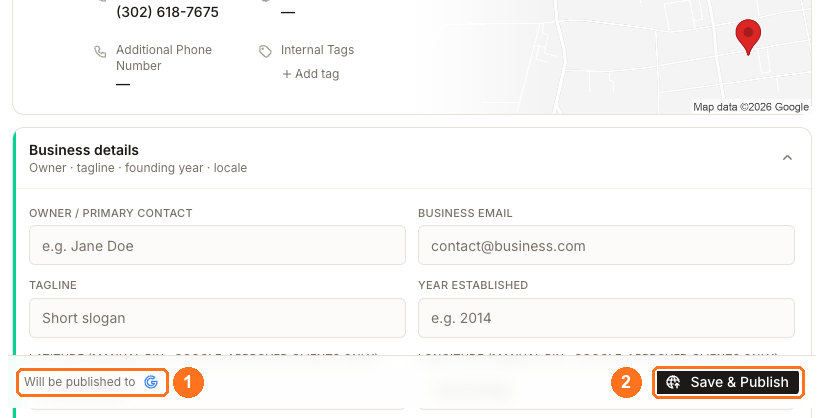
| Sending it now | Save & Publish in the page footer, beside Will be published to and the connected publisher's mark |
| Country | Country · can't be changed after creation is disabled, permanently |
Why this matters
Search engines and directories match your business by comparing the details they find in different places. When the same location is listed with two phone numbers or two versions of its street address, every copy is a weaker signal than one consistent record would be — and inconsistent details are a common cause of duplicate listings appearing later.
Synup's answer is structural rather than diagnostic: one authoritative record that syndicates outward, rather than a report telling you which directory drifted.
Or do it yourself
Open the location and stay on the Master tab. The caption states its reach: Master data syndicates everywhere. Open a publisher tab only to override a field for that site.
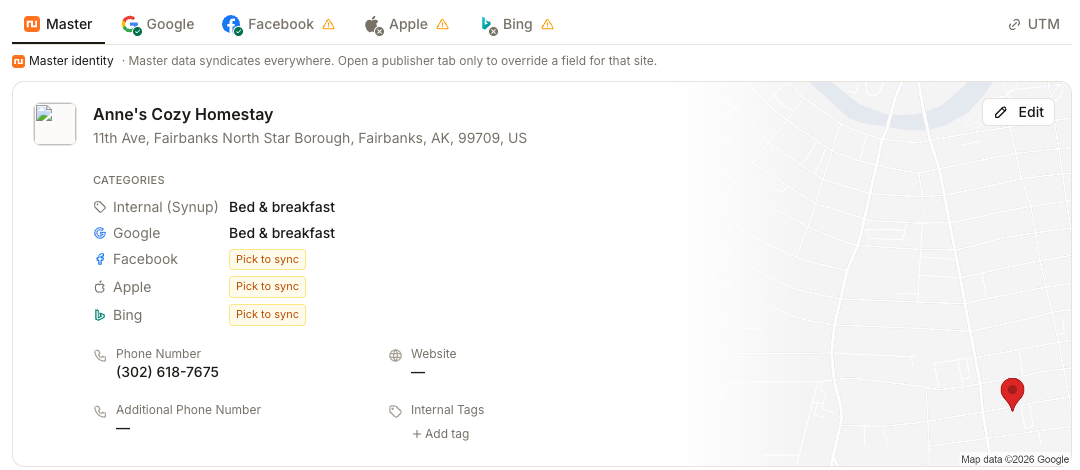
Click Edit. The drawer opens as Edit details — Master.
Set Business name to the name on the premises. A name padded with a city or a service keyword weakens the match rather than strengthening it, because it stops agreeing with what directories find elsewhere.
Complete the Address block and check Country before anything else — it is disabled and cannot be corrected later. Put extra numbers in Additional phone numbers (comma-separated) rather than crowding two into Phone number.
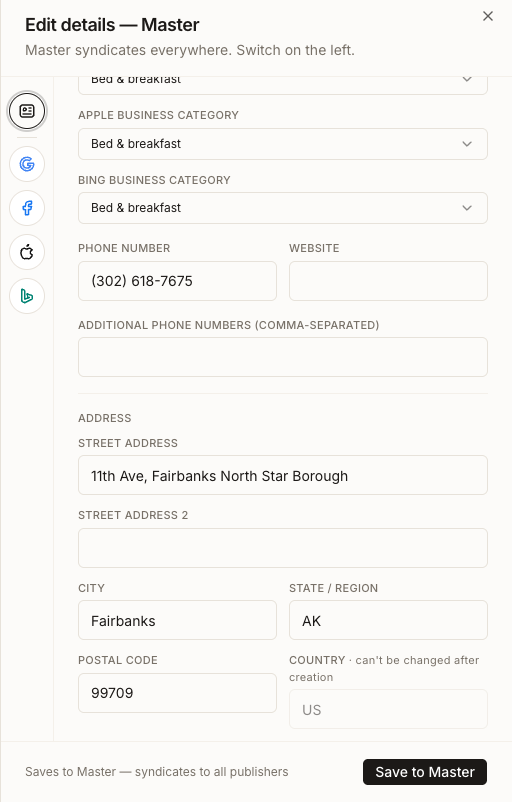
Click Save to Master. The change is stored and queued for the publishers this location is connected to.
To send it to a connected publisher immediately instead of waiting for the queue, use Save & Publish in the page footer. The footer names where it is going.
If one site genuinely needs a different value, do not change Master — open that publisher's tab and edit it there. That drawer offers Save for Google alongside Save to Master, so the same screen can write either the exception or the shared record.
What you'll see when it's done
- The Master identity card shows the corrected values
- Every publisher tab reflects them, except any field deliberately overridden
- The footer confirms which connected publisher the change is going to
- Where nothing is connected yet, the footer reads Connect Google to publish this location. and Save & Publish stays disabled
Watch out for
Questions people ask
Why does Synup call it Master identity rather than NAP?
Because the record holds more than name, address and phone — website, categories and internal tags sit there too. The principle is the one NAP consistency describes: a single authoritative record that syndicates, rather than values maintained per directory.
What is the difference between Save and Save & Publish?
Save records the change and lets it go out with the normal publishing queue. Save & Publish dispatches it to the connected publisher immediately. Use Save & Publish when the correction is urgent — a wrong phone number, for example — and Save for ordinary edits.
I updated Master and one publisher still shows the old phone number. Why?
Check that publisher's tab for an override on that field. Master does not overwrite an override, so the field has to be reset on that tab before it will inherit again. If there is no override, the publisher may still be processing the update.
Will Synup tell me if a directory has the wrong address?
Not as a portfolio report — there is no cross-directory mismatch score. What you can see is the status of each connection on the location's directory table, which tells you whether your current record reached that publisher.
Next
To see what an individual publisher will receive before it goes out, see previewing publisher-specific values. To send saved changes onward, see publishing saved location changes. If the same location keeps generating extra listings, see resolving duplicate listings.