
Manage location profile content
How do I add photos, services, attributes, and descriptions to a location?
Four things decide whether someone picks your listing once they've found it: the description, the photos, the attributes and the services. For each one, you need to know where to edit it and which publishers actually take it. The answers are different for all four.
Master, or a publisher tab?
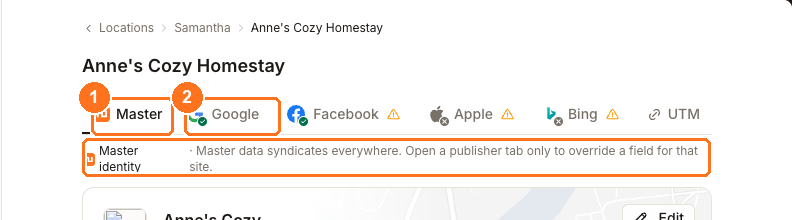
Everything on this page is edited from that row of tabs. Master is the shared record that syndicates everywhere, and it's where the description and the photos go. A publisher tab is normally for a value that should differ on one site — but attributes and services break that rule, because Master has no card for them at all.
Each publisher takes a different subset
Only photos reach all four. Everything else is accepted by some publishers and not others, and that is what decides how much a given piece of work is worth.
Photos
- Who takes it
- Google, Facebook, Apple and Bing
- Where you edit it
- Master, through the Media card
- Worth knowing
- Photos are filed into Google's own categories, and saving publishes them to Google for connected locations
Description
- Who takes it
- Google, Facebook and Apple — not Bing
- Where you edit it
- Master
- Worth knowing
- Bing has no description field at all, and the length the others accept differs — Google 750 characters, Apple 500, Facebook 255
Attributes
- Who takes it
- Google, Bing and Apple — not Facebook
- Where you edit it
- a publisher tab, not Master
- Worth knowing
- Google is the source and maps out to the other two; Apple accepts a limited set and needs an Apple connection first
Services and menu
- Who takes it
- Google only
- Where you edit it
- the Google tab
- Worth knowing
- No other publisher receives a structured service or menu list from Synup
Keep hold of that last card. A services list is worth building, but it is a Google improvement rather than a network-wide one — which is a different calculation from writing a description that three publishers will take.
Description and photos, on Master
Description is marked From the business · optional. Optional describes where it comes from, not how much it matters — it's on the Google profile checklist and it's the only place you get to say why someone should choose you. Write it once here and Google, Facebook and Apple all take it.
Media opens into its own drawer.
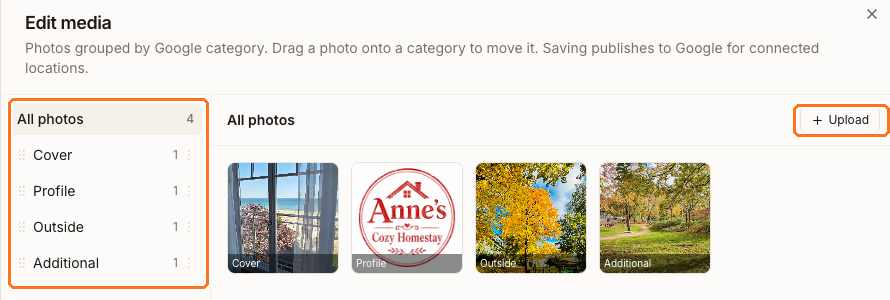
Photos are filed into Google's fixed categories — Cover, Profile, Logo, Outside, Inside, Product, Menu, Team and the rest — and you move one by dragging it onto a category. Uploading isn't enough on its own: the drawer says what finishes the job, Saving publishes to Google for connected locations.
Attributes and services, on the publisher tabs
Switch to the Google tab and two cards appear that Master doesn't have.

Attributes are the amenities and facilities that put you into filtered searches — the "free WiFi", "wheelchair accessible", "pet friendly" kind of thing. The list you can choose from comes from your primary Google category, so set that before you open this card.
Google is also the source for everywhere else. The attributes drawer says so plainly — Master = your Google attributes; map them out to Bing & Apple — and Map to Bing & Apple does the fanning out. Save first and map second: doing it in that order keeps attributes that only exist on one publisher.
Services takes Google's structured service types for your category plus any custom ones you add, each with a name, description and price. If Google defines none for your category, add custom services instead. Menus appears alongside it for food and drink businesses — it needs a food category before it will publish.
Watch out for
Questions people ask
Will this raise my Google Business Profile score?
Four of the eight checks on that card are here — 3+ photos, Description, Services / menu and Attributes — so yes, filling them in is the fastest route. The card itself grades a stored snapshot of your Google profile that refreshes on its own schedule, so don't expect the number to move the moment you save. See reading the Optimizer score.
Do my photos appear on every directory?
Google receives them on publish. Facebook, Apple and Bing hold your photos and take them when the location is next submitted, which is a slower path — so a successful publish isn't confirmation that every directory has updated.
Next
Once the content is in, when changes go live covers sending it and how long each publisher takes. To see which checklist items a location still has outstanding, its Listings Overview names them.