
Understand Profile completeness
What does Profile completeness measure, and why is it different for each publisher?
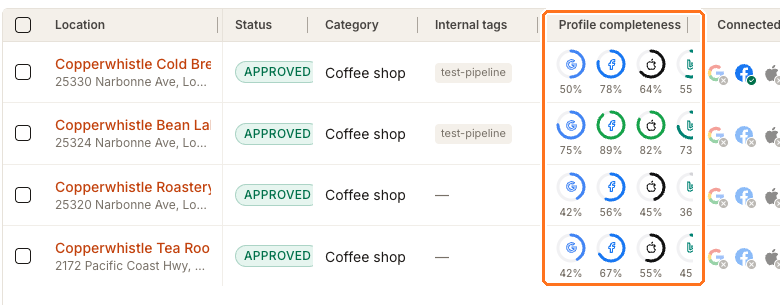
Profile completeness is the column of four rings on Clients → All locations → Manage, one each for Google, Facebook, Apple and Bing. Each ring counts how many of the profile fields that publisher accepts you have actually filled in Synup. Publishers accept different fields, so one location normally shows four different percentages — and none of them is the Google Business Profile Optimizer score or the Connection score.
Where the rings live
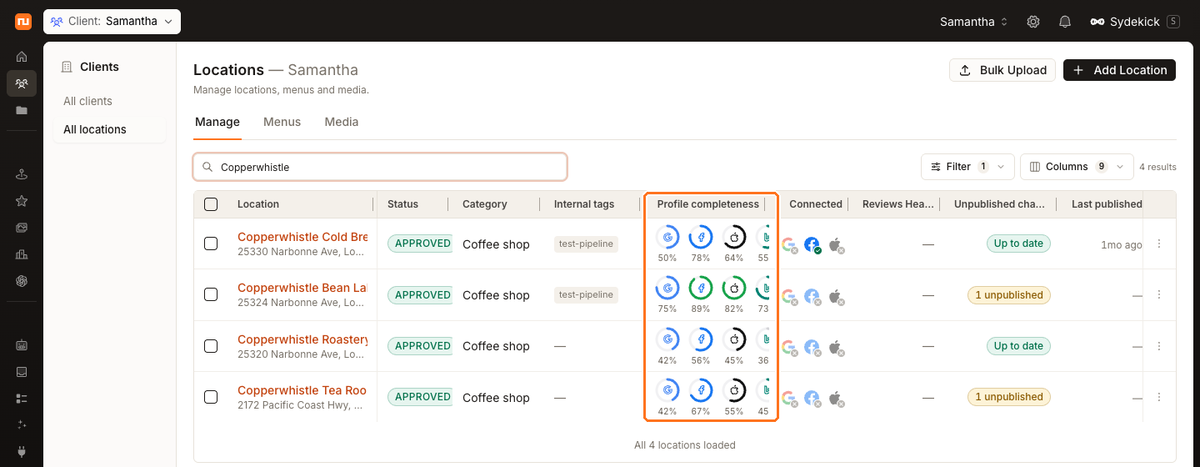
Hover a ring to confirm which publisher it belongs to — the tooltip reads Google: 67% complete. Sort by the column to rank the whole portfolio instead of reading it location by location.
Why one profile produces four different numbers
The rings share one field list — business name, address, phone, website, primary category, description, hours, attributes, payment methods, photos, open status, service area — but each publisher is only scored on the fields it can actually accept. Google accepts all twelve, so it has the strictest denominator. Apple has no service area field and Bing has no description field, so both score out of eleven. Facebook takes neither attributes, payment methods nor service area, so it scores out of nine.
For example, a profile with eight completed Google-supported fields can read Google 67% — eight out of twelve. The same profile can read Facebook 78% when only seven of those completed fields are supported by Facebook, because seven out of nine is a higher fraction. The profile is no better on Facebook; the yardstick is shorter.
If you have overridden a field for one publisher, that publisher's ring uses the override, because the ring measures what that publisher will actually receive. Address and photos are shared across all four.
Three numbers that look alike
These three can appear together and mean different things. Different values across them do not by themselves indicate a problem:
Profile completeness rings
- Where
- Clients → All locations → Manage
- Answers
- How much of the profile have I filled in Synup, publisher by publisher?
Google Business Profile Optimizer
- Where
- A location → Listings → Overview
- Answers
- How complete does Google's stored copy of my profile look against eight checks?
Connection score
- Where
- A location → Listings → Published
- Answers
- Are my directly connectable publisher accounts connected?
The first counts fields you filled in Synup, the second grades Google's own cached snapshot against eight Google-specific checks, and the third only looks at publisher connections. Reading one as if it were another is the most common source of confusion in Listings.
Raising a thin profile
-
Sort the Profile completeness column and open the weakest location.
-
Go to its Master tab. Master is where you fill a field once and every publisher inherits it.
-
Work down the sections that are empty — Description, Hours, Social & payments, Service area, Action links, Media. Each section saves on its own.
-
Come back to the locations list. The rings redraw from the values you just entered, and each one moves by a different amount: a field Facebook doesn't accept won't move Facebook, and filling a service area moves Google and Bing while leaving Facebook and Apple exactly where they were.
Watch out for
Questions people ask
Why is Google always my lowest ring?
Because it has the most fields to satisfy — twelve, against nine for Facebook. Google is the strictest scorer of the four, so it's the useful one to work against.
Does this score affect my rankings?
Not directly. It's Synup's own measure of how much of the profile you have supplied. What affects visibility is the data actually reaching each publisher, which is why completeness matters — it's the input, not the outcome.
Next
For Google-specific completeness and the eight checks behind that score, see the Google Business Profile Optimizer. To fill the fields the rings are counting, see editing a location profile.