
Read the Listings Overview
How do I read the Listings Overview and decide what to fix first?
Start here when you aren't sure which listing problem needs your attention. With one location selected, Listings → Overview tells you what is working, what is broken, and where to go next. The Sydekick summary at the top has already ranked the work; the cards below are the evidence behind that ranking.
What you're looking at
Every other Listings screen reports the state of one thing. This is the only screen that tells you what to do first.
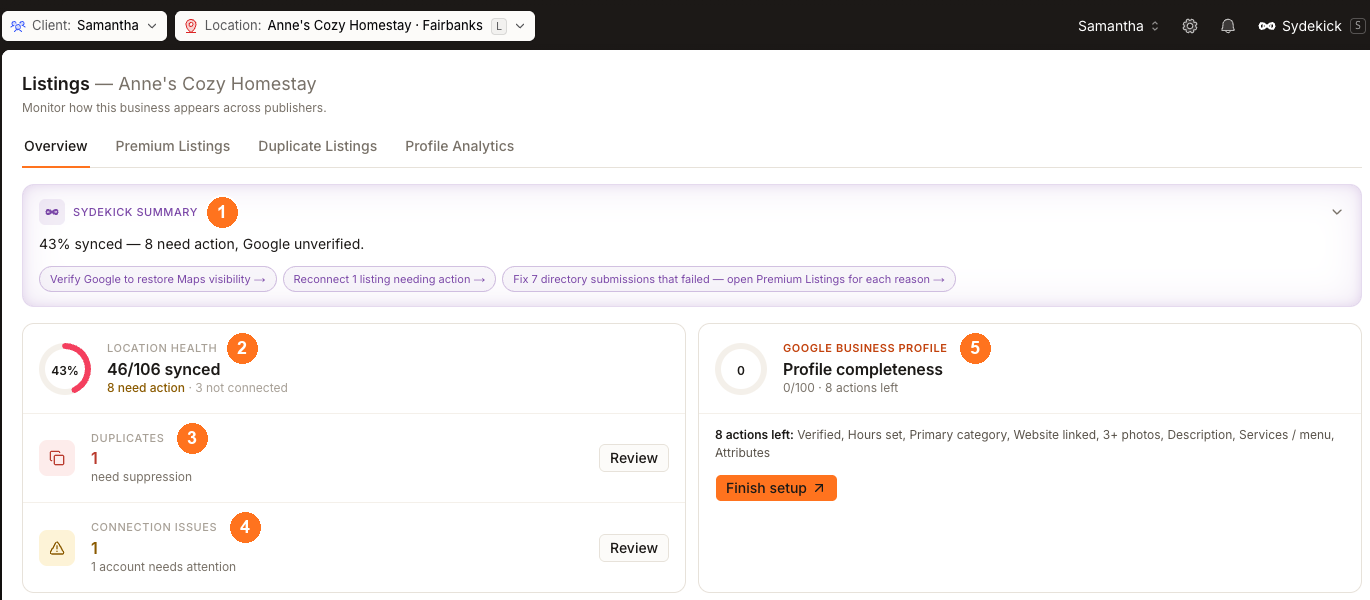
Sydekick's read states the position in one line. Read it first.
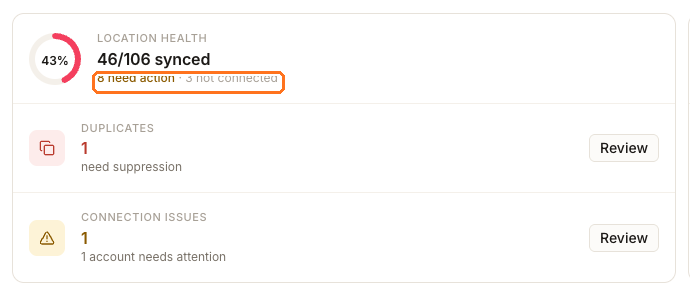
Location health is the size of the problem — synced directories over every directory this location is eligible for. Click the need action figure to open exactly those rows.
Duplicates counts records waiting to be suppressed. It is usually a small number with outsized impact, because a duplicate splits your reviews between two records.
Connection issues counts publisher accounts in trouble — expired tokens, suspensions, revoked permissions. It is narrower than need action, so 0 here does not mean everything is fine. A location with no connection issues can still have dozens of directories needing work.
The Google Business Profile card scores Google's stored copy of your profile out of 100 and lists the checks still outstanding.
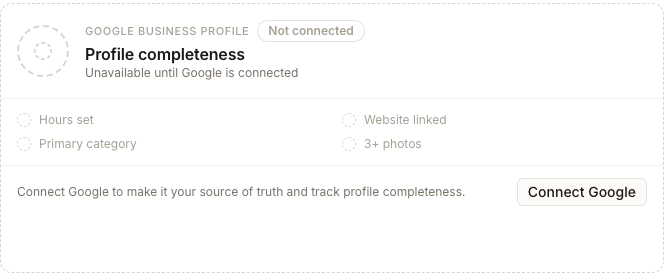
It reads a cached snapshot on its own schedule, so it can lag behind a change you already made. Without a Google connection it reads Unavailable until Google is connected.
Why these percentages don't agree
This is the most common misreading of the screen. Location health, Connection score and Profile completeness all show a percentage, and they disagree because they are answering different questions.
Location health
- Where
- Listings → Overview
- Counts
- Every directory this location is eligible for, synced or not.
Connection score
- Where
- A location → Listings → Published
- Counts
- Only the publishers you connect directly — currently Google and Facebook.
Profile completeness
- Where
- Clients → All locations → Manage
- Counts
- How many profile fields you have filled in, publisher by publisher.
So one location can honestly show a middling health figure, a very different connection score and a nearly complete profile on the same day. None of the three is wrong; they are counting different things.
The same trap applies to not connected. This screen may say 3 not connected while Published shows Not connected 0, because the directory table treats Synup-submitted directories as in-flight rather than unconnected. The directory table explains that distinction.
Looking at one location, or your whole portfolio?
The Location picker decides which question this screen answers.
Pick a single location and you get the diagnosis above: what is wrong here, and what to fix first.
Pick All locations and you get a client-wide roll-up instead — overall health, the locations needing attention ranked by impact, your weakest publishers, and a Google unverified count with a filter to match. Use it to choose which location to open next, not to check whether a fix worked.
The tabs follow the scope. All locations drops Published, because directory connections are made per location.
Watch out for
Questions people ask
What does "need action" actually count?
Directories that reported a problem — a failed submission, a rejected category mapping, an expired connection, a listing claimed elsewhere. It excludes directories that simply haven't been attempted yet and ones still in flight. Several of the reasons behind it need nothing from you; the directory table breaks them down.
My Location health is under 50% — is that bad?
Not on its own. Most of the 106 directories behind that number are minor. Sort the directory table by Publisher weight and check the Very high rows. If those are synced, a middling percentage is mostly long tail.
Next
Work down from whichever card is worst. Directory problems go to the directory table, duplicates go to resolving duplicate listings, and a thin profile goes to the Google Business Profile Optimizer.