
Set content checks
How do I set the content rules every post and reply must follow?
Open Settings → Content checks and select Add guideline. Give it a Name, write the Guideline in clear language, tick where it Applies to (Posts, Review replies, Listing updates), and choose whether it Can be sent anyway. Select Save guideline. From then on, Synup checks content against it before anyone sends, schedules or saves, across every client in your workspace.
Key facts
| Where it lives | Settings → Content checks |
| When you'll see it | Only when content checks are turned on for your workspace, and only for owners and admins |
| Who it applies to | Everyone: every client, your whole team and Sydekick |
| What gets checked | Posts: text and link. Review replies: reply text. Listing updates: description, services and products |
| Default for a new guideline | On, and mandatory (Can be sent anyway off) |
| Publisher requirements | Set by each destination, kept up to date by Synup, always on and always mandatory |
| It is | A check, not a factual or legal guarantee |
Why this matters
Agencies often have rules a new teammate might not know: a clinic can't promise results, a lender must include a disclaimer, a brand never mentions a competitor. Writing those rules once means every post, reply and listing description is checked against them before it goes out, whoever writes it, including Sydekick.
Mandatory or can be sent anyway?
| Setting | When content doesn't follow it | Good for |
|---|---|---|
| Can be sent anyway off (No · mandatory) | Sending is held until it's fixed. No one can send it anyway | Legal, medical or regulatory wording |
| Can be sent anyway on (Yes) | A person sees what wasn't followed and can choose to go ahead. It's recorded as sent anyway, never as passed. Sydekick can't make that choice | Style and tone preferences |
Steps
Open Settings and select Content checks. The header shows Admins only and Workspace · all clients.
Select Add guideline (or Add a guideline if you have none yet).
Enter a Name. It's shown wherever the guideline isn't followed, for example Medical compliance.
Write the Guideline the way you'd brief a teammate. You can paste a paragraph with several instructions; content has to follow all of them.
Example: Don't promise results or call a treatment a cure. Mention that results vary from person to person.
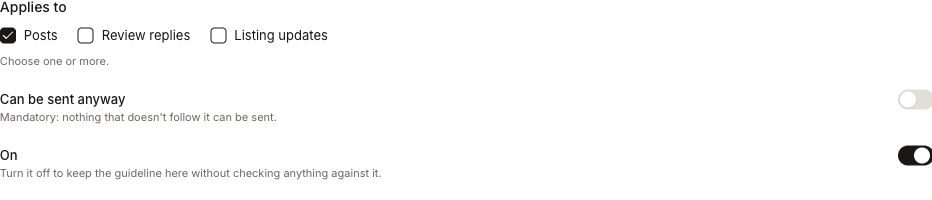
Under Applies to, tick one or more of Posts, Review replies and Listing updates.
Leave Can be sent anyway off to make it mandatory, or switch it on to let a person override it.
Keep On switched on. Turn it off to keep the guideline without checking anything against it.
Select Save guideline. If it's a stricter post guideline, Synup first asks Save this guideline? and tells you how many scheduled posts it would hold until someone fixes them, or that it can't tell until they're checked at send time. Select Save guideline again to confirm.
Your guidelines
The table lists each guideline with Applies to, On, Can be sent anyway and Updated. Use Show guidelines for to filter by All, Posts, Review replies or Listing updates. Switch On or Can be sent anyway directly in a row, or open the row menu for Edit guideline and Remove guideline. A guideline marked Converted came from an older word rule; review its wording.
Below your guidelines, Publisher requirements lists what each destination demands, such as post length per network or description length on Google. These are Maintained by Synup and can't be turned off or sent anyway.
What people see when they send
Beside Send, Schedule or Save, your team sees whether the content follows the guidelines, for example All 3 guidelines met or 1 of 3 guidelines not met, with the rule, what broke it and how to fix it.
- Couldn't verify means the checker couldn't tell from the text alone, for example whether a claim is true. It's handled like a failure: held if mandatory, offered to a person if sending anyway is allowed.
- If the checker didn't respond, the result reads Couldn't verify and is handled the same way: held if the guideline is mandatory, or offered to a person if sending anyway is allowed. People can use Check now to try again.
- When a person goes ahead anyway, Synup asks Go ahead with 1 guideline not met? and records it as sent anyway.
Worked example
Suppose your team wants every review reply to stay polite with unhappy customers but would rather not block urgent replies over tone. Select Add guideline, name it Reply tone and write: Thank the reviewer, and never argue with a complaint. Under Applies to, tick only Review replies. Because this is a style preference, switch Can be sent anyway on, then select Save guideline.
Afterwards, check for Guideline saved. The table row should show Review replies, with On switched on and Can be sent anyway turned on. The count line should include the new guideline among those that can be sent anyway. If a reply doesn't follow it, a person can go ahead, and it's recorded as sent anyway. Sydekick can't make that choice.
What you'll see when it's done
- Guideline saved and the guideline in the table, with On switched on
- The count line, for example 3 guidelines · 1 can be sent anyway · 9 publisher requirements
- Content checks shown next to Send, Schedule or Save for the content types you picked
Watch out for
- Sydekick never sends anyway. Even when a guideline allows it, only a person can choose to go ahead.
- Rules apply to the whole workspace. There are no per-client guidelines here.
- Members can't see the guidelines. They see Only admins can see and change the guidelines but are still checked against them. Share the rules with your team another way if they need to read them.
- Unverifiable is not passed. A guideline that asks whether claims are true may return Couldn't verify often; word it around what the text itself shows.
- Not available yet? If the page says Content checks aren't turned on for this workspace., the feature isn't enabled for you.
Questions people ask
Can I make a rule apply to only one client?
No. Guidelines are workspace-wide and apply to every client, your team and Sydekick.
Can Sydekick send something that breaks a guideline?
No. If content doesn't follow a guideline, Sydekick can't choose to send it anyway, even when the guideline allows people to.
What happens to posts already scheduled when I add a rule?
If the new or stricter rule applies to posts, scheduled posts that don't follow it are held until fixed. Synup tells you how many before you save, when it can.
Why can't I see Content checks in Settings?
It appears only for owners and admins, and only when content checks are turned on for your workspace.
Next
- Replies checked against your guidelines: AI review replies
- Where post authors see the check: post composer
- How a held listing update affects publishing: when changes go live