
Configure listing publisher sets
How do publisher sets decide which directories a client gets?
A publisher set is a named list of listing sites. A client on a set gets listing sync only on those sites; a client with no set keeps every site in your plan. Owners and admins create and edit sets in Settings → Publisher Sets. You then assign a set to a client with Change publisher set, from the Clients list or the client's page.
Key facts
| Where sets are defined | Settings → Publisher Sets (owners and admins only) |
| Where sets are assigned | Clients → row menu → Change publisher set, or the Publisher set bar on the client page |
| Who can assign | People with Clients access who aren't limited to particular clients |
| No set | No publisher set: the client gets every listing site your plan includes |
| A set | Only the selected sites, and only those your plan includes. A set can narrow your plan, never widen it |
| Exclude all | Allowed. The client gets no listing sites |
| Not affected | Posting and reviews. Account connections stay available, including for directories left out of the set |
| Locations without a client | Not affected by publisher sets |
Why this matters
Different clients pay for different packages. Publisher sets let you offer, for example, a basic package of core directories and a premium package with everything, without editing each location. Changing a set updates every client on it.
Steps
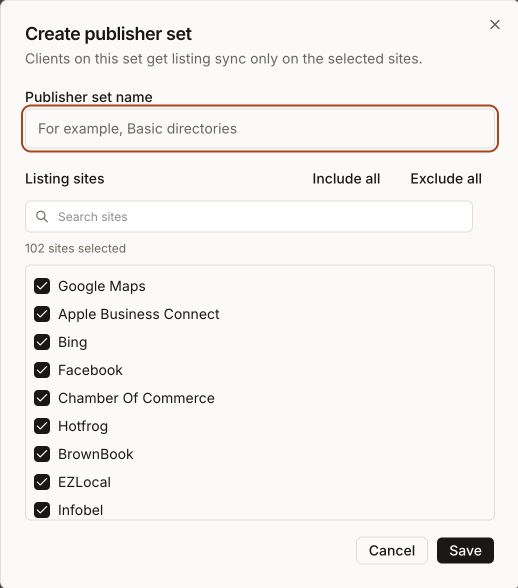
Open Settings → Publisher Sets and select Create publisher set.
Enter a Publisher set name, for example Basic directories.
Under Listing sites, tick the sites to include. Use Search sites, Include all or Exclude all. The count reads, for example, 12 sites selected.
Select Save. You'll see Publisher set saved.
Synup offers Assign Basic directories to clients. Tick the clients that should get it now and select Assign publisher set, or select Skip for now.
Create a publisher set
Assign or change a client's set
- Open Clients, then the client's row menu, and select Change publisher set. Or open the client and select Change publisher set on the Publisher set bar under the header.
- The dialog Publisher set for the client's name shows the current set.
- Choose a set and select Assign publisher set. If the client already has one, the dialog says the new set replaces it.
- To take a client off sets entirely, select Remove publisher set. The dialog says the client gets every listing site again.
Edit or delete a set
Open the row menu on Settings → Publisher Sets:
- Edit opens Edit publisher set. If clients are on it, Synup asks Update assigned clients? and tells you how many clients are affected before you select Save changes.
- Retry listing updates appears when updating a set's clients failed.
- Delete removes the set. A set assigned to clients can't be deleted; move or unassign those clients first.
What changes when a client's set changes
| Change | What Synup does |
|---|---|
| A site is removed from the client's set | Stops new listing work for that site and cancels updates that were queued but not yet sent there. An update already in progress may still finish. A listing that is already live there isn't taken down by Synup; it stays on that site but no longer gets updates from Synup |
| A site is added | Starts the work to list the client's existing locations there |
| Set removed from the client | The client gets every site in your plan again |
| Set excludes all sites | No listing sync at all; posting and reviews still work |
The Listing updates column on Settings → Publisher Sets shows progress: Updating while clients are being brought in line, Up to date when done, and Needs retry if it failed.
Example: your agency sells a Basic package with four core directories and a Complete package with every site. You create both sets, assign Basic to a new bakery client, and later upgrade them with Change publisher set to Complete. Synup starts listing the bakery's locations on the newly included sites.
Worked example
Imagine a gym chain wants to use a smaller list of directories. Open the client's row menu on Clients, select Change publisher set, choose your smaller set and select Assign publisher set. The dialog says the new set replaces the current one. Synup stops new listing work on the sites that were dropped and cancels updates that were queued but not yet sent there.
Afterwards, the client's Publisher set bar should show the new set's name. On Settings → Publisher Sets, Listing updates should move from Updating to Up to date, or show Needs retry if updating the set's clients failed. Any listings already live on the dropped sites may stay there without updates, so check those sites before telling the client anything about them.
What you'll see when it's done
- The set's name on the client's Publisher set bar, and in the Publisher set column on the Clients list if you show it
- The set's Sites and Clients counts on Settings → Publisher Sets
- Up to date in Listing updates
Watch out for
- Removing a site doesn't remove the listing there. Synup stops updating it but doesn't delete or suppress a listing that is already live, so its details can go out of date. Whether the directory later drops it on its own isn't confirmed; check the listing on that site before telling a customer it's gone.
- A set can't add sites your plan doesn't include. If a site isn't in your plan, choosing it in a set doesn't give it to the client.
- Leaving Google or Facebook out doesn't disconnect them. The client can still connect those accounts for posting and reviews with Connect accounts.
- Members limited to some clients can't change sets. They see the set's name but no Change publisher set button.
- Client health follows the set. For a client on a set, the listing coverage in its health score is measured against the set's sites.
Questions people ask
What does a client without a publisher set get?
Every listing site your plan includes. The client page shows No publisher set.
Why can't I see Publisher Sets in Settings?
Only agency owners and admins manage publisher sets. Anyone else who opens the page sees You don't have access to publisher sets.
Why can't I delete a publisher set?
It's still assigned to clients. Move those clients to another set or remove their set, then delete it.
If I leave Google out of a set, can the client still post to Google?
Yes. Publisher sets only control listing sync. Posting and reviews work independently of the set.
Next
- Show the Publisher set column and filter clients: search, filter and save client views
- See each directory's status for a location: the directory table
- How listings feed the client's health score: understand client health
- Connect accounts for posting and reviews: connect accounts and locations