
Understand the Dashboard
What does the Dashboard show, and where should I start?
The Dashboard is your agency-wide starting point. It brings together four signals—locations at risk, unreplied reviews, average rating, and pending approvals—then shows the work behind them. Start with the signal that represents unresolved customer impact or blocked work, inspect its queue, and open the source module before deciding what to change.
Start with the four priority signals
Open Dashboard from the main navigation. The first metric row gives you four different kinds of signal; it is not a single health score.
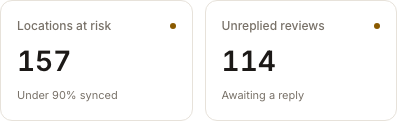
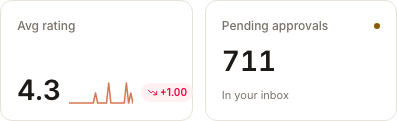
Read the cards as follows:
- Locations at risk counts locations with fewer than 90% of their publishers synced. Open it to inspect the publisher-sync gaps behind that count.
- Unreplied reviews shows the current reply backlog. Open it when customer feedback is waiting for a response.
- Avg rating gives you the portfolio rating signal and, when available, its recent movement. Open it to investigate the reviews behind the change.
- Pending approvals shows work that is waiting for a human decision. Open it when progress may be blocked in Inbox.
An increase is not always good. More unreplied reviews, at-risk locations, or pending approvals means more unresolved work. Use the meaning of the metric—not just whether the number moved—to choose where to look.
Find the work behind the number
Below the metrics, four queues make the overview actionable:
- Reviews awaiting a reply shows recent individual reviews so you can judge what needs a response.
- Listing health shows at-risk locations, their synced percentage, and a reason for the risk.
- Waiting on your approval shows human-facing Inbox items that have not been resolved.
- Recent threads lets you reopen your recent Sydekick investigations.
The metric tells you where to investigate; the queue tells you which records need attention. Open the relevant module before acting when you need the full client, location, review, or approval context.
A practical way to choose what comes first
- Look for work that directly affects customers now, such as a recent unreplied review.
- Check whether weak listing coverage affects one location or a broader part of the portfolio.
- Review pending approvals that may be holding up already-prepared work.
- Use average rating and recent movement to spot a trend worth investigating, not to assume its cause.
This order is a decision aid, not a Product-enforced sequence. Your business priorities and the severity of the underlying records still decide what comes first.
Watch out for
- The Dashboard is agency-wide. Open the source module to confirm the affected client and location before making a change.
- A dash or an empty card does not always mean zero. A data source may be unavailable or may not have enough usable data.
- A location with no listing-coverage data is unknown, not healthy. The Listing health card keeps that state separate from the below-90% at-risk count.
- Approve changes the state of an Inbox item. Read the item and confirm its scope before approving it.
Questions people ask
Why doesn't the Dashboard tell me the root cause?
It is designed to prioritize work across modules. A headline count can show that work exists, but the detailed Listings, Reviews, or Inbox view contains the evidence needed to understand why.
Where should I start if several cards need attention?
Start with the customer or workflow consequence your team considers most time-sensitive. Then open the matching module and confirm the specific records involved before acting.