
Generate post ideas with Sydekick
How do I get post ideas without writing from scratch?
Use Generate Idea when you want Sydekick to prepare post options for the brand or location you are viewing. Sydekick creates three ideas and submits them to the Ideas grid as drafts. Nothing is generated merely because you opened Social, and nothing is published until you finish the separate post-composer workflow.
Generate ideas for the right location
- Open Social, then select Ideas.
- Check the client and location shown at the top of the page. Choose a specific location for local ideas, or All locations for brand-level ideas.
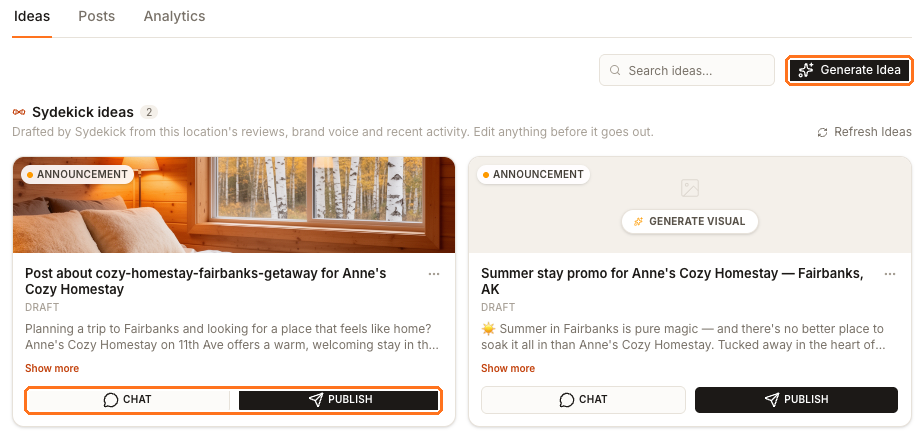
- Select Generate Idea (1). If the grid is empty, select Generate 3 Ideas in the empty state instead.
Sydekick opens with a prepared request for the scope you selected. Generation can take a minute or two, so you can leave the page and return; the new cards appear in the grid when they are ready.
Review every draft
New ideas have a Draft state. Read the complete copy with Show more, and verify names, locations, offers, dates, hours, and any other business details before using it. Generated text can draw on the location's records, reviews, brand voice, and recent activity, so an outdated source detail can also appear in a draft.
Use Search ideas when you need to find a draft again. Depending on the card, you can also:
- Select CHAT to continue with Sydekick about that idea.
- Select GENERATE VISUAL when the draft does not already have an image.
- Select PUBLISH (2) to hand the draft to Create Post.
PUBLISH is a handoff, not the final publish
Despite its label, PUBLISH on an idea card does not send the post to a social profile. It opens the composer with the idea copied in. You still review the post, choose profiles and timing, and use the composer's final publishing action.
The current Ideas page does not include Refresh Ideas. Use Generate Idea whenever you need a new set.
Next
Continue with Create and publish a post to review the preview, select profiles, and publish or schedule the draft. To add your own image or video first, see Add images or video to a post.