
AI for content ideas: research post ideas with Sydekick
Give Sydekick a brief for one business and it does the first round of research: the weather in the area, or the services on the business's website. It drafts a few angles, explains each one and saves post ideas to Inbox → Approvals, where you compare them, refine the wording with Tweak and decide. Approving records a decision: nothing is published or sent.
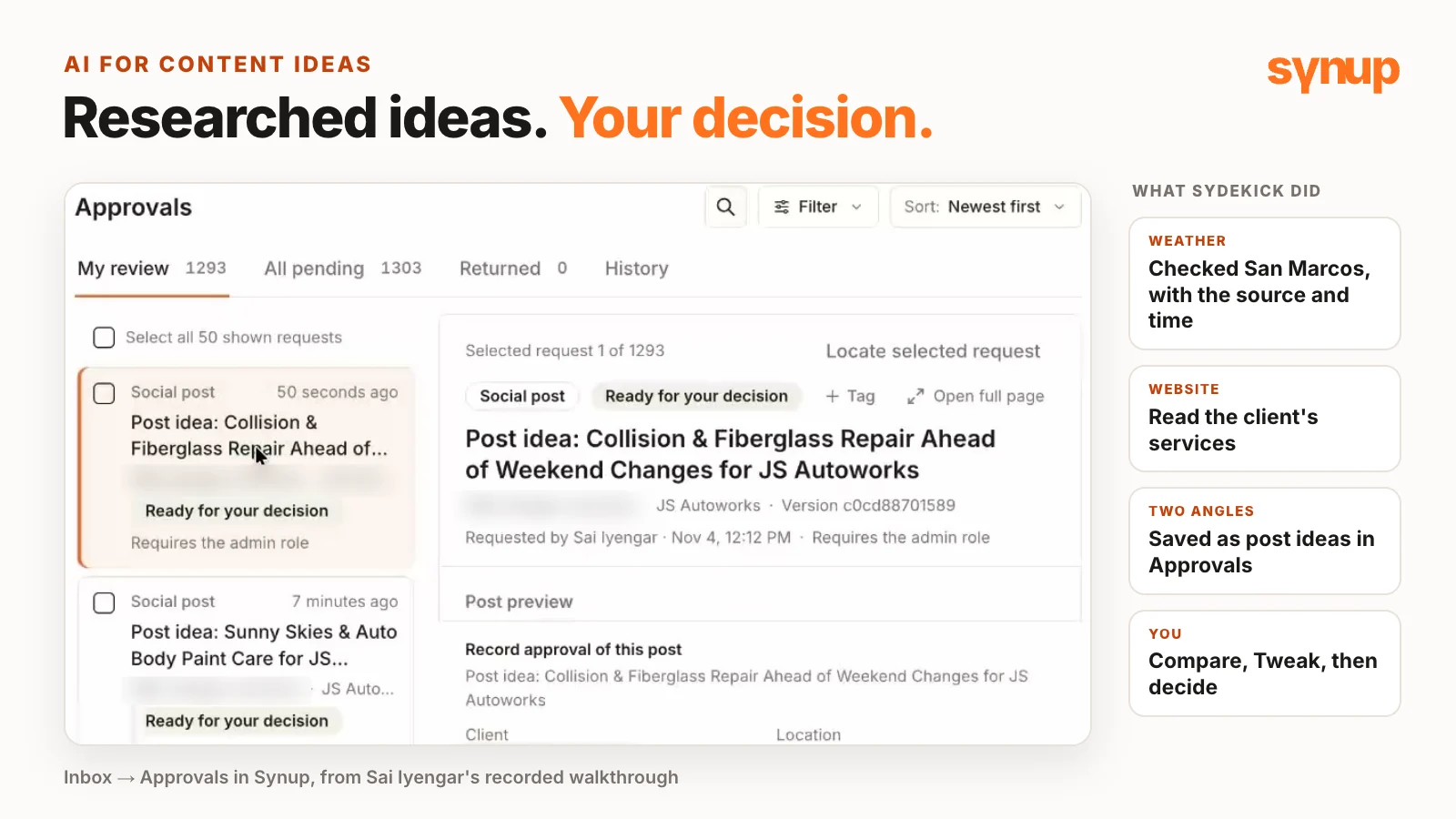
AI for content ideas works best when it does the research and a person makes the call. In this walkthrough, Saisrivatsan Iyengar, VP Engineering at Synup, gives Sydekick, Synup’s AI agent, a brief for one business and lets it find the starting points: the weather in the area and the services on the business’s own website. Sydekick drafts a few angles, explains each one and saves post ideas for review. Sai then compares them, refines the wording and leaves the decision to a person.
Short answer: Pick one business, give Sydekick a clear brief, and ask it to show its sources, offer a few options and explain its choice. In the demo, it researched the weather in San Marcos, Texas, and a local auto body shop’s website, drafted angles tied to the shop’s real services and saved post ideas to Inbox → Approvals. From there you compare them, refine one with Tweak and decide. Approving records a decision: nothing is published or sent.
Watch: AI for content ideas with Sydekick
The weekly question: what should the post be about?
- The hard part isn’t posting. Everyone agrees something should go out this week. Deciding what to actually talk about is where it stalls.
- It gets harder across several businesses. Each one has different services, a different local audience and different things happening around it.
- Where Sydekick helps: the day-to-day groundwork. Give it a useful brief, let it do the initial research, then use your own judgment to choose content that makes sense for the business.
- For every idea in the demo, Sai looks at the same three things: where the idea came from, a few possible angles to compare, and a recommendation saved for review.
Start with one business and what it sells
- The example: JS Autoworks, an auto body business in San Marcos, Texas.
- Context before content. Its website talks about collision repair, custom paint, restorations and fiberglass repair. Those are the services every idea should connect to.
- One location selected. Sai works with that specific location selected in Sydekick, so the research is about San Marcos.
- Text ideas only. The demo keeps to text post ideas, reviewed in Inbox → Approvals. What to develop further gets decided after that.
Weather ideas: research first, then two angles
The weather changes all the time, which gives a local business a timely reason to talk about a service. The connection still has to fit the business. For an auto body shop, that means bodywork, paint or restoration.
The brief:
- Discover, don’t supply. Sai asks Sydekick to find the conditions first and then work out whether there’s a useful angle, instead of telling it what the weather is.
- Ask for the evidence: the observation time and the source, so a reviewer can see where the idea came from.
- Keep the forecast separate. Today’s conditions and tomorrow’s can be different, which matters if the post is meant for a later day.
- Two ideas, not one, each grounded in the services on the website, with a short explanation of the angle. That gives you something to compare.
- Review only. The brief makes clear these are recommendations for review.
What came back, as recorded on Wed Nov 4, 2026:
- The evidence: an observation time (5:45 AM CST) and a cited source (NOAA weather station data), with the next few days’ forecast listed separately. Before using it, Sai would check that the observation is recent enough for the content being planned.
- Idea 1, “Sunny Skies & Auto Body Paint Care”: uses Wednesday’s sunny, 75°F afternoon light, which makes paint blemishes, chips and scratches easy to spot, and connects it to custom paint and restoration work.
- Idea 2, “Collision & Fiberglass Repair Ahead of Weekend Changes”: treats Thursday’s warm, sunny 79°F forecast as a good window for body panel and fiberglass collision repairs, both services the business offers.
How Sai reads the two angles:
- Three questions: which service is being promoted, why that service is relevant here, and whether the post would sound natural coming from the business.
- Don’t stretch it. These are starting points. If a connection is weak, choose a different angle rather than stretch the weather into a promotion.
- Check the tone. A small chance of rain doesn’t justify a dramatic headline. The useful question is whether the information helps say something relevant and helpful to the audience.
- Match the idea to the day. If the forecast changes, revisit the angle. With the observation time and the forecast visible, anyone reviewing the post can see what it was based on.
- Start local, then pick the service. Begin with local conditions, then decide which service deserves attention: a practical way to approach timely content, whether an agency is running it for many clients or a business is planning its own posts.
Save both ideas, then compare them in Inbox → Approvals
- One saved, one not. Sydekick wrote both weather ideas but saved only the first one to Approvals.
- A short follow-up fixed it. Sai asked it to save the second idea it had already drafted, reuse the research and leave the first one as it was. Sydekick saved the second as its own post idea.
- Where to find them: Inbox → Approvals lists the latest post ideas, including the one Sai had just asked it to save.
- What approving does: it records your decision for that version. In the approval screen’s words: “Nothing is published or sent, and no agent resumes from this approval.”
- Then decide. Compare the two, choose the better fit and refine the wording before taking anything further. Sai’s summary of the workflow: local research, a choice of ideas and a review.
Website service topics: ideas from the business's own site
The second brief starts from a common request: talk more about the services on the website, but which topics first?
The brief:
- Read the site and find the service phrases, then prioritize them by what a potential customer might be looking for: someone who needs a repair, someone exploring a restoration project, or someone trying to understand the cost.
- Show the evidence: the short phrases on the website that support each choice.
- Be clear about scope. The topics come from the business’s own website. Sai doesn’t ask for search volumes and doesn’t claim a post will improve rankings.
- The goal: turn real services into useful promotional content.
What came back: three topics, each with the website phrases behind it, such as “Quality collision repair and custom paint in San Marcos.” Sai looks first at the customer need behind each phrase, because a repair inquiry is different from a custom paint inquiry, and the post should reflect that difference.
| Topic from the website | Who it’s for | Why it matters |
|---|---|---|
| Collision repair | Vehicle owners who’ve been in an accident and need body repair: high-urgency, transactional intent | It’s a need rather than a want, so people don’t think twice about going to a business for it. |
| Custom paint | Car enthusiasts and vehicle owners who want an aesthetic upgrade | A different message: the look and finish of the work. |
| Restorations and fiberglass repair | Classic car collectors | Also an aesthetic upgrade, for a narrower audience. |
- Sydekick’s pick: collision repair, labeled its strongest idea. In Saisrivatsan Iyengar’s reading, it’s the topic most likely to bring the business more work. Its saved post idea is “Collision Repair & Free Estimates Promo”.
- Plus alternatives: a complete recommendation and some alternative directions. Only the main idea was saved; the alternatives stay as options to discuss.
- Choose this week’s priority: immediate repair inquiries, one particular service, or helping someone take the first step and request an estimate.
- The website is the foundation. The business’s own priorities decide what to emphasize.
- Use it in a content planning meeting. More repair inquiries wanted? Start with the repair angle. Want to show off the finish of the work? Look at the paint or restoration option. People hesitating because they don’t know where to begin? The estimate angle gives them a clear next step.
- Keep the rest. Choose one for this post and keep the others as ideas to discuss. For an agency, Sai points out, that’s a more useful client conversation than asking whether the client likes a caption.
Refine the saved idea with Tweak
- Review the wording last. A draft can sound convincing and still say something more specific than the website supports.
- Tweak sits on the saved post idea. Use it to change or add whatever the post needs.
- Sai’s example: the website says the business supports insurance, so Sai uses Tweak to ask for that in the post caption. Sydekick rewrites the caption, which now includes “We support insurance claims”.
- Same record, still pending. Tweak changes the saved draft in place: it’s the same recommendation, it stays pending review, and the card keeps a history of each tweak.
- The everyday loop: discover the service topics, understand the customer intent, compare content options and tighten the copy before anyone decides what to use.
How to brief Sydekick for content ideas
Sai’s wrap-up: the same business’s content, approached from different starting points. Local weather gave a timely angle, and the website gave service topics and the customer needs behind them. Throughout, a person chose the direction and reviewed the wording.
- Start small: one location and one clear objective.
- Ask for three things: show its sources, offer a few options and explain its choice.
- Then take the idea that fits, refine it and bring it into your own review process.
- Credits: Sydekick’s research, such as searching the web or reading a website, uses credits.
- The point, in Sai’s words: to help get “from a blank content brief to a researched idea that the team can discuss and develop.”
For more, see Sydekick’s chat, the approvals inbox, automated review monitoring with Sydekick and Google Business Profile post ideas.
Common questions about AI for content ideas
How can you use AI for content ideas?
Give an AI agent a clear brief for one business, let it do the first round of research, then choose with your own judgment. In Synup's demo, Sydekick researched the weather in San Marcos, Texas, and the business's own website, drafted angles tied to real services, explained each one and saved post ideas to Inbox → Approvals for a person to compare, refine and decide.
Does Sydekick post the ideas it saves?
No. Post ideas wait in Inbox → Approvals. Approving records your decision for that version: nothing is published or sent, and no agent resumes from that approval. In the demo, every idea was left pending review.
Where does the weather information come from?
Sai Iyengar asked Sydekick for the observation time and the source, with the forecast kept separate. As recorded on Wed Nov 4, 2026, the response cited NOAA weather station data with a 5:45 AM CST observation time and listed the next few days' forecast on its own. Check that an observation is recent enough for the post you're planning, and revisit the angle if the forecast changes.
Does Sydekick use search volumes to choose website topics?
No. In the demo, it read the business's website, picked three service topics (collision repair, custom paint, and restorations and fiberglass repair), quoted the website phrases behind each and ranked them by customer intent. The brief asked for no search volumes and made no ranking claims.
What if Sydekick saves only one of two ideas?
Ask it to save the other. In the demo, Sydekick drafted two weather ideas but saved only the first. A short follow-up asked it to save the second idea it had already drafted, reuse the research and leave the first unchanged, and the second was saved as its own post idea.
Can you edit a saved post idea?
Yes, with Tweak on the saved post idea. Sai Iyengar asked it to include insurance, which the business's website supports, and Sydekick rewrote the caption on the same record. It stayed the same recommendation, still pending review.
Put your local marketing in motion.
Manage listings, reviews and local visibility in one place. Sydekick, your AI agent, lines up the work and you approve what goes live.
- 14-day free trial
- $50 in AI credits
- Cancel anytime