Google Business Profile Description: Complete Guide for Local SEO & Conversions
How to write a Google Business Profile description that turns profile views into calls and visits.
Your Google Business Profile description is one of the first things potential customers read when they find you on Google Search or Google Maps. It’s also one of the most underused fields in local marketing.
Writing an effective business description helps convert local searchers into customers. Yet most business owners either leave it blank, stuff it with keywords, or paste in a generic paragraph that says nothing meaningful.
This guide breaks down exactly how to write, edit, and optimize your business profile description so it works harder for your local SEO, builds trust, and drives real customer actions like calls, bookings, and store visits.
What Is a Google Business Profile Description?
The business profile description is the text you control inside the “From the business” section of your Google Business Profile. It’s completely separate from Google reviews, and the editorial snippets that Google sometimes auto-generates.
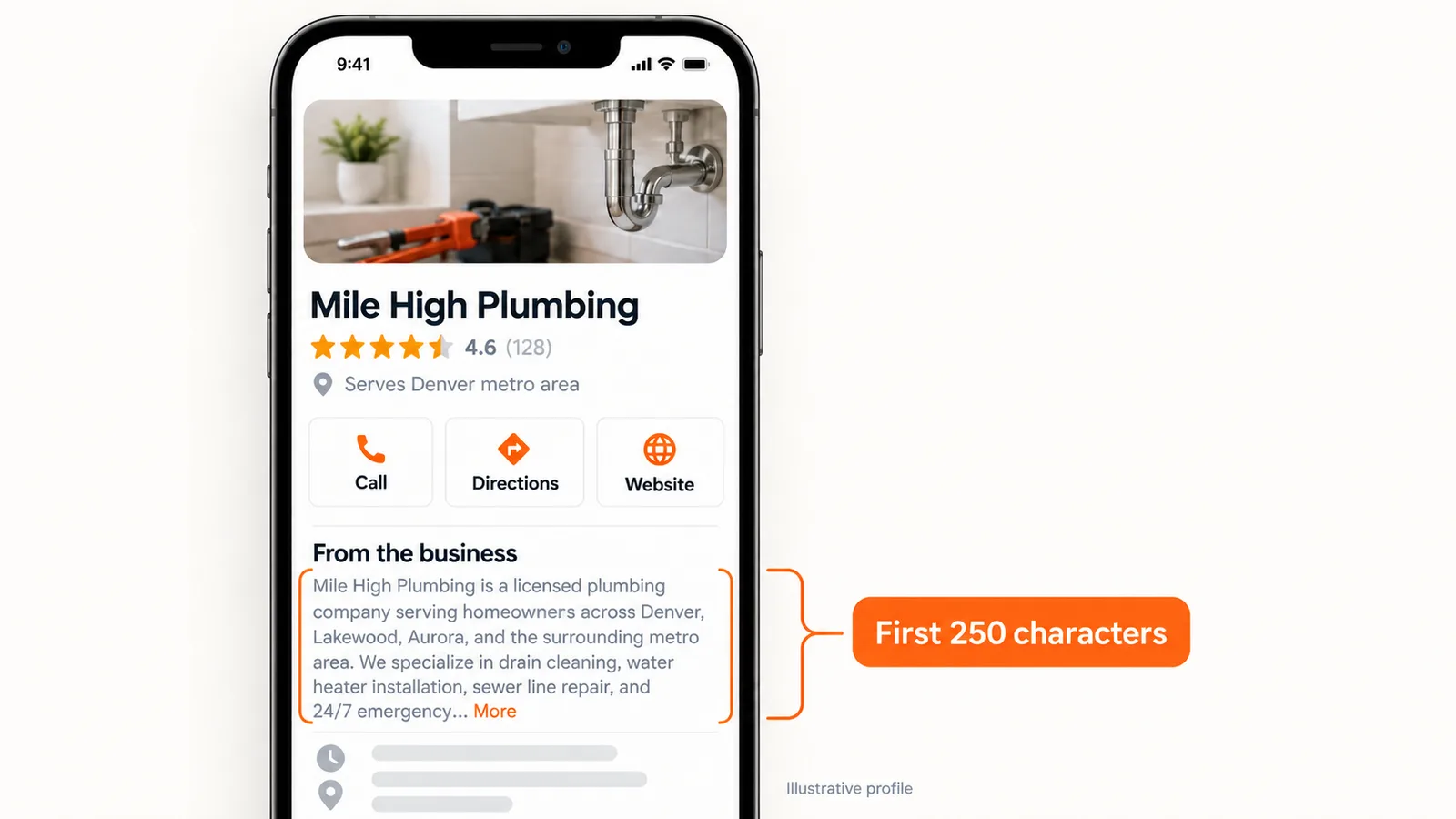
Google Business Profile descriptions are limited to 750 characters. That’s roughly two to three sentences. Here’s the catch, though. Google only shows the first 250 characters in the Knowledge Panel and on Maps, and people have to tap “More” to read the rest. Everything after that requires an extra click to read.
Almost every business vertical can use this field: restaurants, law firms, plumbing services, dental clinics, auto repair shops, retail stores, and more. A few categories like hotels may have separate summary fields, but the description is available to the vast majority of local businesses on Google.
Visually, it shows up as a single plain-text paragraph under the “From the business” heading. No bold, no bullets, no HTML code. Just words. That’s why every character has to count.
Why Your Business Profile Description Matters for Local Search
Let’s get the big question out of the way: descriptions do not directly influence local search rankings. Google has said as much. But that doesn’t mean they’re optional.
Here’s what the data shows:
-
Complete profiles rank 19 positions better than incomplete ones. In that data, profiles with a completeness score of 5 averaged rank 43 and 13% visibility, and the fully filled-out ones did a lot better.
-
42% of local searchers click Google Maps Pack results. Your description is often what they read before deciding to call or keep scrolling.
-
One study of more than 16,000 profiles found that when the description matched the search keyword, visibility went up 4.6 percentage points (using stem-based matching).
Profiles with accurate information are more likely to appear in local search results and map packs. Google considers profile completeness part of its guidance for improving local ranking.
A strong description can drive real-world actions like calls and visits. It builds trust before the click, answers the “is this the right business for me?” question, and feeds engagement signals (click-through rate, calls, direction requests) that indirectly support local SEO prominence.
Google’s Official Rules for a Business Profile Description
Before you write a single word, know the rules. A flagged description can get suppressed, and in worse cases Google suspends the whole account.
Here’s what Google requires and prohibits:
Must do:
-
Accurately represent the business: use your legal business name, describe real offerings, and reference your true physical address or service area.
-
Keep content relevant to the business and its services.
-
Use clear, natural language without keyword stuffing in descriptions.
Must avoid:
-
Harassment, hate speech, or misleading claims as per Google’s Business Profile policies.
-
Avoid promotional pricing or sales language in descriptions. Keep promos and price lists out of this field. They belong in Google Posts.
-
Avoid including URLs or HTML code in the description field. Google rejects these. Your phone number and website already exist in dedicated profile fields.
-
Exaggerated, unverifiable claims (“Best in the world,” “#1 rated”) that erode credibility.
Google’s guidelines discourage irrelevant or distracting text in profiles. If it doesn’t help a customer understand what your business does and where, leave it out.
The bottom line: keep the description focused on your business and offerings. Promotional content, links, and gimmicky formatting will get you flagged.
Character Limits, Structure, and Where to Place Key Information
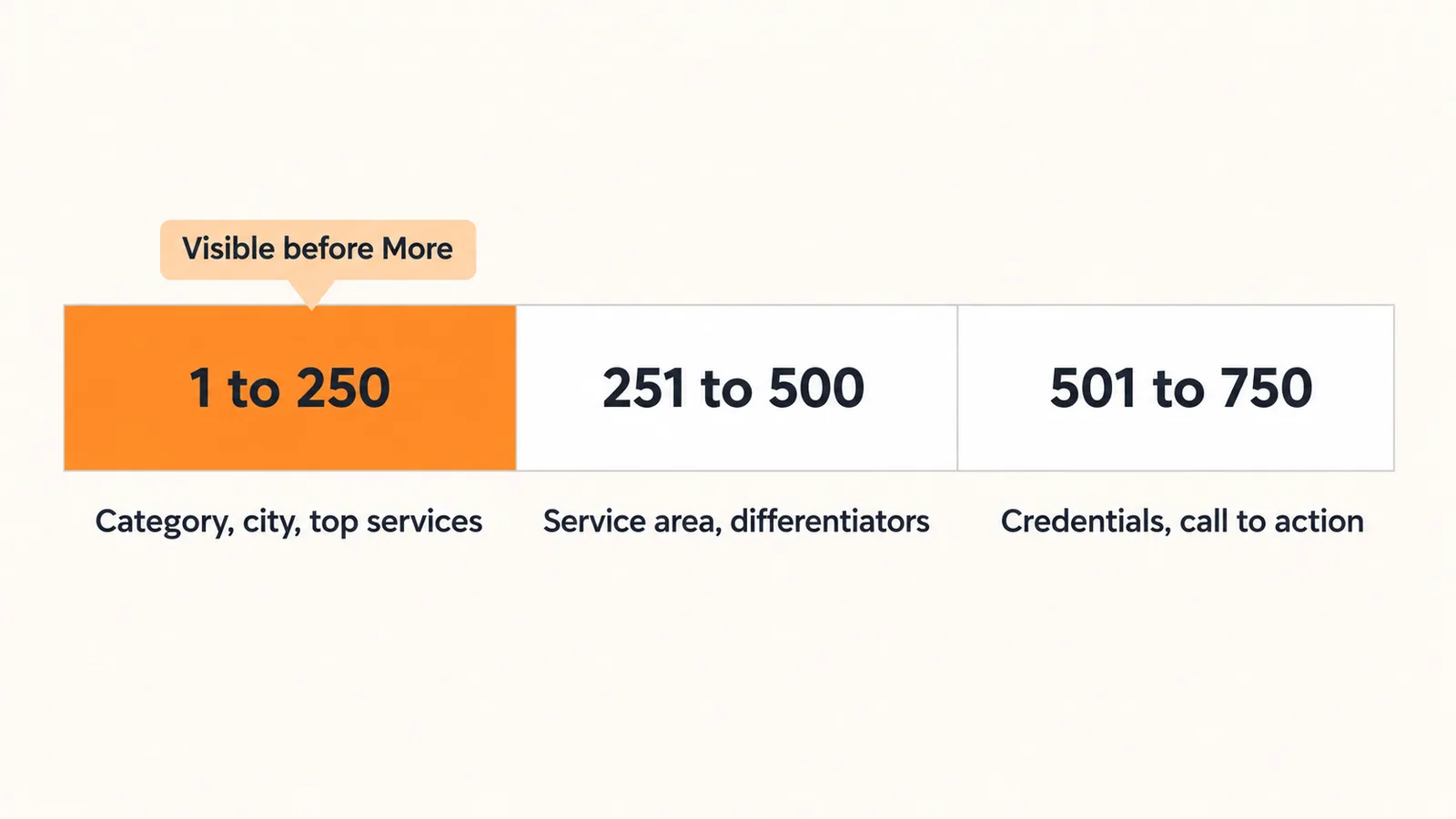
Google Business Profile descriptions are capped at 750 characters. That’s a hard limit. Anything beyond gets truncated or rejected. Those first 250 characters are all most people see before tapping “More.” So open with your primary category and city, and put your top services right after.
Structuring your 750 characters:
| Position | What to include | Why |
|---|---|---|
| Characters 1–250 | Primary category, location, core services | Visible before truncation |
| Characters 251–500 | Service area details, differentiators | Adds depth for interested readers |
| Characters 501–750 | Credentials, founding year, subtle CTA | Closes the pitch |
Since the UI renders plain text only, write a single tight paragraph rather than attempting bullets or line breaks. Group your information logically: who you are, what you do, where you serve, and why you’re different.
If you’re a service area business, name your main cities or towns near the top. Your address is probably hidden on the profile, so the description has to tell people where you work.
Step-by-Step: How to Add or Edit Your Google Business Profile Description
The old Google Business Profile dashboard is largely retired. Today, edits happen directly through Google Search or the Google Maps app.
Before you can edit anything:
-
Verify ownership. The profile must be verified (via postcard, phone, video, or another method) before the description field becomes available.
-
Sign in with the right account. You need the Google Account that owns or manages the profile. Businesses can manage multiple profiles directly from Google Search using multiple accounts if needed.
-
Prepare your text. Write and character-count your description in a separate doc before pasting it in. Google doesn’t always show a live character count in the edit screen.
Google reviews profile edits usually within 10 minutes to 30 days. Simple edits tend to go live fast, though anything that trips a policy review can sit in the queue a lot longer.
With multiple locations, agree on one editing process up front. Otherwise each location’s details start drifting from one profile to the next. A shared template with location-specific placeholders saves time and reduces errors.
How to Find and Edit the Description Field (Search & Maps)
Here’s where to find it:
Via Google Search:
-
Sign in to the managing Google Account.
-
Search your business name + city in Google Search.
-
The in-search management panel appears. Click “Edit profile.”
-
Navigate to “Business information” or “Description” (the label may differ slightly by region).
-
Paste your pre-written description and click “Save.”
Via Google Maps:
-
Open the Google Maps app (mobile) or maps.google.com (desktop).
-
Search for your business listing.
-
Click or tap your business, then select “Manage your Business Profile.”
-
Choose “Edit profile” and locate the description field under business details.
-
Paste, review, and save.
Have your final text pre-written and character-counted before you open the edit screen. This minimizes the chance of typos or accidentally exceeding the character limit.
Framework: A Simple 5-Part Formula for an Effective Description
Instead of staring at a blank text box, follow this reusable formula. It works for both brick-and-mortar locations with a physical address and service area businesses that travel to customers.
The five elements:
-
Primary category - What you are (“full-service auto repair shop,” “family dental clinic”).
-
Core services - Your most important offerings, stated clearly.
-
Location or service area - Where you serve customers.
-
Differentiators - What makes your business unique: years of experience, certifications, specialty services.
-
Subtle call to action - Not “Buy now!” but something like “Call today for a free estimate.”
The sentence order should flow naturally: identity → services → service area → proof/credibility → invitation to contact or visit. The first sentence should mention the primary business category and location.
Descriptions should clearly communicate your value proposition and business offerings. Highlight your unique selling proposition to differentiate from competitors. Use specific details about your business history or experience to build trust.
Include a call-to-action at the end of your description, something gentle that tells people what to do next. And each service or keyword should appear once to avoid keyword stuffing.
Using Relevant Keywords Without Keyword Stuffing
Keywords in the description support user understanding and entity clarity, not direct rankings. Google primarily uses categories, services, and Google reviews for relevance, and descriptions reinforce that story.
Here’s how to integrate relevant keywords smoothly into natural sentences:
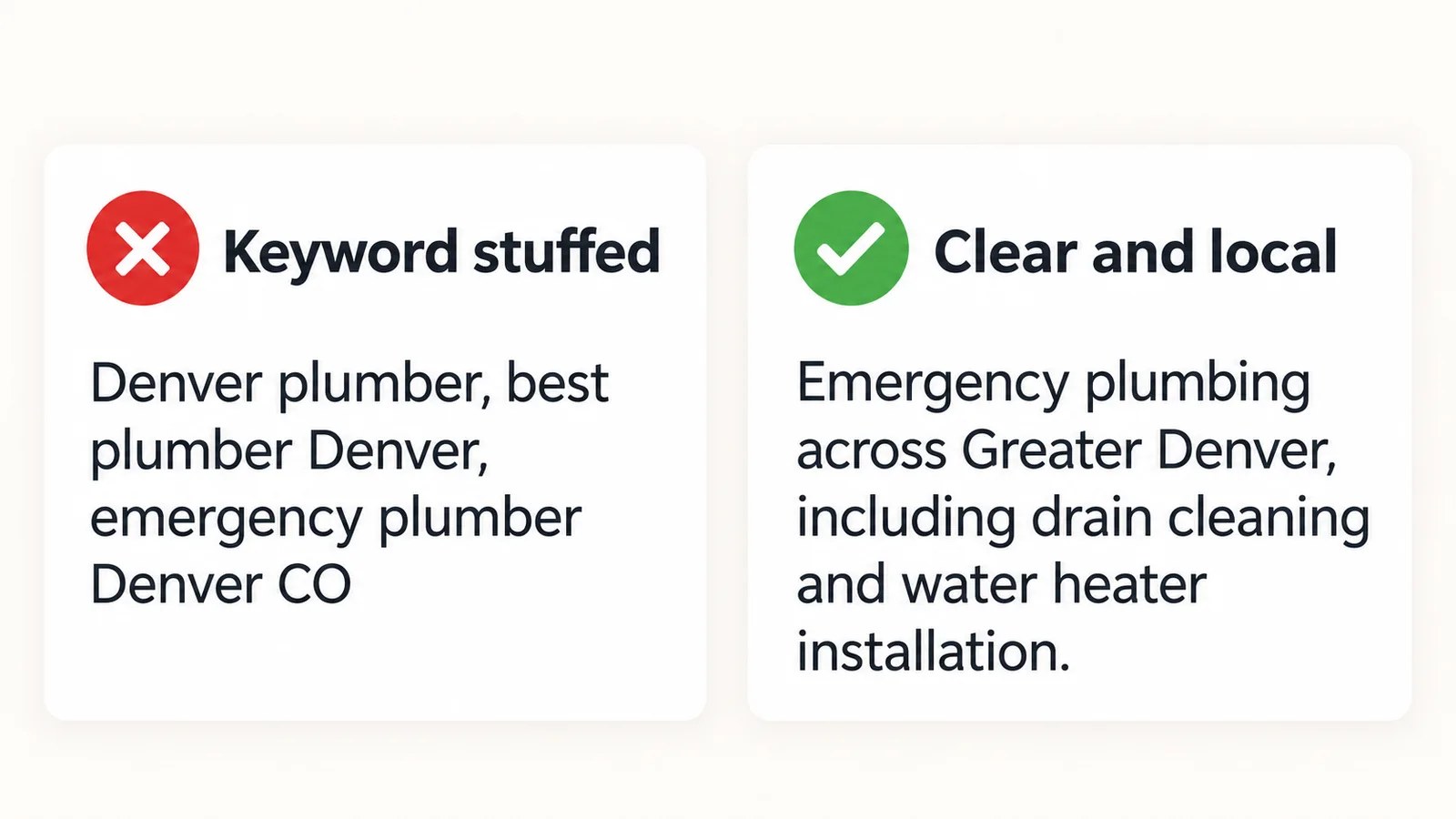
Do this: “We provide emergency plumbing services across Greater Denver, including drain cleaning, water heater installation, and sewer line repair.”
Not this: “Denver plumber, best plumber Denver, Denver plumbing services, emergency plumber Denver CO.”
Include geographic markers to enhance local search relevance. Mention your city, neighborhood, or county the way local customers actually talk, like “Downtown Austin,” “Brooklyn Heights,” or “East Bay,” rather than robotic location identifiers.
Use relevant keywords naturally without stuffing. One mention of your primary service and one of your city is enough. Google’s algorithm is smart enough to connect “roof repair” in your description with “roofing contractor” in your categories.
Align your description language with how customers actually search. “Roof repair in Austin” beats “residential and commercial roofing solutions provider” every time.
Tailoring Descriptions for Service Area Businesses vs. Storefronts
The copy strategy changes depending on whether customers come to you or you go to them.
For storefronts:
-
Emphasize your physical address, neighborhood landmarks, and walk-in convenience.
-
Mention parking availability or proximity to transit.
-
Reference regular business hours if they’re a selling point (e.g., “open 7 days a week”).
For service area businesses:
-
List the core cities, counties, or boroughs you serve customers in, since your physical location is hidden.
-
Use language like “Serving homeowners across [City A], [City B], and surrounding suburbs.”
-
Make sure your description’s service area wording matches the service area settings inside the profile for consistency.
Mixed models (showroom + mobile service): mention both. Example: “Visit our showroom in Buckhead or schedule in-home service anywhere in metro Atlanta.”
Multi-Location Google Business Profiles: Keep Descriptions Local
If you’re a franchise, agency, or brand managing multiple locations, resist the urge to copy-paste the same description everywhere.
Each location should have a unique description reflecting local services, neighborhoods, and attributes. Two locations at the same location (like suite-based offices in one building) especially need distinct descriptions referencing their unique services.
Best practices for multi location businesses:
-
Create a master template that maintains brand voice across all profiles.
-
Customize each description with the location’s city, neighborhood, and any location-specific attributes like “next to Union Square Park” or “inside the Madison Heights Shopping Center.”
-
Tailor each description for businesses with multiple locations. Mention local landmarks, hours that differ, or services unique to that branch.
Synup’s local visibility platform helps agencies and multi location businesses push location-specific descriptions in bulk while maintaining brand standards. Instead of editing hundreds of profiles manually, you can manage Google Business Profiles at scale from a single dashboard.
Business Description Examples for Common Local Industries
Here are five concrete business description examples, each following the 5-part formula and staying under 750 characters. Examples include specific services like “drain cleaning” or “water heater installation” to show how real world examples work.
Plumber - Denver, CO (Service Area Business)
“Mile High Plumbing is a licensed plumbing company serving homeowners across Denver, Lakewood, Aurora, and the surrounding metro area. We specialize in drain cleaning, water heater installation, sewer line repair, and 24/7 emergency plumbing services. With over 15 years of experience and a team of certified technicians, we offer same day service for urgent issues. We accept most major insurance plans for covered repairs. Call today for a free estimate.”
HVAC Contractor - Austin, TX (Service Area Business)
“CoolTex HVAC is a family-owned heating and cooling contractor serving Austin, Round Rock, Cedar Park, and Central Texas since 2008. Our NATE-certified technicians handle AC installation, furnace repair, duct cleaning, and seasonal maintenance. We offer same day service for emergency breakdowns and accept all major insurance plans. Contact us to schedule your free in-home consultation.”
Hair Salon - San Francisco, CA (Storefront)
“Bloom Salon is a full-service hair salon located in the heart of the Mission District, San Francisco. We specialize in precision cuts, balayage, color correction, and keratin treatments. Our stylists bring a combined 30 years of experience and ongoing training in the latest techniques. Walk-ins welcome during regular business hours, or book your appointment online.”
Dental Clinic - Chicago, IL (Storefront)
“Lakeview Family Dental is a general and cosmetic dental clinic serving patients in Chicago’s Lakeview neighborhood since 2012. Our board-certified dentists provide cleanings, fillings, Invisalign, teeth whitening, and pediatric dentistry. We accept most major insurance plans and offer flexible payment options. Schedule your visit today at our office on North Ashland Avenue.”
Coffee Shop - Multi-Location Retail (Portland, OR)
“Northpoint Coffee Roasters is a locally roasted coffee shop with three Portland locations in the Pearl District, Hawthorne, and Division Street. Each shop serves single-origin espresso, cold brew, pastries from local bakeries, and seasonal specials. Founded in 2015, we source beans directly from farms in Colombia and Ethiopia. Visit your nearest location, open daily from 6 AM to 7 PM.”
Writing Entity-Rich Descriptions That Support Local SEO
Entity recognition helps Google understand your business context. An “entity” in this sense is any specific, identifiable thing: your business name, category, city, services, certifications, founding year.
Here’s how to embed entities naturally:
-
Instead of “We’re a law firm,” write “Hartwell & Associates is a family law firm in Chicago.”
-
Instead of “We do electrical work,” write “24/7 emergency electrician serving Brooklyn, Park Slope, and Williamsburg.”
-
Instead of “We’re experienced,” write “Pediatric dentist in Austin with 12 years of practice and board certification from the American Academy of Pediatric Dentistry.”
Consistent entities across the business profile description, website landing pages, and local citations help Google connect the dots. If your own description says “serving Dallas” but your website says “serving DFW Metroplex” and your citations say “Dallas-Fort Worth,” Google has to guess which is accurate.
Include concrete details: founding year, certifications (“NATE-certified technicians,” “BBB-accredited”), neighborhoods served, and unique attributes (“women-owned,” “open 24/7”). The goal is to sound natural to humans while giving search engines clear, structured business information.
How AI Can Help You Scale Business Profile Descriptions
For agencies and brands managing hundreds of Google Business Profiles, writing unique descriptions for each location manually is painful. AI tools can accelerate the process significantly.
Here’s a practical workflow:
-
Generate a first draft using AI with your 5-part formula as a prompt template.
-
Swap in location-specific details - city names, service lists, local landmarks.
-
Edit for accuracy and compliance - verify services are correct, remove any prohibited content, confirm character count.
-
Test variations - brainstorm different differentiators or phrasing, then measure which versions drive more calls or direction requests.
AI should never be the final step. Human review ensures the description is truthful, locally relevant, and policy-compliant.
Synup’s AI agent Sydekick can auto-suggest and update descriptions at scale for multi location businesses as part of broader Google Business Profile optimization workflows, generating drafts, flagging policy issues, and pushing updates across all locations from one platform.
Keeping Your Description Accurate as Your Business Evolves
Your business profile description isn’t a “set it and forget it” field.
When to update:
-
Quarterly, at minimum, as a standard review cycle.
-
Immediately when you add or drop services, change your service area, update your business name, or rebrand.
-
When Google or third-party data sources trigger suggested edits to your profile. These can overwrite your own description if you’re not monitoring.
Align the description with your updated categories, services, and attributes so all business information tells the same story. A description that mentions “residential painting” when your categories say “commercial painter” creates confusion for both local customers and Google.
A local SEO platform like Synup can monitor all your profiles for changes, suggested edits, and data conflicts across multiple locations, so you catch problems before they cost you customers.
Turning Views Into Calls, Bookings, and Store Visits
A strong description can improve engagement and drive customer actions. Here’s how to connect description quality directly to measurable outcomes.
Pre-answer common questions. If customers always ask “Do you serve my area?” or “Are you open on weekends?” put it in the description. Reducing friction means faster decisions.
Match the description’s promise with your landing pages. If your description says “free consultation for homeowners in Phoenix,” your website better say the same thing when they click through. Broken promises kill customer conversion.
Use subtle calls to action. Encourage subtle prompts like:
-
“Call today for same-day service in Brooklyn.”
-
“Visit our Denver showroom 7 days a week.”
-
“Schedule your free consultation online.”
These stay within Google’s policies while still telling people what to do next.
Track the results. Google Business Profile insights show views, searches, direction requests, and calls. Change your descriptions and measure whether those actions increase. Synup tracks the calls and direction requests each profile gets, so you can see which descriptions actually bring in customers.
Common Mistakes in Business Profile Descriptions (and How to Avoid Them)
Here are the pitfalls that harm trust, search visibility, or compliance:
| Mistake | Why it hurts | Fix |
|---|---|---|
| Keyword stuffing | Looks spammy to users, may trigger manual edits or rejection | Use each relevant local keyword once, in a natural sentence |
| Vague, generic copy | “We offer great service for all your needs” says nothing about your business accurately | Name specific services, your service area, and at least one differentiator |
| Copying website text verbatim | Often exceeds 750 characters, buries key info, and reads as a wall of text | Write a dedicated, concise description for the GBP field |
| Exaggerated claims | “#1 in the world” erodes credibility when Google reviews and real world feedback tell a different story | Stick to provable facts: years in business, certifications, awards |
| Including URLs or phone numbers | Google rejects these; the profile already has dedicated fields | Use the profile’s contact fields instead |
| Promotional pricing | “50% off today!” violates Google services policies for this field | Put time-sensitive offers in Google Posts, not the description |
| Outdated information | Claiming services you no longer offer or areas you no longer serve | Review quarterly and update immediately when things change |
Google reserves the right to remove or suppress descriptions that violate its policies. Google rejects content that display links, display low quality text, or focus primarily on advertising rather than describing the business.
How Synup Helps You Manage and Optimize Google Business Profiles at Scale
Everything in this guide (writing descriptions, keeping them accurate, tailoring them per location, tracking results) gets exponentially harder when you’re managing dozens or hundreds of profiles.
That’s where Synup fits in.
Centralized listings management. Synup ensures every location’s business description, service area, and business information stay accurate across Google, maps, directories, and social profiles. No more logging into each profile individually. You can manage local listings from a single dashboard.
AI-powered description creation. Synup’s AI agent Sydekick can generate, test, and roll out new descriptions in bulk while preserving local nuance, swapping in city names, neighborhood references, and location-specific differentiators automatically.
Integrated local SEO tools. Beyond descriptions, Synup offers local rank tracking, review management, and AI-search (AEO) visibility tracking so you can measure how optimized descriptions impact engagement, enhancing search visibility across every location.
Ongoing monitoring. Synup flags suggested edits, data conflicts, and profile changes before they go live, protecting your brand from inaccurate third-party modifications.
Of all the fields on your profile, the description is one of the easiest to fix, and it shapes how people see your business before they ever call. Pair it with consistent management, and you’ve built a foundation for local visibility that compounds over time.
Ready to streamline your Google Business Profile description management and broader GBP optimization efforts? Request a Synup demo and see how it works for multi location businesses and agencies alike.
Reading is step one. Sydekick does step two.
Sydekick runs the listings, review, and visibility work these guides describe, across every location you manage.