Google Local Pack and Why it is Important
How Google picks the three businesses in the local pack, and the profile and review work that gets your business into one of those spots.
Every day, millions of people search Google for a nearby restaurant, plumber, dentist, or gym. Before any blue links show up, most of them see a map with three businesses pinned on it. That’s the Google Local Pack, and for a lot of local searches, it’s the only part of the page anyone looks at.
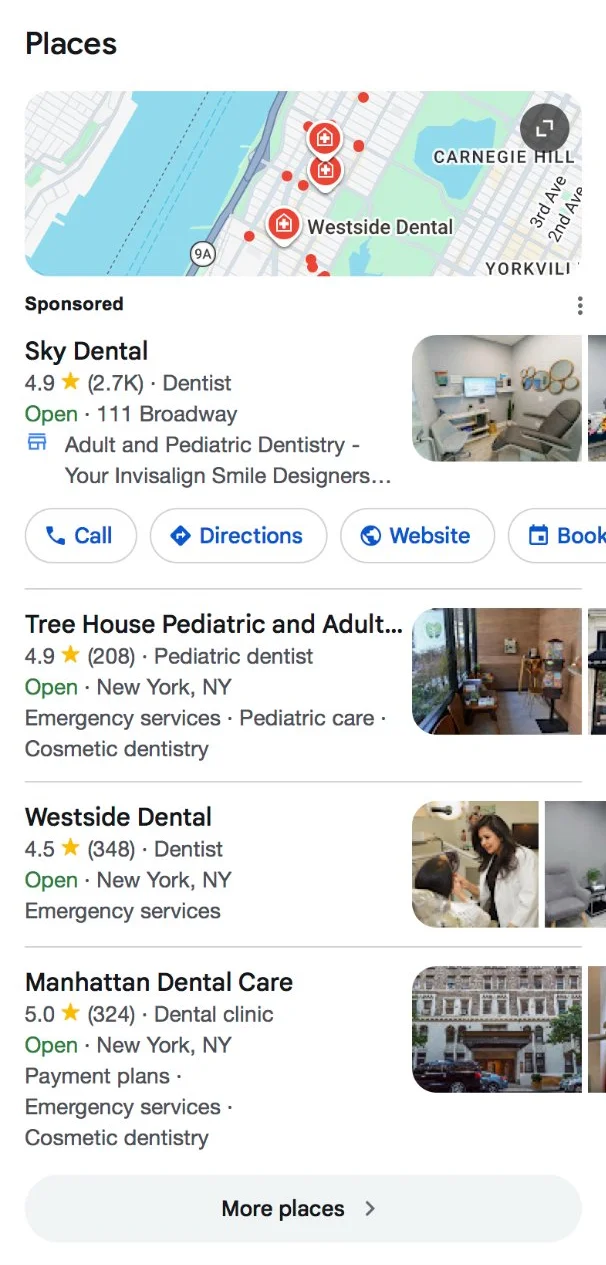
What Is the Google Local Pack (a.k.a. Google Map Pack)?
The pack is a small map with a pin for each business, plus three listings underneath it. Each listing shows the business name with its star rating and review count, and below that, the address and whether it’s open right now. Buttons for directions and the website sit right there too, and on mobile, so does a call button.
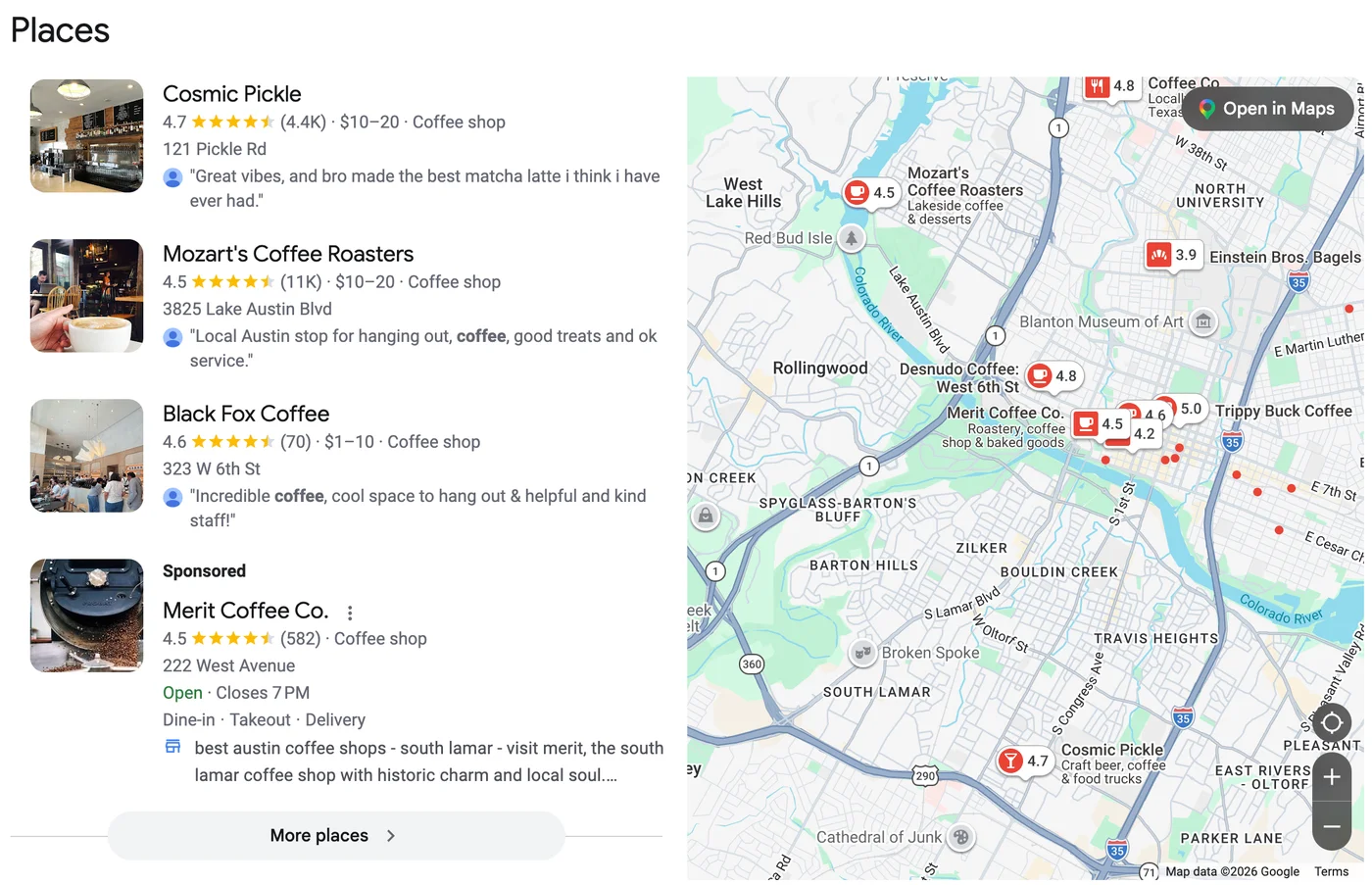
You’ll also hear it called the Google map pack, local 3-Pack, or Google 3 Pack. The three-result format goes back to 2015, when Google cut the old 7-pack down to three. Google has tweaked the design plenty since then, but you still get the same map and three listings.
Most of what shows up in the pack comes from your Google Business Profile, so a strong website on its own won’t get you in. Your categories and reviews carry a lot of weight here, and so does how complete the rest of your profile is. Multi-location brands feel this the most, because a weak profile at even one branch hands its calls to the competitor down the street.
You’ll see the pack on searches tied to a place, like “coffee shops near Union Square” or “sushi in Brooklyn.” It usually sits above the organic results, though Google sometimes places it further down the page. Searchers can call a business or get directions right from the results, so plenty of them never open a website at all.
Tap “More places” and you land in the local finder, which lists the businesses that didn’t make the top three.
How Google Detects Local Intent & When the Local Pack Shows
Local intent means the user searches for a product, service, or place in a geographic context. Sometimes the searcher spells out the place, as in “roofing contractor in Austin.” Other times Google has to read between the lines. Someone typing “pizza” into their phone at 6 p.m. probably isn’t after a recipe.
Mostly, Google goes by what you typed and where your phone or laptop says you are. Language settings and search history can tip the decision too. Synup’s 2026 local SERP study found a Local Pack on 97.4% of “[category] near me” searches, across 12,250 desktop searches in 250 US cities collected in September 2026.
How often the pack shows up depends a lot on the industry. A search for a plumber or a dentist almost always brings one up. A search for B2B software rarely does, since there’s no storefront for anyone to visit.
Google Local Pack vs Organic Search Results
The Local Pack and traditional organic search results look different, behave differently, and rely on different ranking signals. Organic rankings lean mostly on your website’s content and the links pointing to it. The pack cares more about your Business Profile and how close you are to the person searching.
Because it sits above the organic results, the pack pulls in a big share of the clicks. On a phone, it often takes up the whole screen, so a lot of people never scroll far enough to see the first organic result. People searching on their phones also tend to act right away. They tap to call or pull up directions straight from the pack.
You can do well in the pack even if your website sits outside the top five organic results. It works the other way too. A site that ranks #1 organically might not show up in the pack at all. Some local SEOs have also noticed that Google rarely shows a business in the pack and then again in the organic results right below it. In practice, a spot in the pack can mean your website slips a few places in the organic results for that search. That’s why local SEO needs its own plan, separate from the work you do on your website.
Why Google’s Local Pack Matters for Local SEO & Revenue
A Google rep told a 2018 local search conference that 46% of searches have local intent (Search Engine Roundtable). That’s a huge share of searches landing on a results page where the pack has room for only three businesses.
Those searches also turn into sales offline. In a 2014 comScore survey of about 5,000 US adults, 78% of local searches on mobile ended in a purchase, and most of those purchases happened in a store or over the phone (Search Engine Land). So being in the top three versus being buried in “More places” can mean the difference between dozens of leads a month and almost none.
For multi-location brands, the effect adds up. Every location has its own pack to win, so a brand with 50 stores is really competing in 50 separate local rankings, and gains at each one show up as calls and store visits across the whole network. That’s why pack performance belongs in the same KPI report as organic rankings and website conversions.
The Google map pack matters because it’s where potential customers make their first decision: who to call, who to visit, who to trust.
How the Google Local Pack Algorithm Works (Relevance, Distance, Prominence)
Google uses distance, relevance, and prominence to rank listings in the Local Pack. These three pillars work together, but their weight shifts depending on query type, industry, and competition.
Relevance measures how well your business matches the user’s search query. Your primary category does most of the work here, so pick the most specific one that fits. Filled-in services and attributes help too, and so does a business description that says plainly what you do. So for “emergency vet open late,” a clinic listed as “Emergency Veterinarian” will usually beat one listed as plain “Animal Hospital.”
Distance, meanwhile, decides who’s even in the running. Google’s algorithm starts with where the searcher is right now, or the city they typed, and only considers businesses within reach of that spot. In a 2025 study of 3,269 businesses covered by Search Engine Journal, proximity explained 55% of rankings across the top 21 map spots, more than any other factor. Walk a few blocks and search again, and you may see a different set of three.
Prominence reflects how well-known and trusted a business is online. Your reviews and star rating are a big part of how Google judges that. So does how often your business shows up elsewhere online, like in directories or a story in the local paper. Reviews matter more the closer you get to the top. In the same study, review count explained 19% of rankings across the top 21 spots. Inside the top ten that rose to 26%, and the words customers used in their reviews added another 22%.
Paid Google Ads can appear above or near the Local Pack, but the core three positions themselves are organic local results - not pay-to-play.
Setting Up & Claiming Your Google Business Profile Listing
You cannot appear in the Local Pack without a verified Google Business Profile listing tied to a real business location or service area. Claiming it is only the start, though, since a profile nobody updates tends to slip over time.
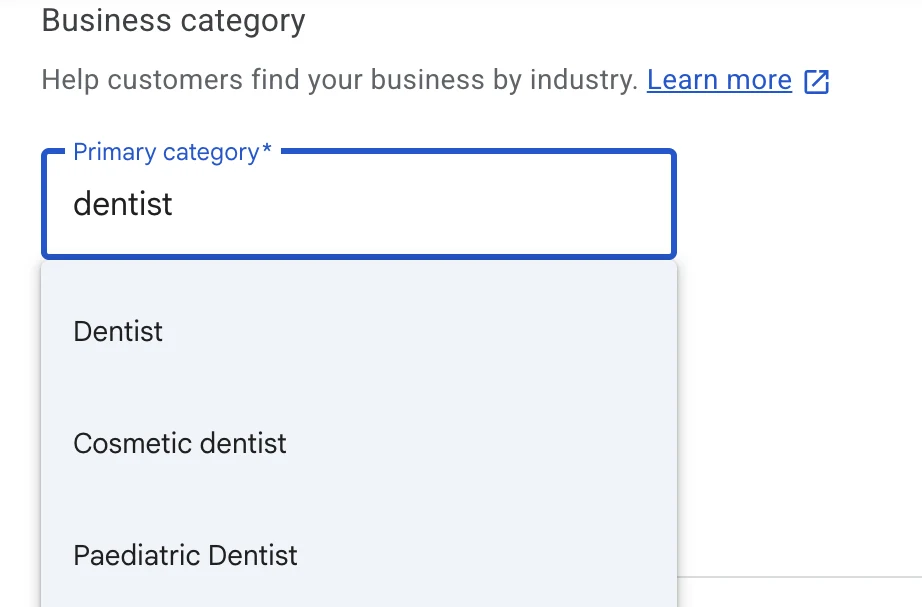
Start by searching your exact business name plus city (e.g., “Bright Smile Dental Chicago”) on Google Maps. If a listing already exists, claim ownership. If nothing comes up, create a new profile. Google will ask for the basics about your business, and the primary category is the one to think hardest about.
Verification methods include:
- Postcard - most common for storefronts
- Phone or email - available for some profiles
- Video verification - increasingly required for newer or service-area businesses
- Bulk verification - available for chains with 10+ locations
Use a business domain email and maintain consistent NAP (Name, Address, Phone) from the start. This avoids duplicate business listings and painful cleanup later. If you’re wondering what a Google Business Profile actually is, start there before diving into setup.
Optimizing Your Google Business Profile for the Local Pack
GBP optimization is the single biggest lever for improving your google local rankings. Complete Google Business Profile details improve local search visibility - and incomplete profiles almost never break into the top three.
Here’s what to prioritize:
- Business name - use your real name, no keyword stuffing
- Primary + secondary categories - be as specific as possible
- Business hours - include holiday and special hours
- Phone number and website URL - match your contact page exactly
- Business description - use location-relevant and service-relevant language (e.g., “emergency HVAC repair in Phoenix” rather than generic phrasing)
- Services and products - list them explicitly with relevant keywords
Adding photos to your Google Business Profile increases engagement. Start with a clear shot of your storefront so people recognize it when they pull up, then add photos of the inside and the work you actually do. Update them at least quarterly.
Keep your GBP listing active by consistently using Posts and up to date service list. For a deeper walkthrough, check out this Google Business Profile optimization guide.
Website & Citation Signals That Support Google Map Pack Rankings
Your GBP listing alone rarely wins competitive three-pack spots without strong website and citation support. Google checks your profile against your website and the big directories, and when they all say the same thing, it trusts the profile more.
The details to get exactly right are your NAP, short for name, address and phone number. Businesses with accurate NAP data rank better in local searches. Ensure your name, address, and phone match exactly across:
- Your website footer and contact page
- Major business directories (Yelp, Facebook, Apple Maps, Bing Places)
- Industry-specific online directories
Embed a Google Map with the exact same address as your GBP on your location or contact page. Give each branch or city you serve its own landing page, written for that area rather than copied from the next one, with links to the services people there actually book. Local landing pages with LocalBusiness schema markup are especially powerful in competitive markets.
Mention the neighborhood or city in your page titles and headings where it reads naturally, the way a customer would say it. If you manage dozens of locations, updating directories by hand gets old fast. Synup’s local listings management pushes one set of details to every directory at once, so a new phone number at one branch doesn’t leave the old one scattered around the web. You can also learn how to build local citations the right way to strengthen your foundation.
Reviews, Ratings & Social Proof in Google’s Local Pack
Reviews strongly influence both map pack rankings and user behavior. 94% of consumers say positive reviews influence their choices, and user ratings are often the first thing a searcher scans before clicking. When three listings look about the same, the reviews are usually what tips the choice.
Google pays attention to how many reviews you have and how often new ones come in. It even reads the words customers use, so a review that mentions “same-day AC repair” can help you show up for that search.
Build a systematic process for generating more reviews:
- Send automated review requests via email or SMS after service completion
- Add QR codes to receipts and in-store signage
- Train staff to mention reviews during positive customer interactions
Respond to every review, positive and negative, with a helpful reply in your brand’s voice. Future customers read those replies too, and a calm answer to a bad review often does more for trust than another five stars.
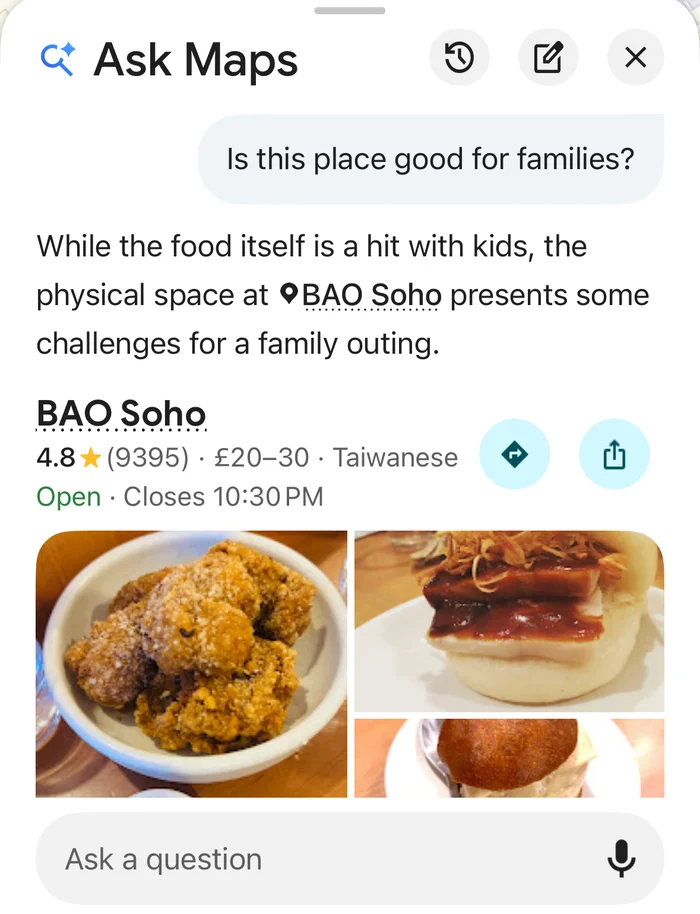
Reviews now do a second job. Google removed Q&A from Business Profiles in late 2025 and replaced it with Ask Maps, a Gemini feature inside Google Maps that answers questions about a business on the spot. It pulls from your profile and website, and it leans on reviews too, often quoting ones that mention a specific service or staff member. So a review that says “they fixed our AC the same afternoon” gives Ask Maps something useful to say about you. A bare five stars doesn’t.
For multi-location brands, review management at scale requires automation. Synup’s reputation management tools pull in reviews from Google and 30+ other sites and draft a reply to each one using your brand’s response rules, so your team just checks it and hits send.
Tracking, Measuring & Improving Your Local Pack Performance
Google’s local pack results shift based on the searcher’s exact location, which means traditional rank tracking from a single point is unreliable. A business might rank #1 in the map pack for user searches two blocks away but not appear at all for someone five miles out.
That’s where local rank tracking grids come in. They check your rank from dozens of points around your location, so you can see which neighborhoods you’re winning. This geo-specific approach shows where you’re strong and where you need work.
Key KPIs to track:
| Metric | Source | What It Tells You |
|---|---|---|
| Impressions | GBP Insights | How often your listing appears |
| Calls | GBP + call tracking | Direct leads from the Pack |
| Direction requests | GBP Insights | Purchase intent / foot traffic |
| Website clicks | GBP Insights + Google Analytics | Online traffic from local SERPs |
| Review velocity | Review monitoring tools | Reputation momentum |
| Local grid rank | Geo-grid tools | Position across your service area |
Track calls from the GBP listing separately from website call conversions to avoid double-counting. Keep your information up to date and audit business details quarterly.
Add UTM parameters to the website link on your Business Profile (for example, ?utm_source=google&utm_medium=gbp). With them, you can see exactly how many visits and conversions the profile drives. Search Console will also report the tagged URL as its own page, so you can see which queries bring people from the pack to your site that you can use to optimize your content.
Why Your Business Isn’t Showing in the Local Pack
Before changing anything, run a grid scan. It shows whether you’re missing everywhere or only past a certain distance, and the fix depends on which.
Your primary category is too broad. This is the most common cause and the easiest fix. A listing set to “Lawyer” will usually lose “personal injury lawyer near me” to a competitor with the specific category. Pick the narrowest accurate one and give it a couple of weeks.
A nearby competitor is filtering you out. When a business with the same category sits at your address or a block away, Google often hides one of the two at default zoom. It’s common in medical buildings and shopping plazas. The only way through is to become the stronger listing, mostly on reviews.
You’re just outside the city line. Search “dentist in Plano” and Google leans toward practices with a Plano address, even when one in Richardson is just across the line. Focus on “near me” and your own city’s searches instead.
Your profile status changed. Suspended profiles vanish from search. Unverified and disabled ones stay visible but lock you out of edits and review replies. Check your dashboard for a status banner.
A recent edit triggered re-verification. Changing your address or business name can put the profile back into review, and rankings often wobble until it clears. If you’re rebranding or moving, make all the changes in one update.
You’re a service-area business with a hidden address. Even with the address hidden, Google measures distance from where you verified, and adding more towns to your service area list doesn’t change that. Location pages on your site for your main areas help more.
Someone changed your listing. Anyone can suggest edits to a Business Profile, and Google sometimes accepts them without telling you. Check your hours, category and map pin regularly, since a wrong edit can quietly cost you rankings.
Spam listings are taking your spot. Fake businesses and keyword-stuffed names still rank in plenty of markets. You can report them through Google’s Business Redressal Complaint Form, and clearing them out can open up a spot in the pack.
How Synup Helps You Dominate Google Local & Scale Your Presence
Synup is a centralized local visibility platform built for agencies and multi-location businesses that need to manage their online visibility across Google and dozens of other platforms - without building an in-house tech stack.
Core capabilities for the Local Pack:
- Google Business Profile management with bulk updates and listing sync across directories
- AI-powered suggestions for categories, descriptions, and business details optimization
- Automated review requests and intelligent response suggestions
- Review sentiment analysis to extract customer feedback insights
- Map-based rank grids that track Google Maps visibility for every location
- Dashboards tying local pack performance to outcomes like calls, direction requests, clicks.
Whether you’re an agency managing 50 clients or a brand with 200 locations, Synup operationalizes everything in this blog post so that local search success becomes repeatable - not a one-off project.
Key Takeaways & Next Steps for Winning the Google Local Pack
The Google Local Pack shows three local business listings with a map for queries with local intent - and it’s where most local customers start their buying journey. A spot in those three turns into phone calls and people walking through your door, and you can track both. Most of the work comes down to keeping your Business Profile in good shape and earning reviews steadily. Rank tracking tells you whether it’s paying off.
The same approach works for storefronts and service-area businesses, though service-area businesses have a tighter radius to work with.
Your 30-day action plan:
- Week 1: Claim or clean up your GBP listing for every location. Fix NAP inconsistencies across your website and top directories.
- Week 2: Add high-quality photos, complete your business description and services, and set accurate business hours.
- Week 3: Set up automatic review requests that go out after each job, then reply to every review you already have.
- Week 4: Start local rank tracking with a geo-grid tool. Review your local SEO checklist and identify gaps.
After the first month, block out time every few weeks to go through your profile and reviews, because none of this stays put once it’s set up. The businesses that win are the ones that keep showing up - literally.
For more tips on scaling this across multiple locations, explore how Synup’s listing management and local SEO tools can automate the work and help you find businesses that need your services - or help your own locations attract more customers from local search, every single day.
Reading is step one. Sydekick does step two.
Sydekick runs the listings, review, and visibility work these guides describe, across every location you manage.