
White label review management software: full walkthrough
Set up seven things once: domain, email, branding, AI assistant, navigation, custom script and help contact. Each client then gets a portal on your domain (once it's verified) with no Synup in it: one inbox for every review, AI reply drafts you approve, review insights, review requests, a review link and QR code, website widgets and reports. White labeling is on Synup's Premium plan and above.
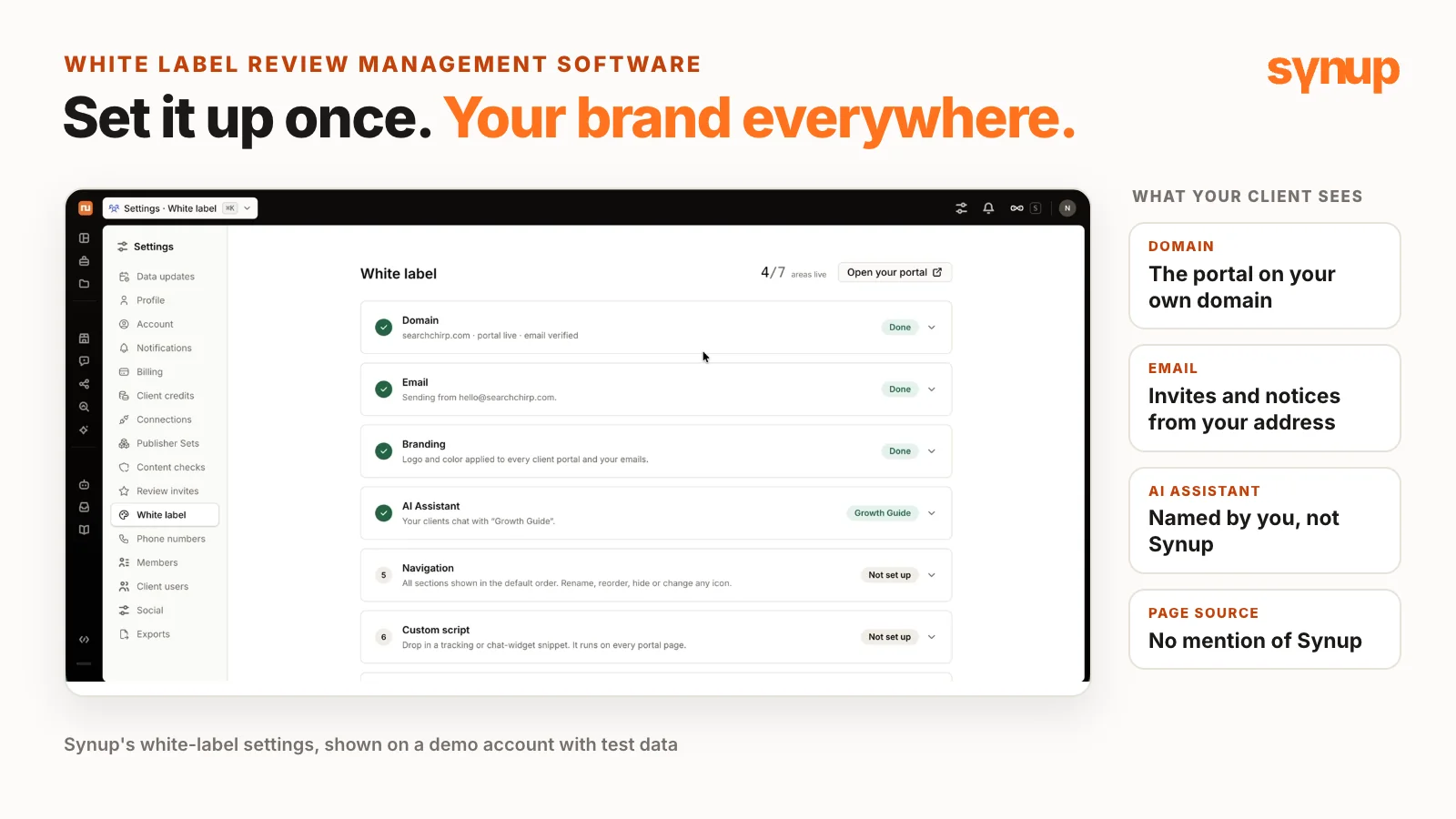
White label review management software lets you run your clients’ reviews under your own brand: your domain, your sender email, your logo and your own name for the AI assistant. In this walkthrough, Niladri Sarkar, Synup’s CMO, shows the whole setup in Synup and every review feature a client sees, on a demo account with test data. Last month’s video covered the process side of white-label reputation management: who owns what, what to check and who does what before you pick a vendor. This one is the software.
Short answer: Set up seven things once in Settings → White label: domain, email, branding, AI assistant, navigation, custom script and help contact. Each client then gets a portal on your domain (once it’s verified) with no Synup in the interface or the page source: one inbox for every review, AI reply drafts you approve, review insights, review requests by SMS and email, a review link and QR code, website widgets and reports. White labeling is on Synup’s Premium plan and above.
Watch: white label review management software, full walkthrough
Set up your white label once
In Synup, open Settings (the icon beside the bell, top right) and choose White label. This is where the whole experience your clients see gets set up.
| Setting | What you set | Why |
|---|---|---|
| Domain | The portal’s address (the demo uses app.searchchirp.com). Synup gives you the CNAME and TXT records and the other settings to add. | Clients log in on your domain, not Synup’s. |
| The sender address on that domain: you choose the handle. | Notifications and user invites reach clients from you. It’s a one-time setup, not one per client. | |
| Branding | The app name or login URL, your logo, favicon and colors. | The portal looks like your own product. |
| AI assistant | A name you choose (the demo’s is “Growth Guide”). | Clients talk to your assistant, not Synup’s. |
| Navigation | The order of the menu; change or hide sections. | Clients see what you want, in your order. |
| Custom script | Google Analytics, a chat widget, a heatmap or another tracking script. | You see what clients use most, and they can reach your support team. |
| Help contact | An email address shown prominently on the client’s dashboard. | Clients always have an address to reach you. |
What your clients see
- Their own portal. After logging in, a client lands on an overview. With several locations, it covers all of them.
- Only what they pay for. Set up each client individually and assign a location, so they see just their own business.
- No Synup anywhere. Once the domain is verified, the interface shows your branding and your domain. Niladri opens the page source and searches it for “Synup” to prove it: no mention. Run the same search on your own portal if you’re not sure the setup is right.
- The brand carries through to the dashboard, the emails and the AI assistant. Clicking Growth Guide opens “Hi, I am Growth Guide, your personal assistant.” Clients can chat with it, have it do tasks, analyze their data or help respond to emails.
- You stay in control of what clients can do in their white-label dashboard.
One inbox, three ways to reply
Review monitoring is one inbox for every review from every source. The demo’s test business gets most of its reviews from Google. Each review shows when it came in, the star rating, whether it’s positive, neutral or negative, and who wrote it.
- More sources: a custom scraper can pull reviews from virtually any page that doesn’t block it. Click Add another site and add the reviews page.
- 1. The client replies. If you don’t run a managed service, clients reply in the review panel of their own portal, by hand or with an AI draft based on your brand settings.
- 2. You reply from the agency dashboard.
- 3. The agent drafts, you approve. This is the one Niladri prefers most. Niladri asked it to draft replies to the five latest unanswered reviews for approval, and it drafted them all within seconds. Approve, reject or request changes on each. It can publish too, if you ask it to.
- Make it weekly. A playbook can check for new reviews every Monday or Tuesday, or every day for a business with lots of reviews, then draft replies and store them for your approval in the agent’s Inbox.
- Who should reply? Niladri prefers that agencies respond to reviews on their clients’ behalf. That way you have something to show for your work, and since reviews make such an impact on local ranking, it’s better to have them under your control than left to busy clients.
Review insights: analytics, competitors and topics
Niladri’s line on review analytics: the proof is in the pudding.
- An AI overview of how the reviews are doing, written from what the reviews say. For the demo business, customers overwhelmingly praise its warm, family-like care.
- Trends: compare the last 7, 30 or 90 days. See reviews received over the last 12 months, sentiment over time, the rating distribution, the split by platform, the average rating and responses. The demo shows no responses: it’s a demo account.
- What customers talk about: Niladri calls this very important. It surfaces problems as well as opportunities from what customers write.
- Competitors: Synup finds the top five competitors from the business’s category and location, and you can edit the lineup. Every month it tracks their review ratings, the number of reviews, sentiment and distribution, and review velocity.
- Why review velocity: reviews strongly affect how a business ranks and how visible it is, especially with AI in play. Niladri recommends keeping a tab on review velocity against competitors to see whether you need to step up.
- Topic trends: for multi-location businesses or any that get lots of reviews. See what customers appreciate, whether they recommend the business, how often they mention the staff or the owner, and which mentions are rising, declining, emerging, resolved or faded. Compare by month or a custom date range.
- Manage topics: add your own keywords to track. Some businesses are prone to spam because of competition in their area, so Niladri recommends tracking a standard keyword list over time, plus any threats related to legal issues, law enforcement or anything illegal.
Ask for reviews by SMS and email
Most customers, however happy, will probably never write a review until you ask. Niladri feels the best time to ask is while the customer is still at the store, but is totally against in-store kiosks: too many reviews from the same IP address or location can trigger spam filters. That’s why review requests matter.
In Synup, go to Reviews → Invite → Acquire New Reviews and choose Email/SMS, a static URL or adding more customers to an existing campaign.
| Choice | Options | Why |
|---|---|---|
| Where reviews go | Publish to directory, or collect internally | Internal feedback stays in your dashboard and isn’t shown publicly unless you want it to be. |
| Connect your own domain | Every request comes from your business, not Synup. | |
| SMS | Synup’s shared number, or your own 866 or 855 toll-free or local number from the system | Requests come from a number you choose. |
| Message | Customize it and preview the email or SMS | It reads the way you want. |
| Rating | One to five stars, or two options such as a smiley face or a thumbs up | The classic star scale, or a simpler choice. |
| Destination | Google or Facebook | The public site where customers leave the review. |
- Don’t ask for Yelp reviews. Yelp’s review policy is against soliciting reviews, and a Yelp profile can get into a lot of trouble for it.
- SMS or email? It depends, but Niladri prefers SMS first, then a follow-up email if the customer doesn’t respond.
- Don’t stop at one request. Niladri says you need at least two to three requests, to give customers time to respond.
A review link and QR code
If you’d rather not use Synup’s sending, or SMS and email requests aren’t working for you, use a static URL: a review landing page for the brand or business.
- Where it goes: your website, your email signature, invoices or billing, sent every time a customer buys or uses your service.
- Setup: a campaign name, the landing page title and the message, as with an invite.
- Destination: Niladri usually picks publish to directory, so customers can review you on third-party sites such as Google and Facebook, where you get much more visibility than on your own website.
- A custom site: Niladri doesn’t keep all the eggs in one basket. A lawyer might collect reviews on Avvo, a doctor on a healthcare review site, a service technician on Thumbtack. Add the site’s name and its review URL, then publish the funnel.
- The QR code: download it once the funnel is published, for email signatures, in-store banners, flyers, the back of business cards and invoices.
- What customers see: a simple page. They pick a rating and are asked to review you on the site you chose.
Review widgets for your website
To display reviews prominently on a website, set up a widget in the review widget section.
- Placement and filters: Niladri’s example goes on the contact form page, with a minimum rating of four stars, Google as the source, most recent first and all time as the date range.
- Internal reviews: include them if they’re good. If they’re not so good, Niladri wouldn’t, for obvious reasons.
- Carousel: set the number of reviews, auto-scroll and its speed.
- Colors: the system can scan your website’s brand and set the widget colors to match. Niladri prefers a white or a dark widget, depending on the site’s colors.
- What shows: the star rating (Niladri keeps it), the reviewer’s avatar, the date, the source name, replies, the rating header and a prompt to write a review can each be turned on or off.
- Embed code for WordPress, Framer, Shopify, Wix or Squarespace. It’s branded with your white-label domain, so there’s no Synup there either.
- Change it any time: on Niladri’s demo landing page, the widget sits at the bottom of the page, and its look is controlled from the dashboard.
Reports for your clients
Clients expect a report at the end of every month, but you probably don’t need to create them by hand.
- Self-serve: clients log in to your white-label dashboard and see their data every month on their own. The basic reporting section includes profile analytics, review analytics, rank tracking and post analytics.
- Custom reporting and insights: Niladri recommends using the system or the AI assistant to pull in the information you want.
- The same report every month: for a specific report with the same design each month, Niladri recommends the agent’s playbooks: use an existing reporting template or design a new one. For example, run a Reputation Performance Report now, or have one created every month.
- Need a hand? Niladri prefers setting up a playbook. If a playbook or a deterministic report is hard to set up, reach out to Synup: it doesn’t take a lot of time, and the report can be up in minutes.
What it costs and how to try it
Niladri’s recap: review monitoring, responding, competitor tracking, review requests, widgets, reporting and the AI assistant, all in one platform under your own brand.
- Plan: white labeling is on Synup’s Premium plan and above. See pricing.
- Your price: Synup charges a fixed fee, and you set your own price.
- Free trial: to try Synup with one of your own clients, there’s a 14-day free trial on synup.com. It covers the Solo plan, so white labeling isn’t included: that needs Premium or above.
For more on what’s included, see white-label reputation management software, Synup’s white-label settings and reputation management in Synup.
Common questions about white label review management software
What is white label review management software?
Review management software that runs under your own brand: your domain, your sender email, your logo and colors, and your own name for the AI assistant. Your clients log in to their own portal for reviews, replies, insights, review requests, widgets and reports, and don't see the software vendor's name. In Synup, white labeling is on the Premium plan and above.
How do you set up white labeling in Synup?
Open Settings (the icon beside the bell, top right) and choose White label. There are seven areas: domain, email, branding, AI assistant, navigation, custom script and help contact. For the domain, Synup gives you the CNAME and TXT records to add. The email is a one-time setup, not something you repeat for each client.
Can clients tell that the portal runs on Synup?
Not once the domain is verified. The interface shows your branding and your domain, and in the demo Niladri searched the portal's page source for "Synup" and found no mention of it. The embed code for review widgets uses your white-label domain too.
Can AI reply to reviews for your clients?
It can draft them for approval. In the demo, Niladri asked the agent to draft replies to the five latest unanswered reviews for approval, and it drafted them within seconds. Nothing was published: each draft can be approved, rejected or sent back with requested changes. A weekly playbook can draft replies to new reviews automatically and hold them for approval.
Should you ask for reviews by SMS or email?
Niladri prefers SMS first, then a follow-up email if the customer doesn't respond, with at least two to three requests in all. Niladri is against in-store review kiosks, because too many reviews from the same IP address or location can trigger spam filters, and advises against soliciting Yelp reviews, which goes against Yelp's policies.
Which Synup plan includes white labeling?
White labeling is on the Premium plan and above. Synup charges a fixed fee and you set your own price. Synup's 14-day free trial covers the Solo plan, so it doesn't include white labeling.
Put your local marketing in motion.
Manage listings, reviews and local visibility in one place. Sydekick, your AI agent, lines up the work and you approve what goes live.
- 14-day free trial
- $50 in AI credits
- Cancel anytime