1 location
$49 / month
- Our plan
- Synup Solo
- Per location
- $49 / month
- Chatmeter
- Custom quote
We help you manage reviews, listings, social and AI search visibility for clients or multiple locations, with an agent that drafts the work for your approval and a team that discusses migration options with you. Our plan prices are public, from $49 a month for one location to $899 for 50. Chatmeter, now part of Alchemer, prices by location on a quote.
Updated . How we verified this

 Where we fit
You want reviews, listings, social and AI search visibility in one workspace, with an agent that prepares the work for your approval and a team that helps you plan your migration. Plan prices are published, and every plan comes with a 14-day free trial.
 Where Chatmeter fits
You already run Alchemer surveys and want review and social feedback analyzed in the same customer experience program, with sentiment and risk analytics.
Compare plans, contract terms, migration, the work each product does for you, and how often each one ships.
| Decision | | Chatmeter |
|---|---|---|
| Pricing and billing | We publish plans by location band. Enterprise pricing is custom. Our pricing | Chatmeter prices by location with unlimited users, on a quote. Source: Chatmeter pricing page |
| Trial or evaluation | Every plan comes with a 14-day free trial. Our pricing | Chatmeter offers a demo. A free trial isn’t documented on its pricing page. Source: Chatmeter pricing page |
| Contract term | Plans are monthly. You can leave at the end of a billing period. Our plan terms | Chatmeter’s published terms set a three-year initial term, one-year renewals and 60 days’ notice, unless the order form says otherwise. Source: Chatmeter Terms of Service |
| Onboarding and migration | Onboarding and customer success managers help with data audit, location migration, and training for admins and users. Plan your migration with us | Alchemer says every customer gets a dedicated Listings Specialist and a customer success manager. Source: Alchemer comparison page, May 2026 |
| Who does the work | Our agent, Sydekick, drafts review replies, posts and listing changes across locations for your team to approve. Our Sydekick capabilities | Pulse Ai analyzes reviews and can auto-respond to recent reviews by rule. Workflow assigns follow-up tasks to your team. Source: Chatmeter Help on Pulse Ai and Workflow |
| Review replies at volume | Draft replies for a whole backlog with AI, then approve them in bulk in our Inbox, or let your client approve them. Our Inbox approval guide | Chatmeter’s AI drafts one text review at a time. Its Auto-Responder answers reviews from about the last 24 hours. Source: Chatmeter Help on reviews; March 25, 2026 release notes |
| AI search visibility | We track how ChatGPT, Gemini and Perplexity answer local questions about each location, and recommend what to fix. Our AI visibility guide | Alchemer’s marketing mentions AI search visibility. Chatmeter’s help center has no article on it as of November 25, 2026. Source: Chatmeter help center; Alchemer multi-location page |
| Release pace | We’ve published 12 release notes since September 6, 2026, one every week. Our release notes | Chatmeter’s help center hasn’t published a release note since March 25, 2026. Source: Chatmeter help center release notes |
| When service ends | We let monthly customers cancel before renewal. Contracted accounts follow their agreement. Our cancellation guide | Chatmeter’s published terms make fees non-cancellable and non-refundable. Its help center has no offboarding article. Source: Chatmeter Terms of Service and help center |
See pricing at 1, 6, 25 and 50 locationsCompare all 29 featuresSwitching and offboarding
Here’s what we charge on monthly billing in USD. For each example, we divide the plan price by the number of locations to show the effective cost per location.
$49 / month
$299 / month
$499 / month
$899 / month
published plansSolo covers one location, Premium up to 10, Pro up to 25 and Scale up to 50. Above 50 locations, Enterprise is quoted. We include white-labeling on Premium and above.
Trying us first? Every plan comes with a 14-day free trial.
See our plans and included creditsChatmeterpricingCustom quote
Chatmeter prices by location, with unlimited users, and doesn’t publish plan prices. Risk Monitoring and Competitive Intelligence need its Performance package, and some review sources, such as WebMD and Vitals for healthcare, cost extra.
Send the same inputs. Ask Chatmeter to quote the scope you priced with us:
Compare 29 features across plans, reviews, listings, social, local SEO and AI, including work our AI agent and playbooks can take on for you. Open a preview to see our screen or play a recorded demo. We had no access to a Chatmeter account, so Chatmeter claims come from its help center, terms and Alchemer’s product pages. Read our verification notes.
| What to compare | | Chatmeter |
|---|---|---|
| Pricing, contracts and agency tools | ||
| Pricing and billing | We publish monthly and annual location-band prices and quote Enterprise separately. Our pricing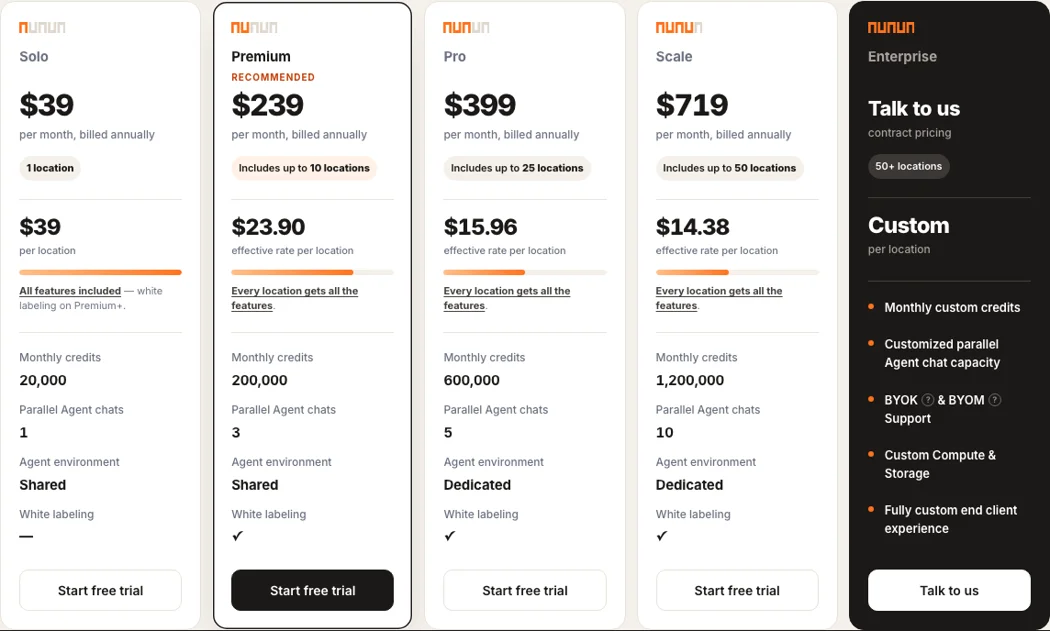 Pricing plans, annual billing (view screen) | Chatmeter prices by location with unlimited users. Prices aren’t published; you book a demo for a quote. Source: Chatmeter pricing page |
| Trial or evaluation | Every plan comes with a 14-day free trial. White-labeling starts on Premium. Our pricing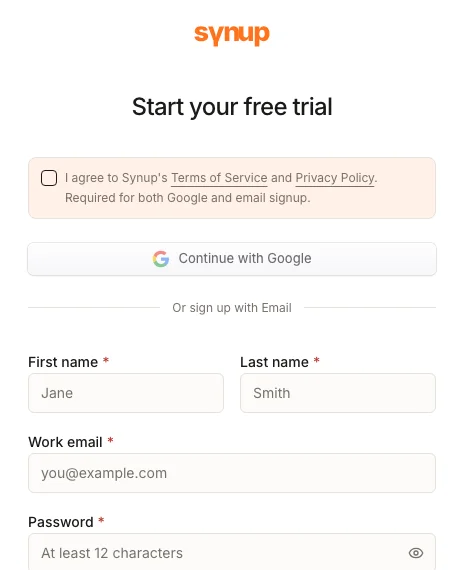 Free trial signup (view screen) | Chatmeter’s pricing page offers a demo, and a free trial isn’t documented. Alchemer’s free trial covers its survey plans. Source: Chatmeter pricing page and Alchemer plans page |
| Contract and renewal | Our plans are monthly, and you can leave at the end of a billing period. Annual billing is optional and saves 20%. Our plan terms | Chatmeter’s published terms set a three-year initial term, one-year automatic renewals and 60 days’ notice, unless the order form says otherwise. Fees are non-cancellable. Source: Chatmeter Terms of Service, sections 6 and 15 |
| White-label branding | We include white-labeling on Premium and higher plans: your domain, app name, logo and colors on the client portal, and the AI agent under your agency’s brand. Our branded domain guide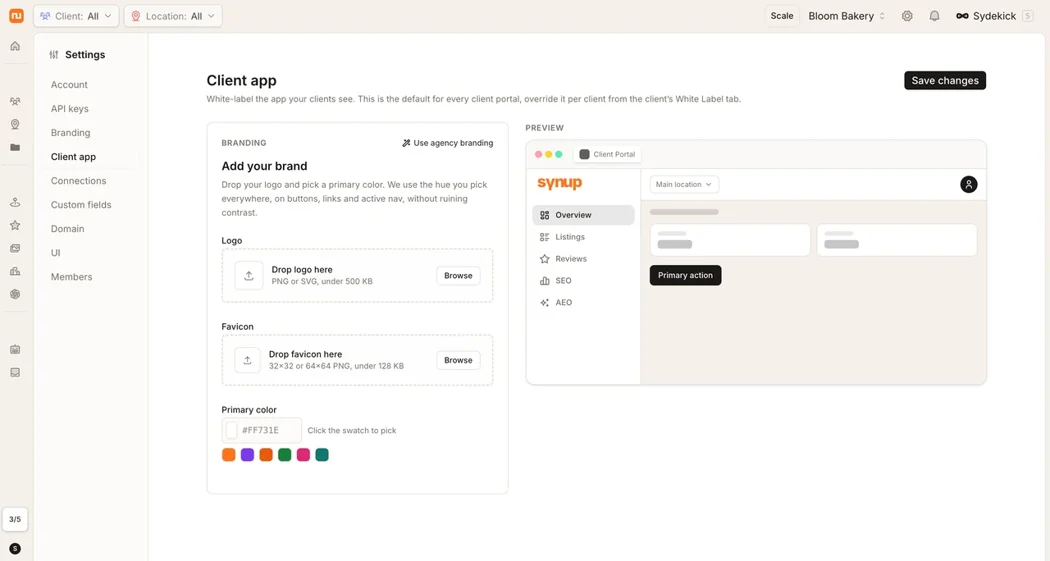 White-label settings (view screen) | Chatmeter’s agency program offers white-label access, a private-labeled dashboard and rebranded sales decks. Partner terms aren’t published. Source: Chatmeter Agency Partners page |
| Client access | Our client portal gives each client a sign-in to Overview, Listings, Reviews, Social, Reports and an approvals Inbox, limited to the locations you assign. Clients can ask the agent about their own locations there. Our client portal guide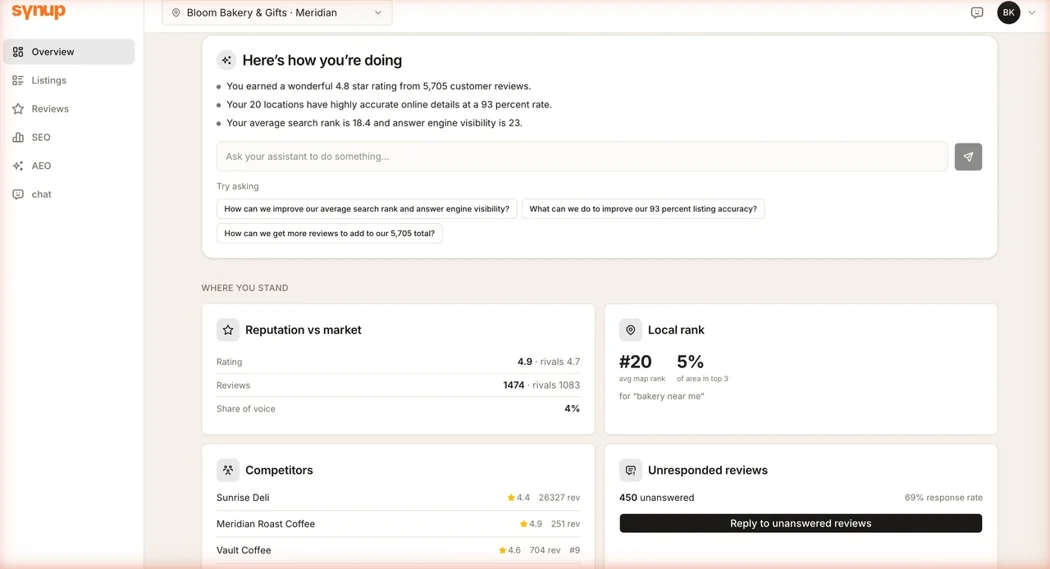 Client portal (view screen) | Chatmeter has a Reseller Admin role, granted by Chatmeter, and custom themes for sub-accounts. Its agency page describes iframe sign-on. Source: Chatmeter Help on roles and customization; Agency Partners page |
| Team roles | We let you invite people as Admins or Members and choose which pages and clients each Member can see. Our team access guide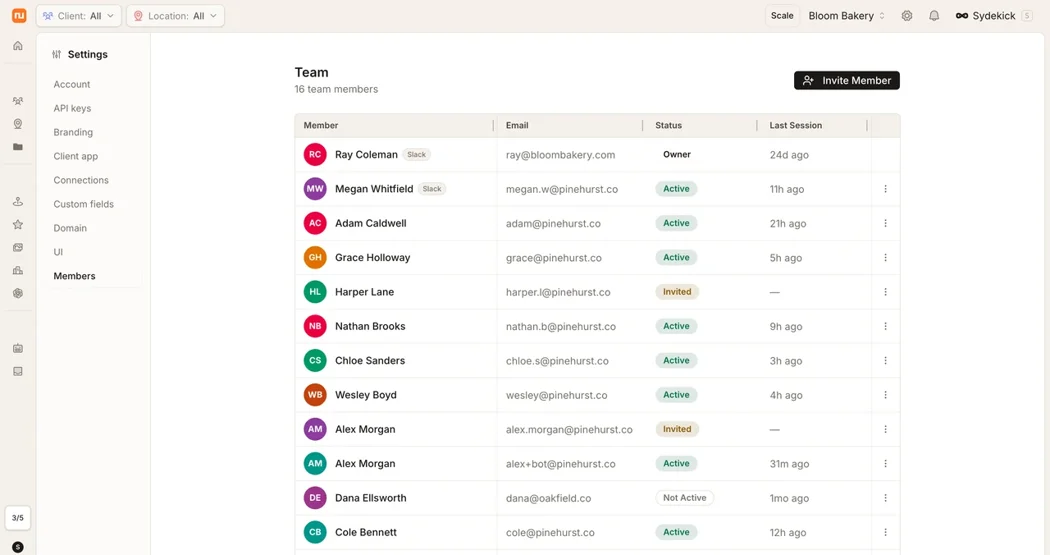 Team and permissions (view screen) | Chatmeter has four basic roles plus custom roles. Separate permissions control who submits and who approves review replies. Source: Chatmeter Help on roles and Workflow permissions |
| Reviews and reputation | ||
| Review monitoring | We collect reviews from Google, Facebook, Yelp, Tripadvisor, Trustpilot, Healthgrades, OpenTable and other review sites, plus any public reviews page you add as a custom source. Our review sites guide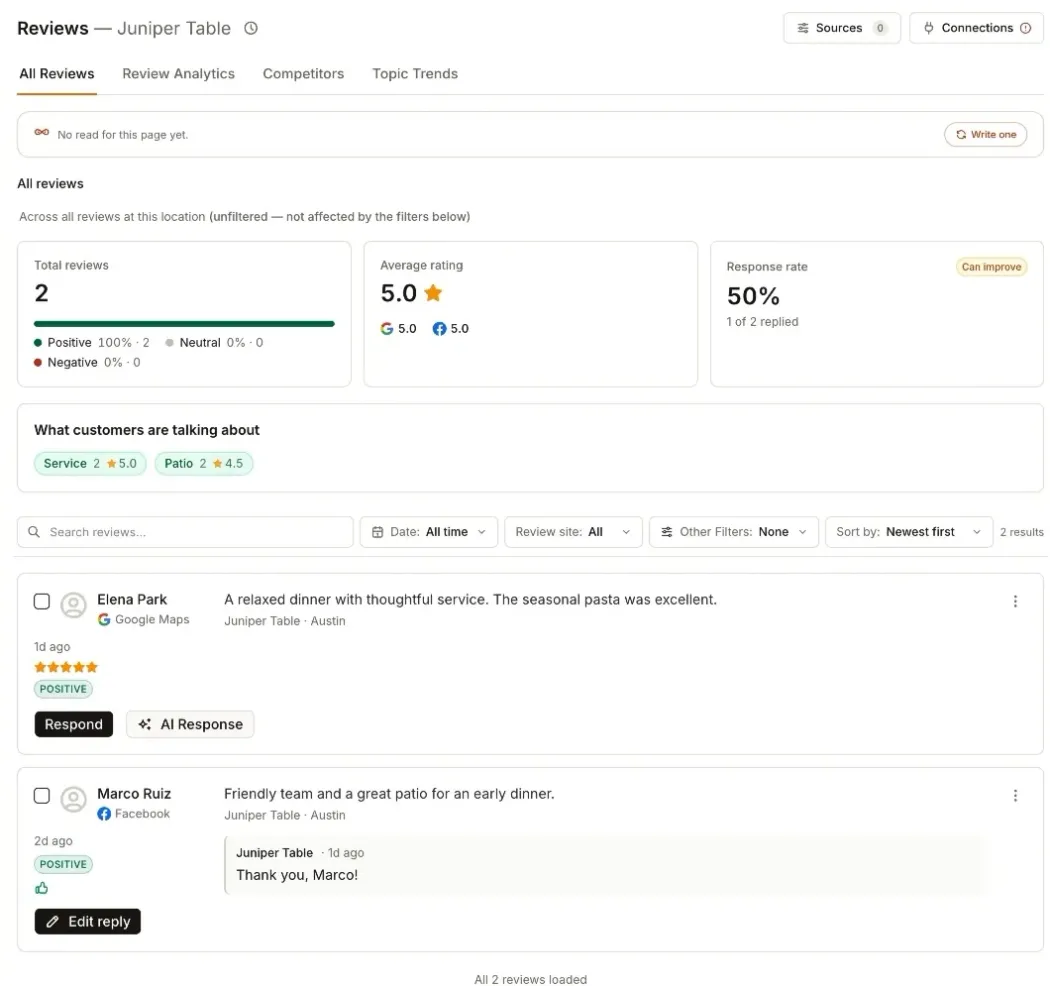 Review feed (view screen) | Chatmeter names Google, Facebook, Apple Maps, Bing, Tripadvisor and Trustpilot among its sources. WebMD and Vitals are available to healthcare clients at extra cost. Source: Chatmeter Help on supported sources; October 2025 release notes |
| AI reply drafts | We draft a reply to any review with AI, one at a time or for a whole backlog across locations, and queue the drafts for review. Our AI reply guide AI reply draft (view screen) | Chatmeter’s AI Generator drafts replies that match a review’s sentiment. It works with text reviews, one review at a time. Source: Chatmeter Help on reviews and responses |
| Automatic replies | A playbook can draft replies every day, for every new review or only the ones you choose, such as 4 and 5-star reviews, with an optional approval step. When approval is required, your team can review the drafts in bulk before they post. Our playbook setup guide | Chatmeter’s Auto-Responder posts replies by rule (location, site, star rating, review type) to reviews from about the last 24 hours. Excluding risky reviews is optional. Source: Chatmeter March 25, 2026 release notes and Workflow guide |
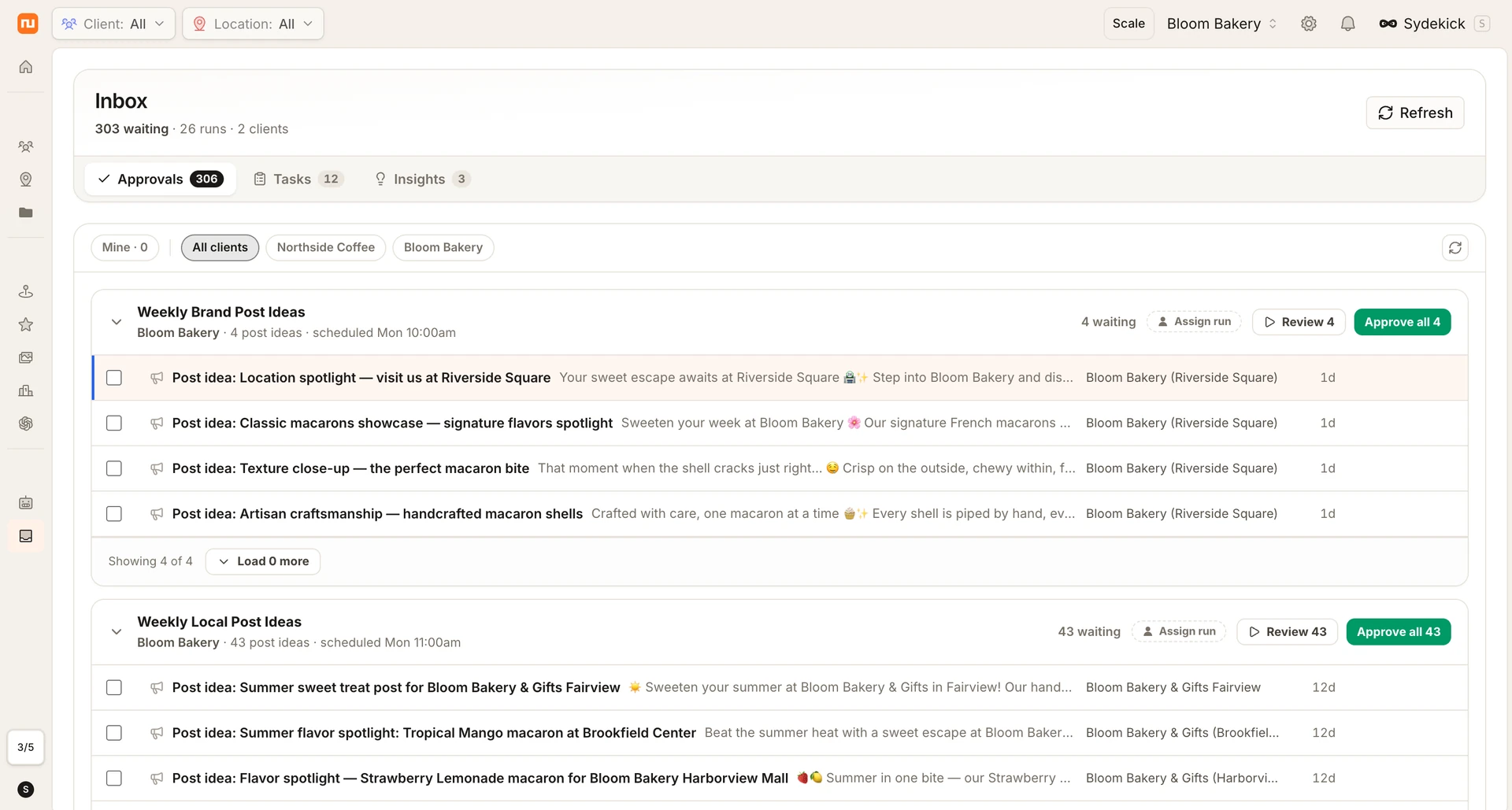
| Reply approvals | Our Inbox lets your team edit, approve or return drafted replies, one at a time or in bulk, and you can ask a client to approve a reply in their portal. Our Inbox approval guide Review drafts awaiting approval (view screen) | Chatmeter routes drafts from users with Submit permission to users with Approve permission, on desktop and in its mobile app. Source: Chatmeter Help on Workflow permissions and mobile approvals |
| Where replies post | We post replies to Google Maps and Facebook. For Yelp and other sites, Respond opens the review there so you can answer from your own account. Our review reply guide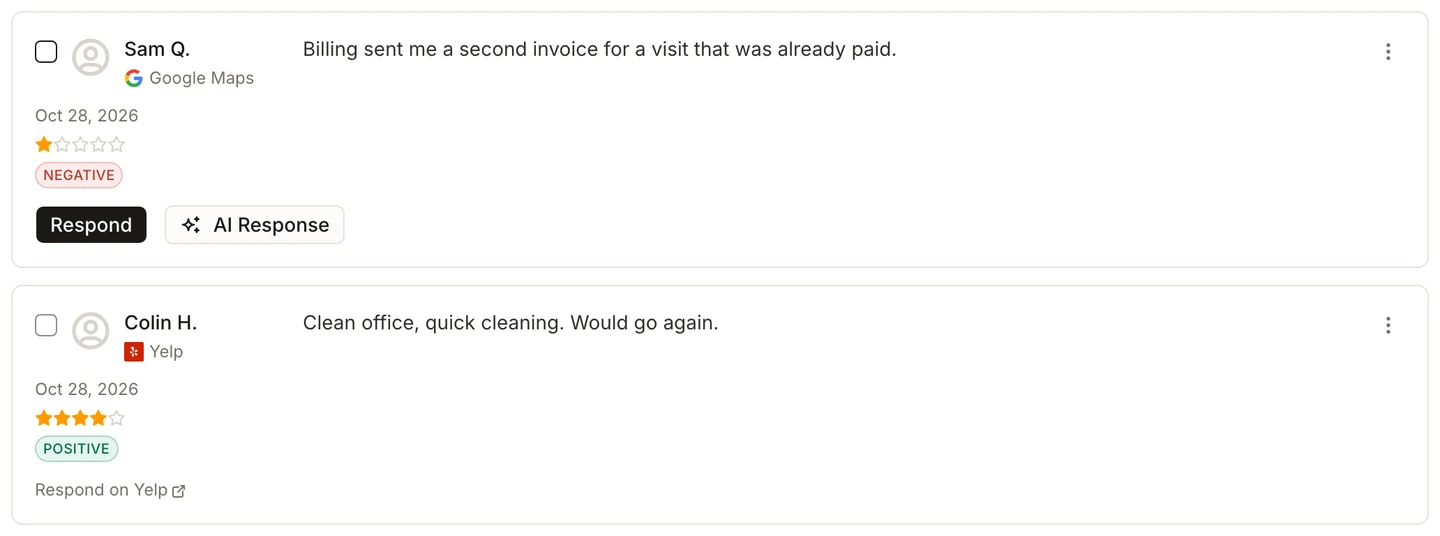 Reply posting destinations (view screen) | Chatmeter documents in-app replies for sites including Google, Facebook, Yelp, Trustpilot, Cars.com and ApartmentGuide, once credentials are added. Other sites are answered on the provider. Source: Chatmeter Help on reviews and responses |
| Review topics and sentiment | Our Topic Trends tags the themes customers mention at each location, with each theme’s sentiment and monthly volume. Ask a question across every location’s reviews, such as which complaints are rising, and get a summary you can act on. Our Topic Trends guide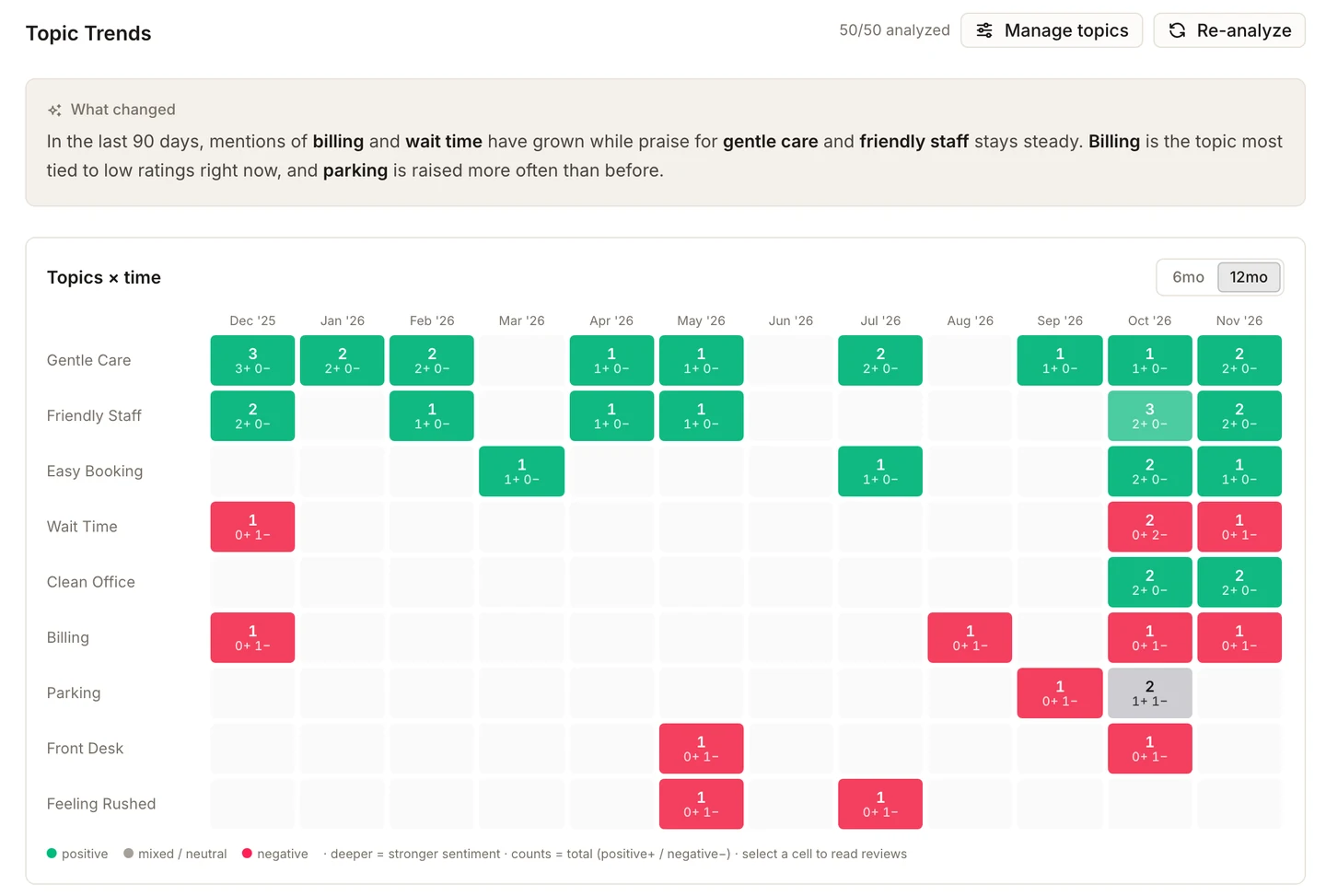 Review Topic Trends (view screen) | Pulse Ai shows top topics, category trends and a topic cloud. Signals answers plain-language questions across reviews, social posts and surveys. Source: Chatmeter Help on Pulse Ai and Signals |
| Competitor review benchmarking | Our Competitors tab compares each location’s Google rating, review volume and review velocity with nearby businesses, on every plan. Turn the gaps into next steps for each location. Our competitor review guide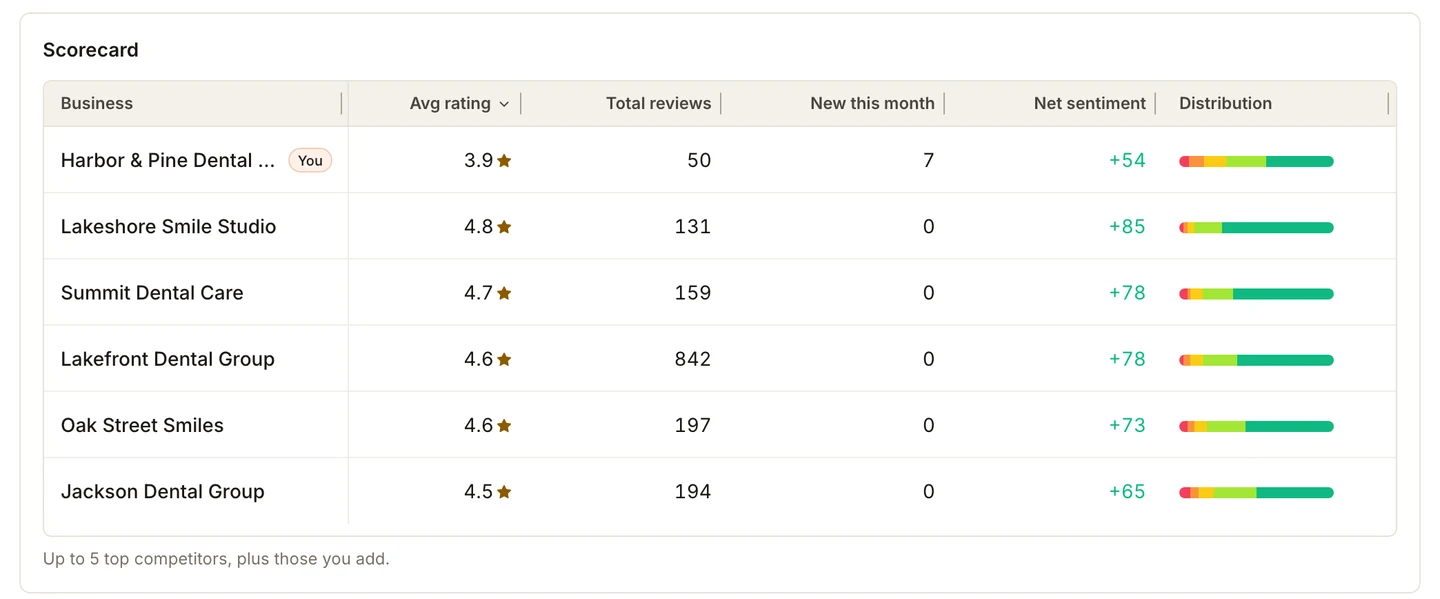 Competitor scorecard (view screen) | Competitive Intelligence is available on Chatmeter’s Performance bundle. Alchemer quotes custom pricing to see every competitor review. Source: Chatmeter October 2025 release notes; Alchemer Competitive Intelligence page |
| Portfolio reporting | Our Reputation view ranks every location on reviews, rating, unreplied reviews and positive share, and exports to CSV. Get a reputation performance report as a PDF and spreadsheet, and have a playbook produce it every month. Our location leaderboard guide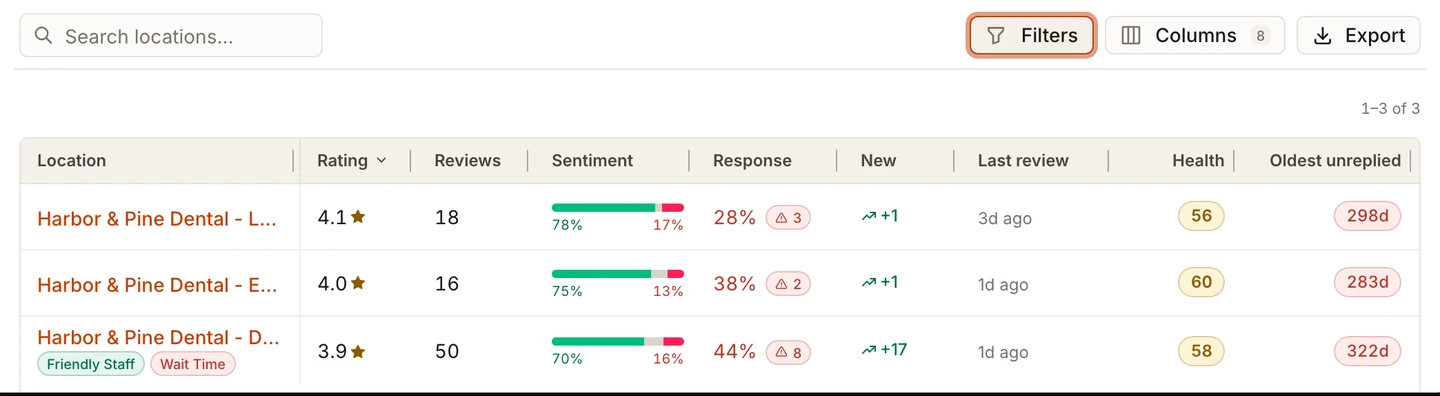 Location leaderboard (view screen) | Analytics Studio builds custom reports, schedules them by email and exports components to CSV. Report limits depend on your billing account. Source: Chatmeter Help on Analytics Studio |
| Prioritizing reviews | Our Review Health gives each location a score from 0 to 100, based on unreplied negative reviews and other factors. A playbook can check every location each morning and queue drafted replies to new negative reviews for your team to approve. This is location-level Review Health, distinct from flagged individual reviews. Our Review Health guide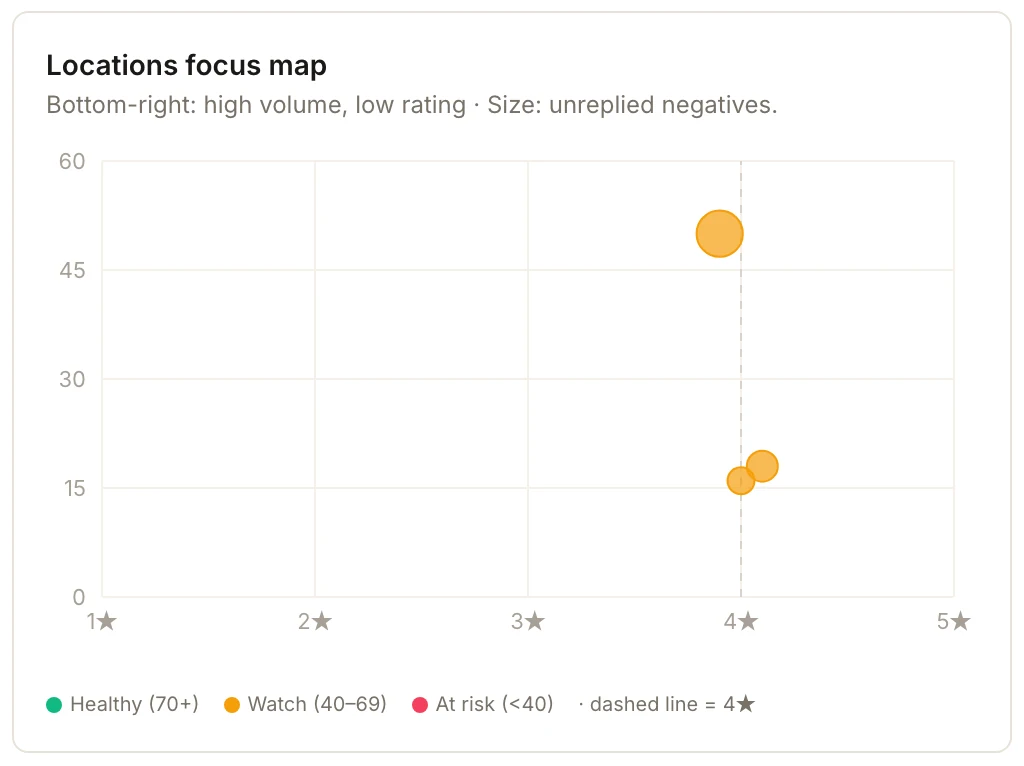 Review Health score (view screen) | Risk Monitoring flags individual risky reviews and is exclusive to the Performance package. By default it covers the last three months plus new 1 and 2-star reviews. Source: Chatmeter Help on Risk Monitoring |
| Review requests | On paid plans, we let teams send review requests by email or SMS from each location’s own sending domain or number, with automatic follow-ups. Our review campaign guide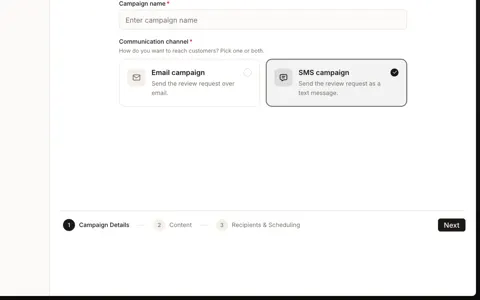 Review campaign setup (play demo) | Chatmeter’s Review Generation sends requests by email, SMS, direct link and QR code. Availability goes through your account representative. Source: Chatmeter March 11, 2025 release notes |
| Listings and location pages | ||
| Listings distribution | We sync each location’s details from one master record to 100+ publishers, including Google, Apple, Bing, Facebook and Yelp. Make the same change across hundreds of locations for your approval. Our publishing guide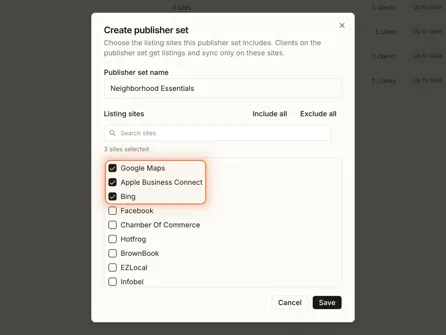 Publisher settings (play demo) | Chatmeter publishes updates with its Listings Management package. Other listings are monitored, and you update them with the provider directly. Source: Chatmeter Help on managing business listings |
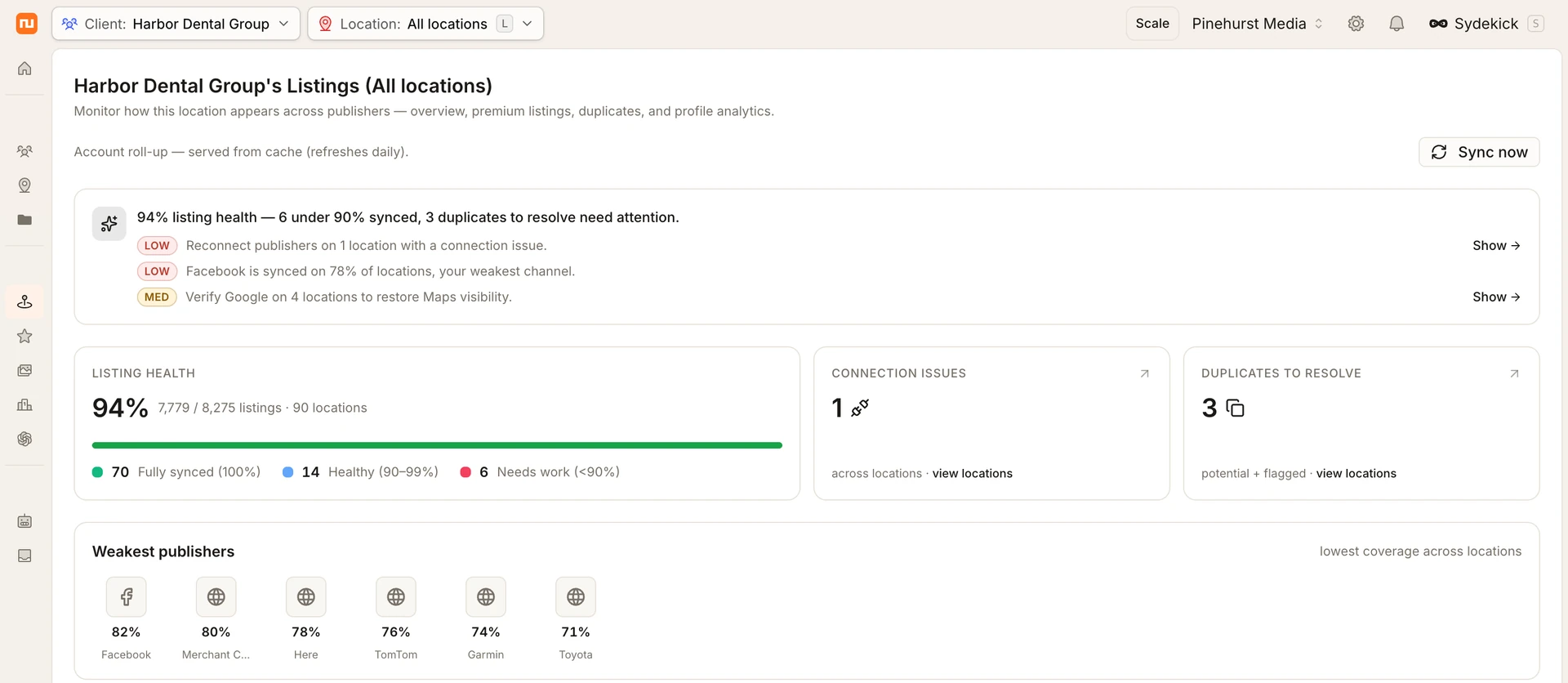
| Publisher sync status | Our Listings Overview shows which directories are live, in progress or waiting on you, for one location or a whole client. Audit a client’s listings and get a list of what needs action. Our Listings Overview guide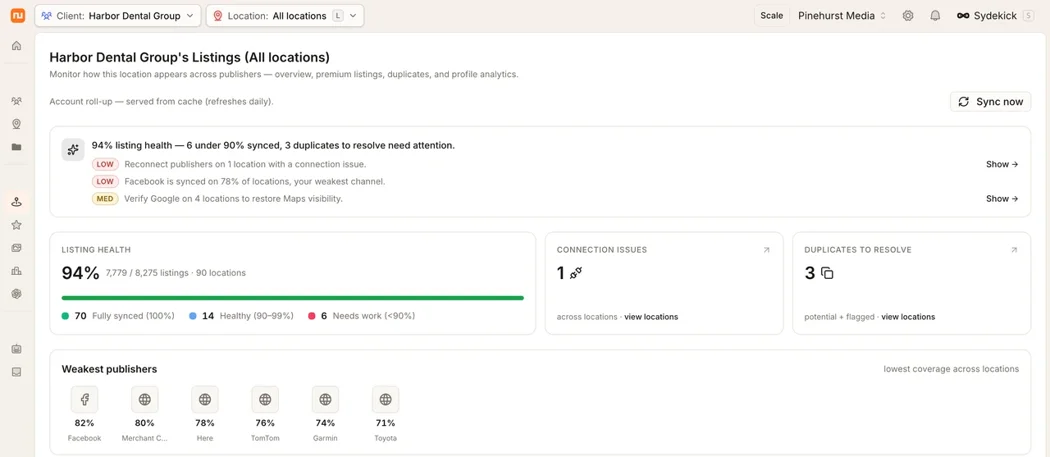 Listings Overview (view screen) | Listings Summary counts listings found, duplicated and mismatched per provider, with CSV export. Listings reports refresh once a month. Source: Chatmeter Help on Listings Summary and listings overview |
| Duplicate listings | We check for duplicate listings every day and let you flag each candidate, which sends a removal request to that directory. Our duplicate listings guide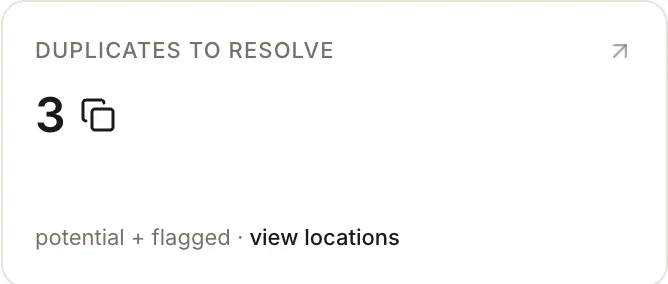 Duplicate listings (view screen) | Chatmeter labels duplicates automatically. It can request merges on Yelp, Bing and Apple; for Google and Facebook, you contact the provider. Source: Chatmeter Help on duplicate listings |
| Holiday and special hours | We send holiday and one-off hours to Google, Apple, Bing and Yelp for that date only. Set them for every location at once, and the change waits for your approval. Our holiday hours guide Holiday hours (view screen) | Chatmeter sends holiday hours to Apple, Google and Yelp. Bing accepts some holidays and Facebook none, and Bing and Apple may need follow-up. Source: Chatmeter Help on holiday and special hours |
| Local landing pages | We build a store locator and a page for each location as a scoped project, from the same records we sync to publishers. Our Locator & Pages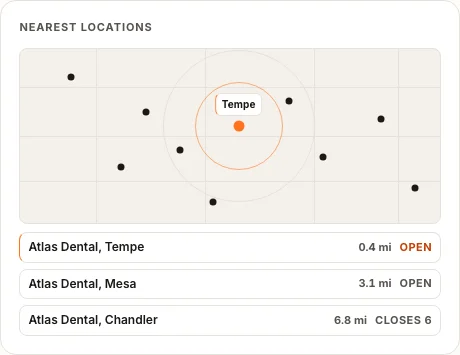 Store locator example (view screen) | Chatmeter sets up branded location pages and a Location Finder according to your contract. Layout changes need Chatmeter’s help. Source: Chatmeter Help on Local Pages |
| Social publishing and inbox | ||
| Social scheduling | We publish or schedule posts to Google Business Profile, Facebook, Instagram, X, LinkedIn, Pinterest, Bluesky, Mastodon and YouTube from one composer. Plan a month of posts for each location and approve them before they go out. Our supported networks guide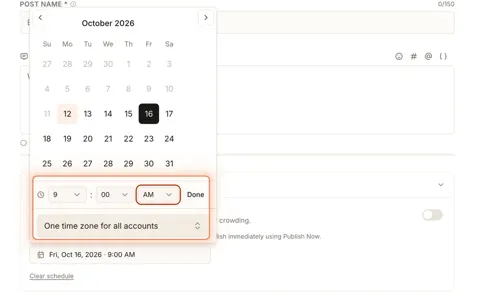 Social scheduling (play demo) | Chatmeter publishes to Facebook, Instagram, Threads, X, LinkedIn, Apple Showcase and Google, with up to two images or one video per post. Source: Chatmeter Help on social posts |
| Social inbox and messages | Our Social Inbox brings comments, mentions and direct messages from Facebook, Instagram and X, plus LinkedIn and YouTube comments, into one queue your team can assign and resolve, with AI-drafted replies. Our Social Inbox overview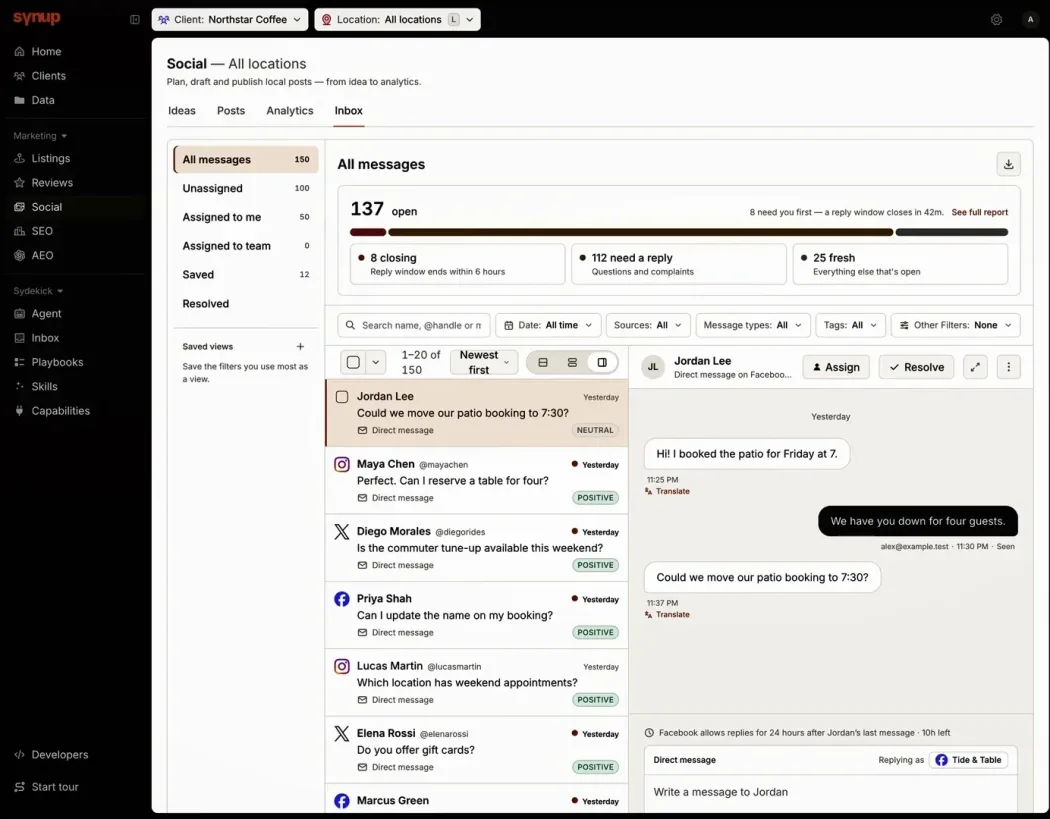 Social Inbox (view screen) | Chatmeter’s help center covers replying to comments. Alchemer’s social media FAQ answers “Not at this time” on direct messages. Source: Chatmeter Help on social; Alchemer social media FAQ |
| Local SEO, AI visibility and automation | ||
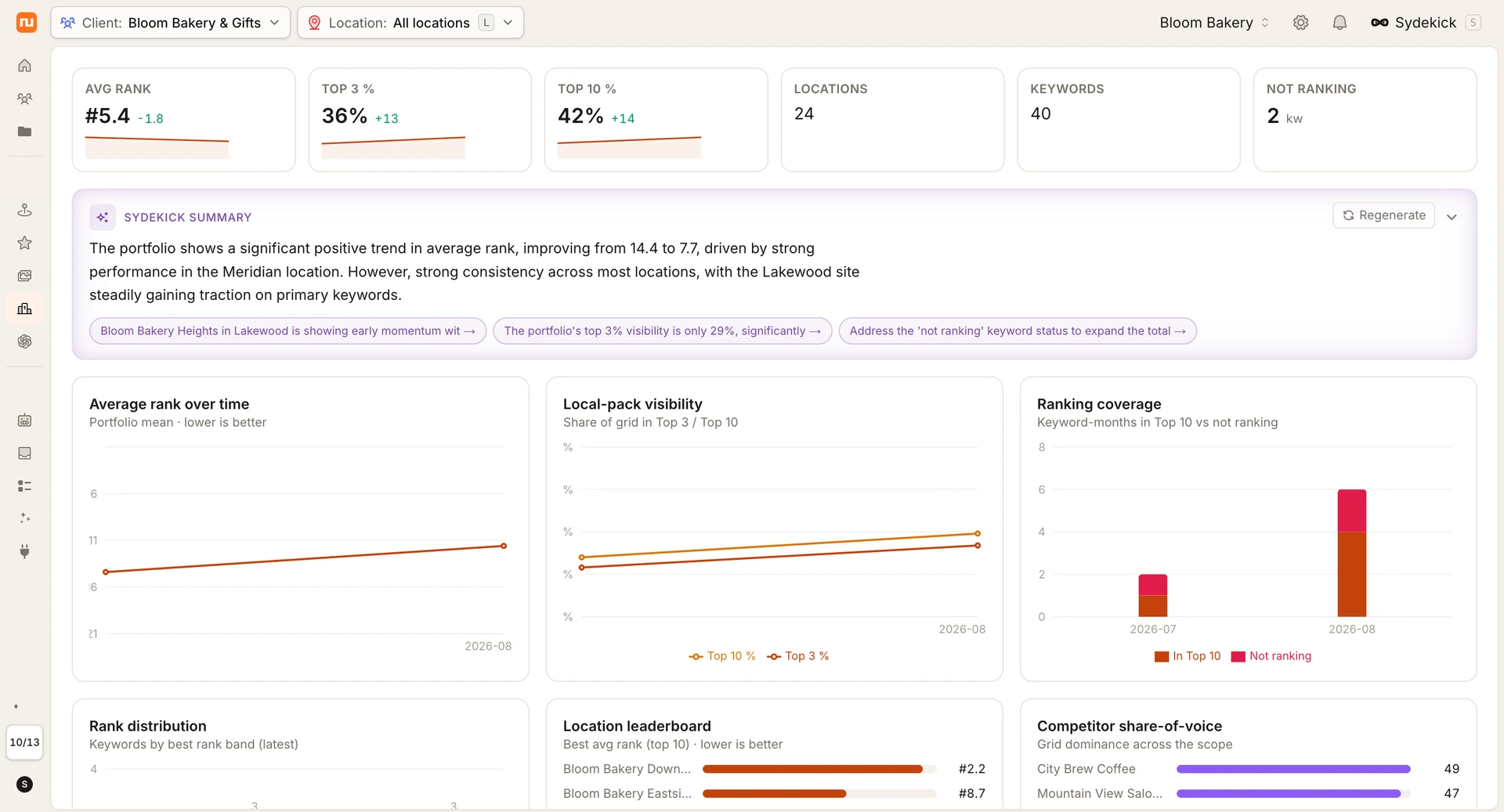
| Map rank tracking | Our rank grid runs 49 Google Maps searches around each location for every keyword and colors each point by your position, with competitors and monthly history. We explain what changed and suggest next steps. Our rank grid guide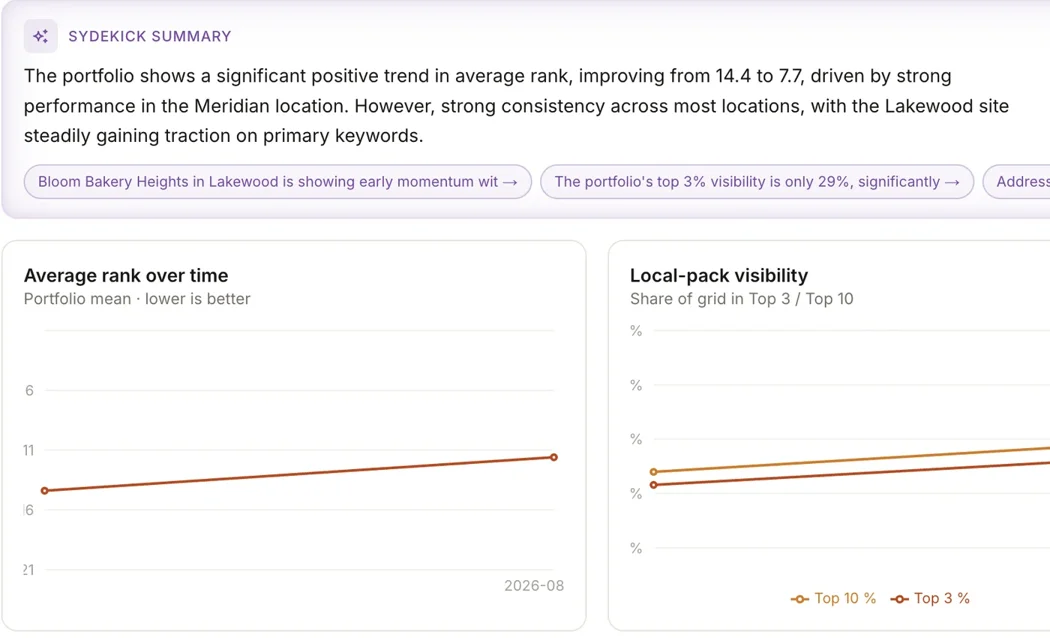 Local rank analytics (view screen) | Chatmeter reports average rank and page-one counts for location keywords on Google, Bing and Yahoo. Grid-based tracking isn’t documented in its help center. Source: Chatmeter Help on SEO rankings |
| AI answer visibility | We ask ChatGPT, Gemini and Perplexity up to 16 local questions for each location and score whether, and how high, each one names you, with the competitors and sources they cite. We also recommend what to fix. Our AI visibility guide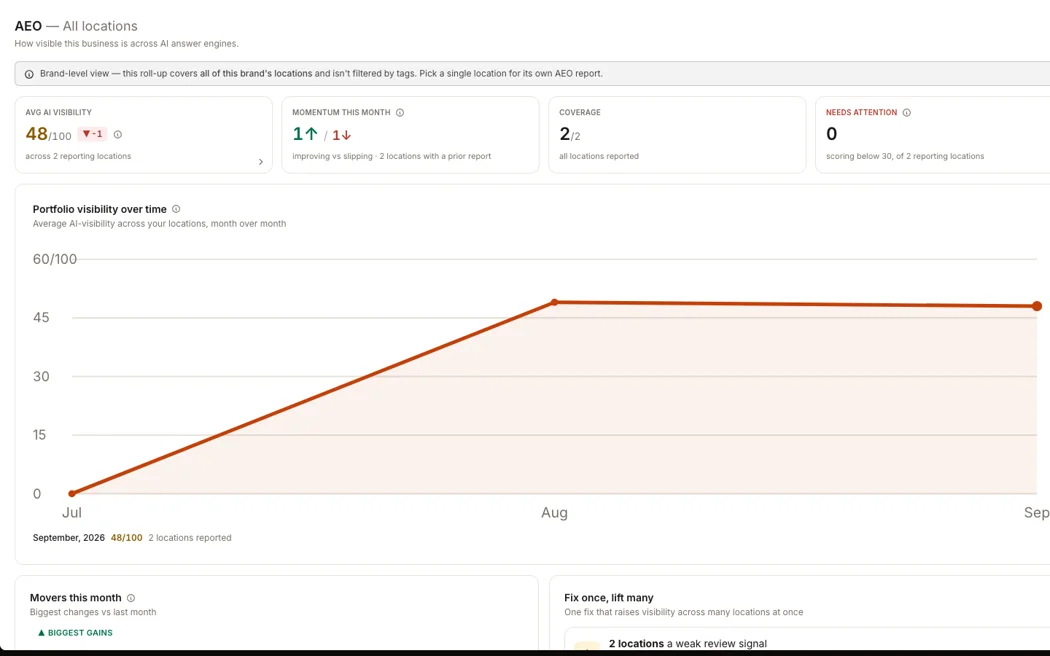 AI visibility report (view screen) | Alchemer’s multi-location page mentions AI search visibility. Chatmeter’s help center has no article on it as of November 25, 2026, and Alchemer’s 2026 roadmap lists it as planned. Source: Chatmeter help center; Alchemer multi-location page and 2026 roadmap webinar |
| Agent actions | Sydekick takes a job in plain language across listings, reviews, social, SEO and AI visibility and hands back drafts. You can configure approval checkpoints for changes customers will see. Our Sydekick capabilities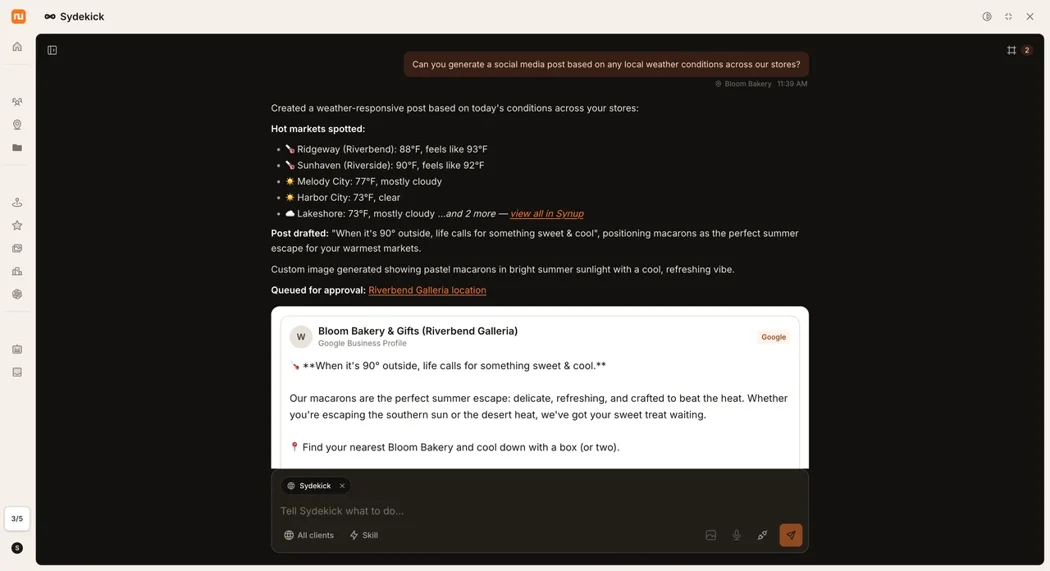 Sydekick conversation (view screen) | Pulse Ai analyzes reviews and drafts replies, and the Auto-Responder posts them by rule. Alchemer’s Iris platform is in beta for select customers from Q4 2026. Source: Chatmeter Help on Pulse Ai; Alchemer Iris page |
| Recurring work | We turn recurring work into playbooks that run on demand or on a daily, weekly or monthly schedule, from built-in playbooks or ones you describe in plain language. Our playbook setup guide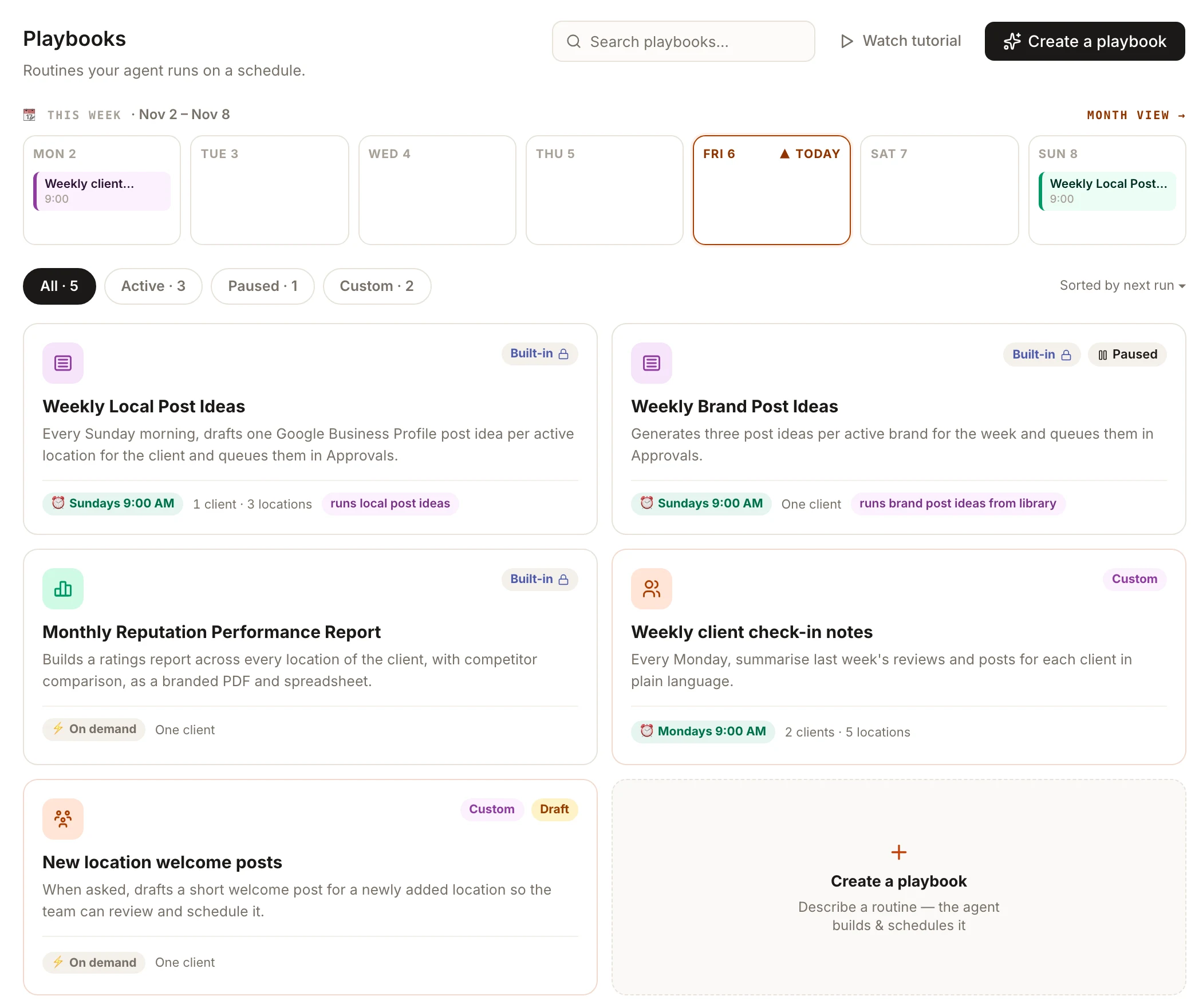 Playbooks library (view screen) | Chatmeter Workflow creates tasks automatically from review and listing rules and assigns them with a due date and priority. Source: Chatmeter Help on Workflow |
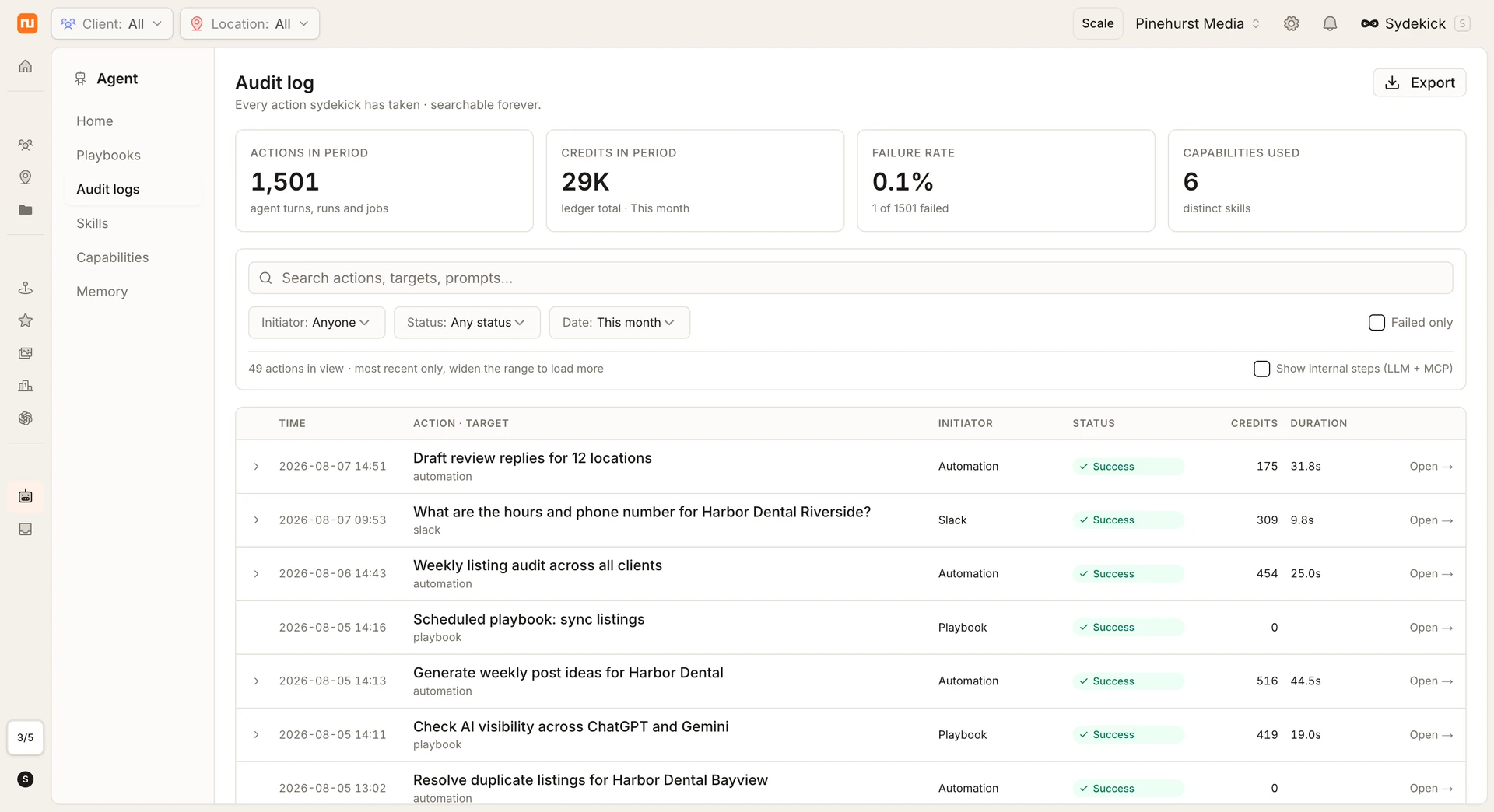
| Activity history | Our agent audit log records every conversation, approval and run, filterable by client, capability and date, with CSV export. Our agent audit log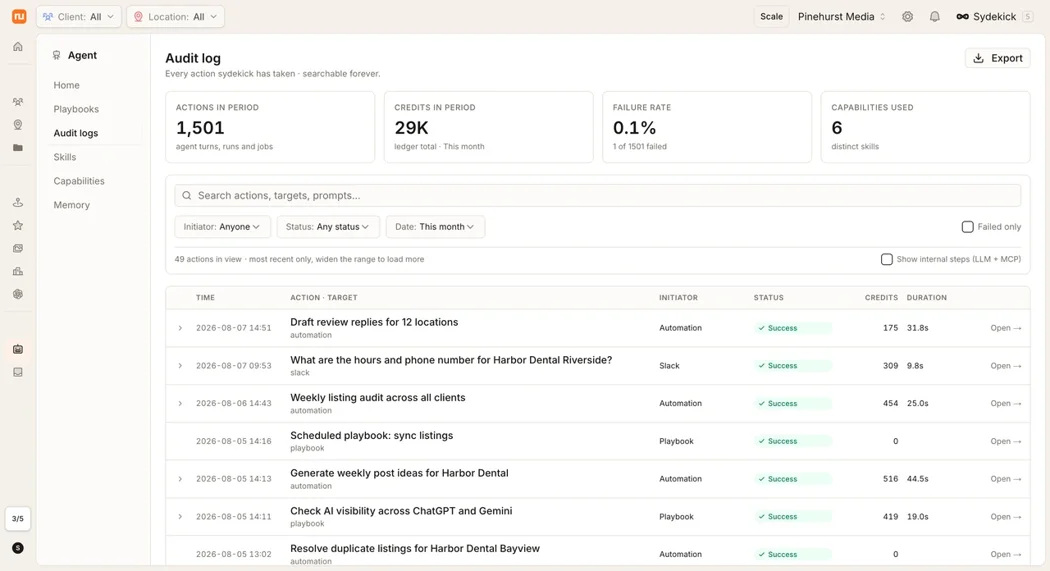 Agent audit log (view screen) | Each Chatmeter task keeps an activity log. An account-wide audit log isn’t documented in its help center. Source: Chatmeter Help on tasks |
| API and AI assistants | We publish a versioned REST API and an MCP server, so your team can run Synup from Claude, ChatGPT or your own agent. Our developer documentation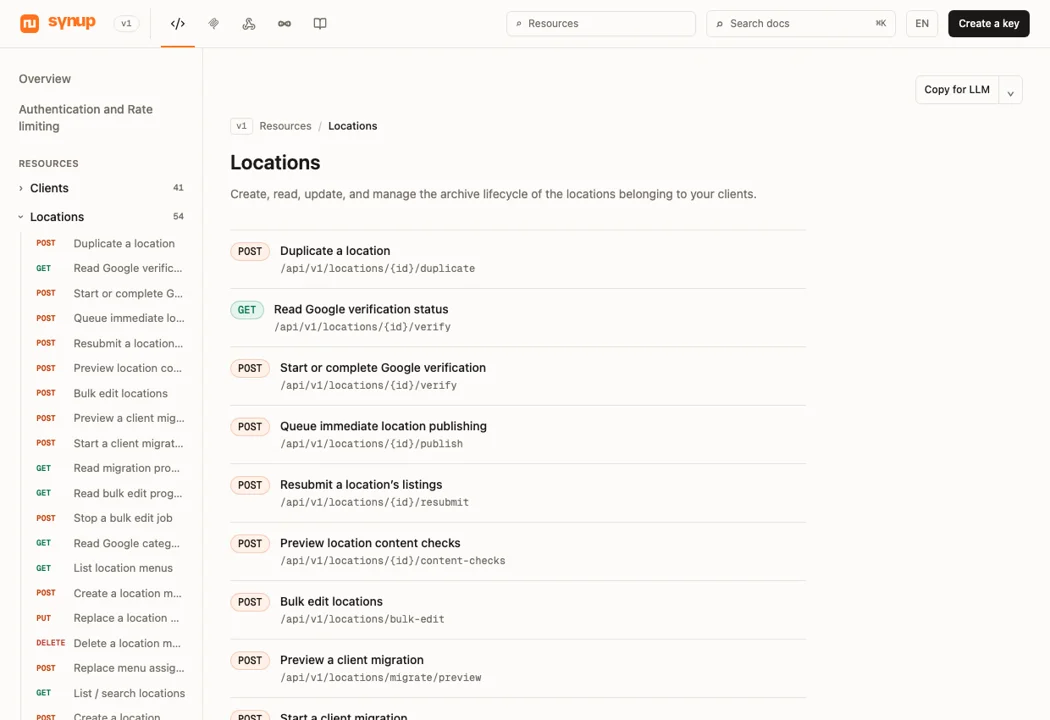 Locations API reference (view screen) | Chatmeter has a REST API, with access arranged through your customer success manager. An MCP server isn’t documented. Source: Chatmeter Help on its API |
In a demo, ask each vendor to take the same job from draft to delivery. A week of review replies across several locations shows how each one handles volume, approvals and where you confirm the result.
Sydekick takes a job in plain language, such as drafting replies to this week’s reviews across a client’s locations, and hands back drafts. Your team or your client approves them in our Inbox, our audit log shows what ran, and a playbook can repeat the job on a schedule. The same agent plans social posts, updates hours across locations, explains rank changes and recommends fixes for AI visibility. To confirm delivery, check the review, post or listing on the destination channel.
See how Inbox approvals workPulse Ai analyzes reviews, surveys and social posts, and Signals answers plain-language questions about them. The AI Generator drafts a reply for one text review at a time. The Auto-Responder posts replies by rule to reviews from about the last 24 hours, and Workflow assigns follow-up tasks to your team. Alchemer’s Iris platform is in beta for select customers from Q4 2026.
Sources: Chatmeter Help on Pulse Ai, Signals, reviews and Workflow; March 25, 2026 release notes; Alchemer Iris pageProduct screenshots with demo data
 View full size
 View full size
Release notes show what changed and when. Here’s what each vendor has published over the same 12 weeks, since September 6, 2026.
release notes12release notes since September 6, 2026
We publish a release note every week. Those 12 notes list more than 130 new features and improvements across listings, reviews, social, SEO, AI visibility and Sydekick.
Chatmeterrelease notes0release notes in the Chatmeter help center since September 6, 2026
Chatmeter’s help center hasn’t published a release note since March 25, 2026. These are the five it lists since January 2025.
Release notes don’t capture everything a vendor ships. Alchemer announced its Iris platform in September 2026, in beta for select customers from Q4, and the AI Removal Assistant by blog post in June 2026. Ask each vendor what shipped in the last 90 days and what’s committed for the next quarter.
Start with who answers reviews, who approves the reply, and what headquarters or your clients need to see each month.
Chatmeter is strongest when your priority is analyzing what customers say across many locations, especially if you already run Alchemer surveys. If your team also needs the work done, ask how much of it each vendor drafts for you, how much still lands on your regional managers, and who handles your migration and training.
Bring two locations with different hours and a week of real reviews. Ask both vendors to show the reply drafts, the approval step, a holiday-hours update and where each change appears on Google, Apple, Bing and Yelp.
We publish plan prices, don’t limit users, include white-labeling from Premium and give each client a portal with their own approvals and the agent under your brand, so you can price a client before a sales call. Chatmeter’s agency program offers a private-labeled dashboard and iframe sign-on; ask for the partner terms in writing.
In a demo, open the client portal as a client and approve a review reply. Check which locations each role can see and whether the people who sign off can find the approval queue.
Use the same sample locations and tasks in each evaluation so you can compare what your team sees and what reaches the customer.
Pick ten recent reviews across three locations, including a negative one. Ask each vendor to draft the replies, route them for approval and post them. Count the steps and check where each reply appears.
Add hours for one upcoming holiday at an authorized test location. Check Google, Apple, Bing, Yelp and Facebook afterwards, and ask where you’ll see a rejected or partial update.
Ask ChatGPT, Gemini and Perplexity which business to choose for a service near one of your locations. Ask each vendor how it measures that answer, how often, and which sources it cites.
Product screenshots with demo data
 View full size
 View full size
 Synup vs Chatmeter reviews on G2
We checked both G2 product profiles on November 25, 2026. G2 now lists Chatmeter as Alchemer Reputation Management and Alchemer Listings Management; we show the reputation profile. The averages cover different numbers and mixes of reviewers.
4.6 / 5 on G2
Chatmeter4.5 / 5 on G2
We selected this review because it raises questions to ask about account coverage during the move to Alchemer. The ratings above reflect the full set of reviews for each product.
The reviewer said the good experience they first described depended on one staff member who later left. Over the next six months they worked with three new contacts, who often missed the meetings they had scheduled.
Ask in your demo. Who will be our account contact after the move to Alchemer, and what happens if that person changes?
Read the review on G2Alchemer bought Chatmeter in September 2025. Chatmeter’s login now carries Alchemer branding, and Alchemer’s 2026 roadmap describes one login and interface across its products. These questions help you plan the renewal.
Chatmeter’s published terms set a three-year initial term, one-year renewals and 60 days’ notice. Alchemer’s services agreement uses 30 days’ notice, allows fee increases at renewal and doesn’t let you reduce quantities during a term. Your order form decides which applies, so ask for it in writing.
Under Chatmeter’s published terms, notice is due 60 days before the term ends. Note the date before you start a comparison.
Chatmeter says its refreshed login changed nothing in your dashboard, data or settings. Alchemer’s 2026 roadmap describes a single login and interface. Ask what changes for your team, and when.
Alchemer’s Chatmeter FAQ says current support and account management remain unchanged. Ask who your named contact is and how coverage works if that person changes.
Risk Monitoring and Competitive Intelligence need the Performance package, listing publishing needs Listings Management, and some review sources cost extra. Ask for an itemized renewal quote.
Plan around your notice date. Our team handles the migration with you, and you export what you need from Chatmeter while you still have access.
moves you overOur team coordinates with yours to plan and complete the migration. Here’s what to agree and prepare:
Chatmeter’s help center has no offboarding article. Its published terms say both parties keep the right to data provided or accessed during the term. Alchemer’s agreement allows it to end access to stored content when the agreement ends.
Export Analytics Studio components, Listings Summary and your location list as CSV while you have access. Ask when Chatmeter stops sending listing updates and how managed listings are handed over.
We let customers cancel monthly plans before renewal. For contracted accounts, we archive locations and deactivate accounts at the end of the term, subject to the agreement.
Export supported reports while you have access. Ask us to confirm when publisher updates stop, how long your data is retained, and your export deadline for your account.
Find your order form, term end date and notice period. Under Chatmeter’s published terms, notice is due 60 days before the term ends.
Save your location list, Listings Summary, Analytics Studio components and any review or survey history you need. Our team audits the data before anything moves.
We connect Google and Facebook for a few locations with you, match existing listings, and run one review reply and one listing update end to end. Agree which system publishes during the overlap.
We move the rest in batches. Turn off Chatmeter auto-responses for a location before we start drafting replies for it, then check hours, addresses and links on Google, Apple, Bing, Yelp and Facebook.
After your Chatmeter term ends, recheck the same listings and review sites, and correct anything that changed.
Alchemer acquired Chatmeter in September 2025. Chatmeter’s products are sold as Alchemer Reputation Management and Alchemer Listings Management, and customers still sign in at Chatmeter’s login page, now with Alchemer branding. We list what to ask before you renew above.
Talk with us about your locations, publisher connections and training needs. Agree on the migration plan and responsibilities before you switch.
Chatmeter prices by location with unlimited users and doesn’t publish prices. Ask for a written quote at the same location counts as our 1, 6, 25 and 50 location examples, with the package, extras and term itemized.
Chatmeter’s published terms describe a three-year initial term with one-year renewals and 60 days’ notice, unless your order form says otherwise, and fees are non-cancellable. Check your order form, then use our five-step switching checklist.
Alchemer’s marketing mentions AI search visibility, but Chatmeter’s help center has no article on it as of November 25, 2026. We track ChatGPT, Gemini and Perplexity answers for each location; see our AI visibility guide.
Yes. Every plan comes with a 14-day free trial. Start with the workflow and account setup. Before you let us publish changes, confirm which provider should manage each location and check your notice date.
Chatmeter blends reviews, social, listings, search and competitors into one score with adjustable weights. We report each signal on its own: listing status, review health, the rank grid and AI visibility, and one report can bring them together. Ask each vendor to show what action the number leads to.
We’re Synup, and we wrote this comparison. Here’s what we checked and where the information comes from.
On November 25, 2026, we checked our 29 feature rows against our help center and product pages, and Chatmeter’s against its help center, terms of service, pricing page, release notes and Alchemer’s product pages. Chatmeter’s help articles are undated, so we give the date we read them. We read both G2 product profiles on November 25, 2026. We had no access to a Chatmeter account, so this page shows no Chatmeter screens.
Our claims link to our pricing, product and help pages. Chatmeter claims name the Chatmeter or Alchemer source in plain text beside the claim. Where Chatmeter’s help center doesn’t cover a feature, we say so and give the date we checked. G2 ratings and the review summary link to G2.
We use our published rate card for the pricing examples and identify Chatmeter’s pricing as quote-based, by location. Check your billing period, package and included products before comparing totals.
Run the same task with both vendors on your own locations to evaluate publisher outcomes and support. Our Synup previews show workflows with demo data. Release-note counts come from each vendor’s published notes and don’t capture every change.
Try our workflow for listings, reviews and local SEO. If you’re moving several locations or need white-labeling, talk with our team about your rollout.